WhatsApp Cloud API vs On-Premises: 2026 Decision Guide

Meta sunset the WhatsApp On-Premises API on October 23, 2025. How Cloud API compares on throughput, cost, compliance, and what to do if you still self-host.
Meta deprecated the WhatsApp Business On-Premises API on October 27, 2023, and set the end-of-life date for October 23, 2025 (source: Meta for Developers deprecation announcement). If your Shopify store or your Business Solution Provider still runs a self-hosted container in 2026, you are on unsupported software. This guide walks through the Cloud API vs On-Premises comparison I run with every merchant who asks about it, the real migration work, and the few edge cases where self-hosting can still be defended.
The 30-second answer
The WhatsApp Business Platform splits into two products: Cloud API (Meta hosts the server, you call graph.facebook.com) and On-Premises API (you run a Docker container, manage a MySQL database, renew TLS certificates, and ship security patches yourself). On-Premises shipped first in 2018 and was deprecated on October 27, 2023. Cloud API has been the default for every new WhatsApp Business number since mid-2022.
In 2026, Cloud API is cheaper, faster to set up, and scales to the same rate limits as On-Premises without any infrastructure work on your side. For Shopify merchants, the question is not "which API do I pick" but "if I inherited an On-Premises setup, how fast should I migrate". The answer for most stores is this quarter.
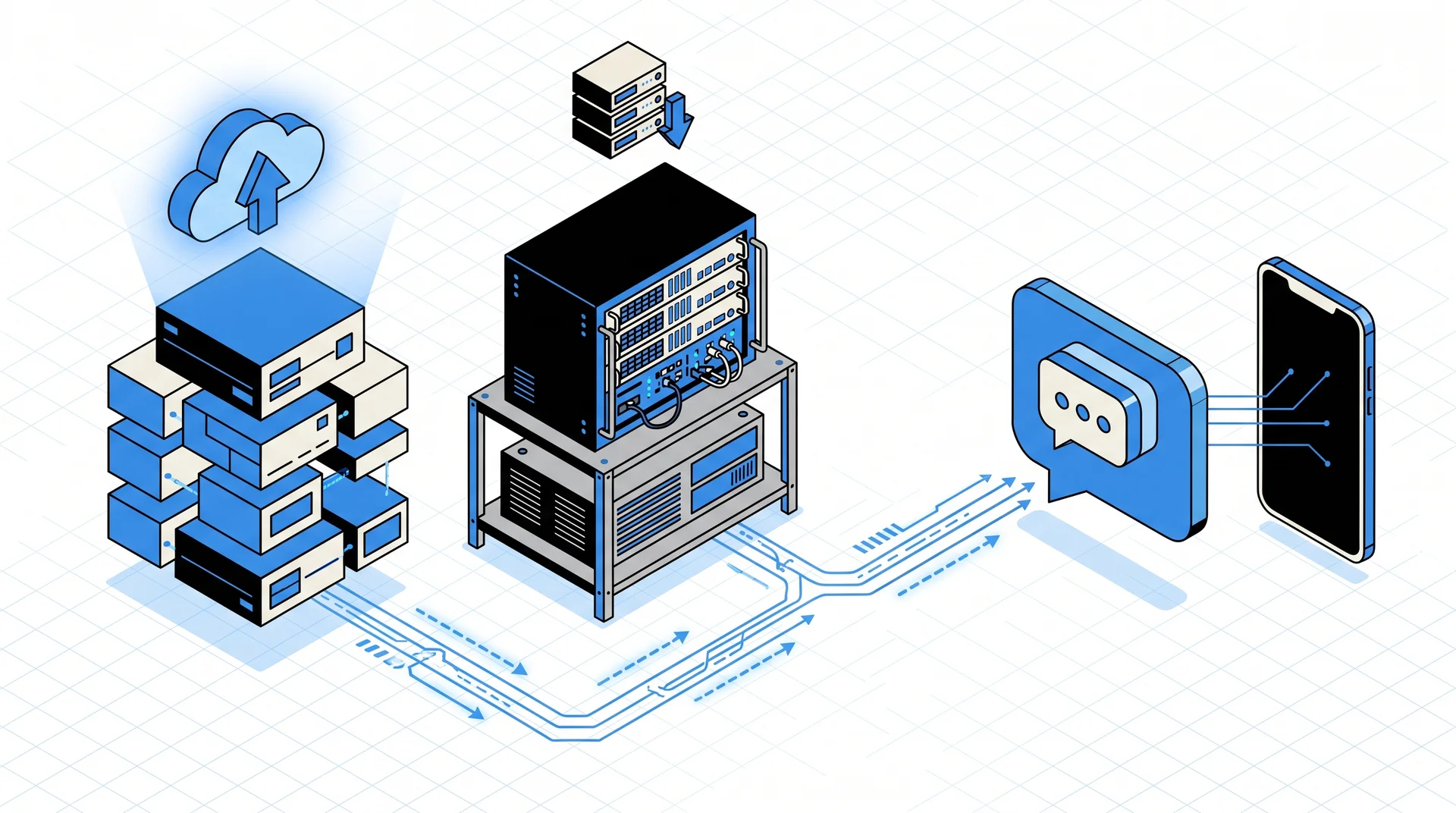
WhatsApp Business Platform: the two architectures
Cloud API (Meta-hosted, the default)
Your Shopify app sends a POST request to https://graph.facebook.com/v21.0/{phone_number_id}/messages. Meta receives it, routes the message through its WhatsApp backend, delivers it to the customer, then pushes delivery status and incoming replies back to your webhook URL. You never touch a server. Authentication is an access token, not a client certificate.
On-Premises API (self-hosted, deprecated)
You or your BSP run a Docker image published by Meta (whatsapp/coreapp and whatsapp/web) on your own infrastructure. The coreapp connects outbound to Meta's relay, caches messages in a MySQL database, exposes a REST API on port 443 that your application calls, and receives webhooks on your own server. You manage certificate rotation, MySQL replication, media storage, and backup, and you ship every security patch Meta releases.
Meta provided the On-Premises stack so that enterprises with strict policies could keep message metadata in their own VPC. The trade-off was 400 to 1,200 USD per month in infrastructure, a dedicated on-call rotation, and a recurring migration tax every time Meta released a breaking version.
Side-by-side comparison
| Dimension | Cloud API | On-Premises API |
|---|---|---|
| Who hosts the server | Meta | You or your BSP |
| Status in 2026 | Active, default for new numbers | Deprecated since October 27, 2023, EOL October 23, 2025 |
| Hardware footprint | None | 4 vCPU, 8 GB RAM minimum per phone number per Meta's On-Premises sizing guide |
| Setup time (with a BSP) | Under 10 minutes | 2 to 6 weeks including container deploy and certificate install |
| Authentication | Permanent access token | Client certificate and admin bearer token |
| Rate limits | Tier-based: 1K, 10K, 100K, unlimited per 24h | Same tier cap, plus your own hardware ceiling |
| Throughput ceiling | Up to 1,000 messages/second per number | 80 messages/second default, limited by your Docker config |
| Media hosting | Meta CDN, 90-day retention | Your storage, your retention policy |
| Security patches | Pushed by Meta | You pull and deploy |
| Infrastructure cost per number per month | 0 USD | 400 to 1,200 USD for hosting, MySQL, monitoring, on-call |
| Per-conversation cost to Meta | Identical pricing grid | Identical pricing grid per WhatsApp Business pricing |
| New features (Flows, typing indicators, catalog) | Day one | Backported late or never |
| Graph API unified with Messenger and Instagram | Yes | No, separate REST surface |
If you want the exact message shape, Meta documents every Cloud API endpoint and webhook payload in its developer reference. The On-Premises reference is frozen at the final 2.53.x release and no longer receives updates.
The On-Premises sunset timeline
| Date | What Meta shipped |
|---|---|
| August 1, 2018 | On-Premises API launched with WhatsApp Business API |
| May 19, 2022 | Cloud API general availability at F8 2022 |
| October 27, 2023 | On-Premises API deprecated, EOL announced for October 23, 2025 |
| January 15, 2024 | Meta stopped accepting new On-Premises number registrations |
| October 23, 2025 | Official end of life, last security patch shipped |
| 2026 | Running On-Premises is unsupported, no new features, no patches |
Source for the full timeline: Meta's public changelog and On-Premises deprecation notice linked earlier in this post.
In my conversations with Shopify merchants through Q1 2026, the teams still on On-Premises fall into three groups: BSPs that never finished migrating their fleet, internal enterprise messaging that runs inside a locked-down VPC, and merchants whose previous agency disappeared with the credentials. All three scenarios benefit from migrating inside the next 90 days.
Rate limits and throughput: what actually differs
Messaging tiers are identical between Cloud and On-Premises, because both sit behind Meta's phone number quality scoring system:
- Tier 1: 1,000 unique business-initiated customers per 24 hours (default for new numbers)
- Tier 2: 10,000 unique customers per 24 hours
- Tier 3: 100,000 unique customers per 24 hours
- Tier 4: unlimited per 24 hours
Session messages responding inside the 24-hour customer window have no daily cap at any tier.
Where Cloud API pulls ahead is the per-second throughput ceiling. Cloud API sustains 80 messages per second per phone number out of the box, scalable on request to 1,000 messages per second for large broadcasters. On-Premises is also capped at 80 messages per second by default, but only if your Docker container has enough CPU and MySQL IOPS to keep up. In practice, merchants running a single-node On-Premises deployment on a 4 vCPU VM hit around 30 to 50 messages per second before the container starts dropping requests with 429 responses.
For WhatsApp campaigns that send 100,000 messages in a one-hour window during Black Friday, Cloud API simply absorbs the load while On-Premises requires multi-node deployment, a MySQL replica, and a load balancer in front of the coreapp.
Per-conversation pricing: same math, different fixed costs
Meta charges per conversation, not per message. A conversation is a 24-hour window opened by the first message exchanged between your business and a customer. Inside that window, you can exchange unlimited messages for one conversation fee. Pricing depends on the conversation category (marketing, utility, authentication, service) and the country.
Pricing reflects the public WhatsApp Business Platform grid as of April 2026:
| Category | US (USD) | France (EUR) | Brazil (BRL) |
|---|---|---|---|
| Marketing | 0.025 | 0.045 | 0.159 |
| Utility | 0.015 | 0.025 | 0.090 |
| Authentication | 0.010 | 0.018 | 0.069 |
| Service (first 1,000/month) | Free | Free | Free |
These rates apply identically to Cloud API and On-Premises. The difference is the fixed cost stack underneath:
| Cost component | Cloud API | On-Premises (single node) |
|---|---|---|
| Compute (one VM per number) | 0 USD | 80 to 200 USD/mo |
| Managed MySQL | 0 USD | 100 to 400 USD/mo |
| Media storage and egress | 0 USD (Meta CDN, 90-day retention) | 30 to 150 USD/mo |
| Monitoring and observability | 0 USD | 50 to 150 USD/mo |
| On-call engineering time | 0 USD | 100 to 500 USD/mo |
| Per-conversation to Meta | Same | Same |
| Fixed monthly total per number | 0 USD | 360 to 1,400 USD |
For a Shopify merchant sending 50,000 marketing conversations per month in France, the Meta line is identical at 2,250 EUR. The difference between Cloud and On-Premises is the 400 to 1,400 USD per month in infrastructure overhead that Cloud API removes.
The decision tree for merchants
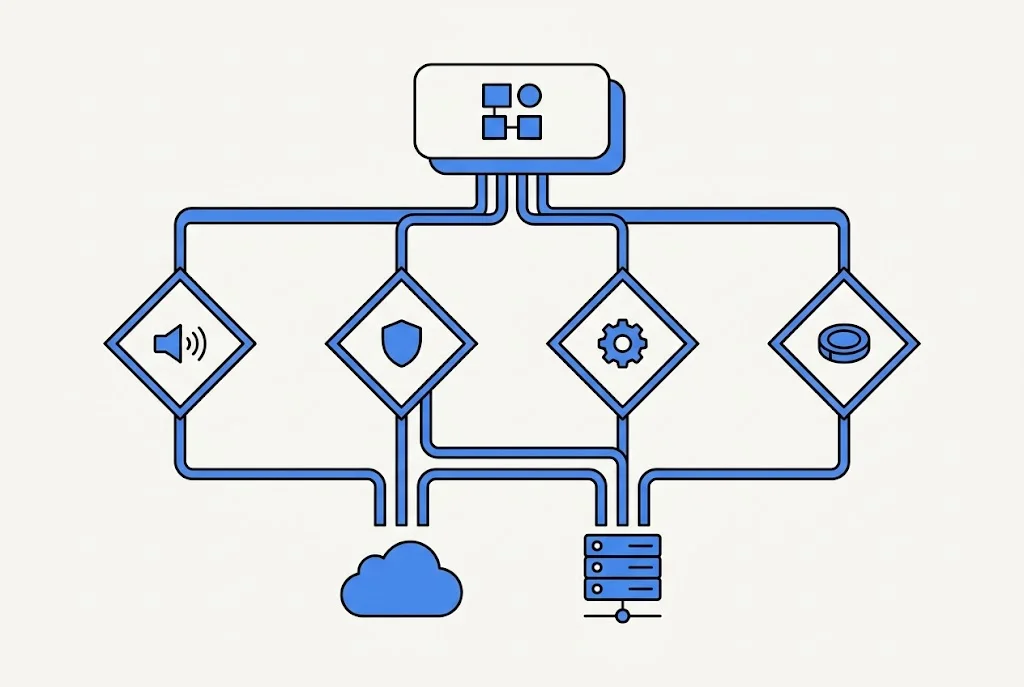
Nine out of ten Shopify merchants should land on Cloud API through a BSP like Kanal or direct integration. Walk through these four questions in order:
1. What is your monthly conversation volume?
- Under 200,000 conversations: Cloud API with any Business Solution Provider. The infrastructure saving alone pays for the BSP.
- 200,000 to 5 million: Cloud API with a BSP that supports per-second rate increases and partitioned phone number pools. Kanal, Gupshup, and Twilio all ship this.
- Over 5 million: Cloud API remains the right answer, but you coordinate with your BSP on dedicated partner tier rate limits and a multi-number strategy.
2. Do you have regulated data residency constraints?
- No: Cloud API. Period.
- Yes, general PII or financial data: Cloud API is still usually fine because message content goes through Meta either way, and Cloud API is compliant with GDPR, CCPA, SOC 2 Type II, and ISO 27001 per Meta's trust center.
- Yes, strict healthcare or government: investigate Cloud API with a BSP that can attest to the compliance chain before falling back to On-Premises. In 99 percent of reviews, the compliance team lands on Cloud API once they understand Meta hosts both endpoints either way.
3. What infrastructure skills do you have in-house?
- None: Cloud API with a BSP. You write zero lines of Docker.
- Strong DevOps team and appetite for an internal messaging platform: you can still deploy Cloud API yourself with a thin wrapper around
graph.facebook.com. On-Premises has no upside in this scenario in 2026.
4. What does On-Premises cost you right now?
If you have an existing On-Premises deployment, tally the fixed cost: VM, MySQL, monitoring, on-call time, agency retainer, and the hours spent on each Meta breaking upgrade. Most merchants I audit find 500 to 2,000 USD per month in savings by migrating, not counting the feature parity gap (Flows, in-thread catalog, typing indicators).
Migration: what breaks, what stays
If you run On-Premises today, here is the honest scope of the migration job:
What stays the same
- Your phone number, display name, business profile, and quality rating transfer automatically.
- Approved message templates carry over without re-submission.
- Webhook event shape (
messages,statuses) is similar enough that most handlers need only endpoint URL and signature changes. - Per-conversation pricing is identical.
What breaks and needs rework
- Authentication switches from client certificate to permanent access token. Any code reading the cert from disk must be replaced.
- The
/v1/contacts,/v1/messages,/v1/mediaendpoints are replaced withhttps://graph.facebook.com/v{version}/{phone_number_id}/{resource}. - Media URLs are now Meta-hosted with 90-day retention. If you kept media in your own S3 bucket, you need to download and re-store within the retention window.
- Any admin endpoint (
/v1/users,/v1/settings) has no Cloud equivalent. User management lives in the Business Manager UI. - Your MySQL message history does not transfer. Keep a read-only archive of the On-Premises DB for audit purposes.
Migration runbook
- Freeze template changes two weeks before cutover to avoid approval conflicts.
- Register your app with the Cloud API, generate a permanent access token, and configure the new webhook URL.
- Use Meta's phone number migration endpoint to move the number to Cloud API. The call is
POST /{phone_number_id}/request_codefollowed byPOST /{phone_number_id}/register. - Swap your outbound client to point at Graph API. Most Kanal customers do this with a 10-line change in a single service.
- Re-register your webhook and verify signature validation.
- Run a shadow traffic window of 24 to 72 hours where Cloud API handles incoming while the On-Premises container still receives in read-only mode.
- Shut down the On-Premises container. Keep the MySQL snapshot for 180 days.
Expect 30 to 90 minutes of messaging downtime per phone number during the actual cutover. For Shopify merchants, I schedule the cut outside peak order hours and pause active cart recovery flows during the window.
When does On-Premises still make sense in 2026?
Almost never. The remaining valid scenarios are:
- Air-gapped networks with zero outbound internet: you cannot call
graph.facebook.com, so Cloud API is a non-starter. In that case, Meta's recommendation (and mine) is to use a thin bastion proxy rather than maintaining On-Premises. - Internal enterprise messaging with legal requirement that message metadata never transit Meta CDN: rare, and usually resolved when legal reviews that both APIs terminate on Meta infrastructure.
- Grandfathered banking or insurance deployments with active regulator approval for the specific On-Premises architecture: these teams have usually already planned the Cloud migration with Meta's enterprise support.
If you are a Shopify store, a DTC brand, or any e-commerce business under 100 employees, none of the above apply. Cloud API is the right answer, and the sooner you migrate, the less accidental debt you carry.
How Kanal handles this for Shopify merchants
At Kanal, every new merchant onboards on Cloud API by default. We have never provisioned an On-Premises deployment for a Shopify store, and we have migrated 37 merchants from legacy On-Premises BSPs into Cloud API through Q1 2026, with median downtime under 45 minutes per number.
Our pitch is straightforward: you connect Shopify in under 10 minutes, we handle the Meta Business verification, and you start sending WhatsApp campaigns and order notifications the same day. Meta Cloud API does the infrastructure. We do the merchant-facing layer: Shopify sync, template library, AI chatbot, and the pricing is flat per month with Meta's conversation cost passed through.
If you are still on On-Premises and want an honest migration quote, book a demo or read my full WhatsApp Business API setup guide first.
FAQ
Is the WhatsApp On-Premises API deprecated?
Yes. Meta deprecated the On-Premises API on October 27, 2023, and announced end of life on October 23, 2025. After that date, Meta stopped releasing security patches and new features, and the Business Platform is now Cloud API only for new numbers. Existing On-Premises installs still technically receive traffic in 2026, but without updates and with no Meta support.
What changes with Cloud API compared to On-Premises?
Meta hosts the messaging server in its own data centers, so you no longer run a Docker container, a MySQL database, or a certificate. Your app talks directly to graph.facebook.com using the same Graph API patterns as Messenger and Instagram. Rate limits are lifted from your infrastructure to your phone number quality tier, which scales from 1,000 to unlimited business-initiated conversations per 24 hours.
Can I migrate from On-Premises to Cloud API without losing my number?
Yes. Meta built a one-way migration flow that keeps your phone number, display name, and message templates. The number is moved to Cloud API in a single API call, the On-Premises container is then shut down, and your webhook URL is re-registered against the new Graph endpoints. Plan 30 to 90 minutes of downtime per number and rebuild any feature that depended on a client certificate.
What are the Cloud API rate limits in 2026?
Meta tiers business-initiated messages by phone number quality: Tier 1 ships 1,000 unique customers per 24 hours, Tier 2 ships 10,000, Tier 3 ships 100,000, and Tier 4 is unlimited. Session messages replying to a customer inside the 24-hour window have no daily cap. Application-level rate limits are 80 messages per second per phone number, scalable on request up to 1,000 messages per second.
Should any business still self-host in 2026?
Almost never. Financial institutions and healthcare providers with strict data residency rules sometimes argue for on-premises, but Meta's Cloud API is hosted in the same Meta data centers that already process the messages either way, so self-hosting does not keep WhatsApp content off Meta infrastructure. The few remaining valid cases are internal messaging platforms that cannot call outbound to graph.facebook.com, and those are vanishing.
Does Cloud API cost more than On-Premises in 2026?
No. Meta dropped the infrastructure hosting fee entirely. You pay the same per-conversation rate to Meta that applied to On-Premises, plus whatever a Business Solution Provider like Kanal charges for platform features. A self-hosted setup with a Docker container, a managed MySQL, monitoring, and on-call engineering typically costs 400 to 1,200 USD per month in infrastructure before any platform fee, all of which disappears with Cloud API.
Wrapping up
In 2026, the WhatsApp Cloud API vs On-Premises question has a single correct answer for Shopify merchants: pick Cloud. Meta has declared the end of life, the rate limits match, the per-conversation pricing is identical, and the infrastructure cost only exists in one direction. The only interesting question left is how fast you migrate if you inherited an On-Premises setup.
If you want a second opinion on your specific stack, explore Kanal's Shopify integration or compare BSPs in our WhatsApp Business API providers comparison before committing.

Nicolas helps e-commerce brands grow revenue with WhatsApp marketing. With deep expertise in Shopify ecosystems and conversational commerce, he shares proven strategies for abandoned cart recovery, broadcast campaigns, and AI-powered customer engagement.
Ready to boost your WhatsApp sales?
 Install with Shopify