How to Ask Customers for Reviews: 20 Review Request Templates
How to ask customers for reviews after a purchase: when to send, 20 review request templates for SMS, WhatsApp and email, and the FTC and Google rules.
 Nicolas ProvostNov 9, 2026 · 17 min read
Summarize this article with an AI
 ChatGPT
 Claude
Table of contents (12)
Key takeaways
- Ask once the product has been used, a few days after delivery, in one short message that names the product and links straight to the review form. Judge.me and Yotpo send their first request 14 days after the order is fulfilled or processed by default.
- Ask every customer, not only the happy ones: the FTC tells marketers not to ask for reviews only from customers they expect to be positive, and Google does not allow merchants to selectively solicit positive reviews.
- An incentive for an honest review on your own site is allowed if it never depends on a positive rating and is disclosed, under the FTC rule in force since October 21, 2024. Google forbids any incentive for a Google review.
- Kanal, our Shopify app, sends the review request on WhatsApp after delivery and customers answer in the chat with text, photos or videos; SMS review requests come with the Scale plan.
To ask customers for reviews, send one short message a few days after delivery, once the product has been used: name the customer and the product, ask a single question and link straight to the review form. Send it on the channel the customer reads, which is often WhatsApp or SMS rather than email, to every customer and not only the ones you expect to be happy, and send one reminder at most.
The effort pays off. In its 2017 study of online reviews, the Spiegel Research Center at Northwestern University found that the purchase likelihood for a product with five reviews was 270% greater than for a product with no reviews, and that for a higher-priced product the conversion rate increased 380%.
This guide covers the timing, the channel, the structure of a request that gets answered, 20 templates for WhatsApp, SMS and email, and the rules set by the FTC and Google. If your store runs on Shopify, the last part shows how Kanal, our app, sends the request on WhatsApp after the parcel is delivered, at the delay you choose.
When should you ask a customer for a review?
Ask after the product has been used, not when it ships. A request that lands before the parcel, or the morning it arrives, gets a review of the packaging and the delivery speed. The right delay depends on how long the product takes to show what it is worth:
| Product type | When to send the first request | Why |
|---|---|---|
| Clothing, shoes, accessories | 3 to 7 days after delivery | Worn once or twice |
| Home goods, decor | 5 to 10 days after delivery | Unpacked and in place |
| Food, coffee, consumables | 3 to 5 days after delivery | Used quickly |
| Skincare, supplements | 2 to 4 weeks after delivery | Results take time to show |
| Electronics, appliances | 1 to 2 weeks after delivery | Set up and used for real |
Trigger the delay on delivery, not on fulfillment: the time a parcel spends in transit varies by carrier and country, and a request counted from the shipping date reaches some customers before their order does. Review apps start from different events by default:
| Tool | Default timing of the first request | Source |
|---|---|---|
| Judge.me | 14 days after fulfillment; Delivered can be chosen as the trigger | Judge.me Help Center |
| Yotpo | 14 days after the order is processed; can be based on delivery for Shopify stores on Starter and above | Yotpo Help Center |
| Shop (Shopify) | A delay you choose, 1 to 180 days after delivery | Shopify Help Center |
| Kanal | After delivery confirmation, at the delay you choose | Review collection |
Sources read on November 9, 2026.
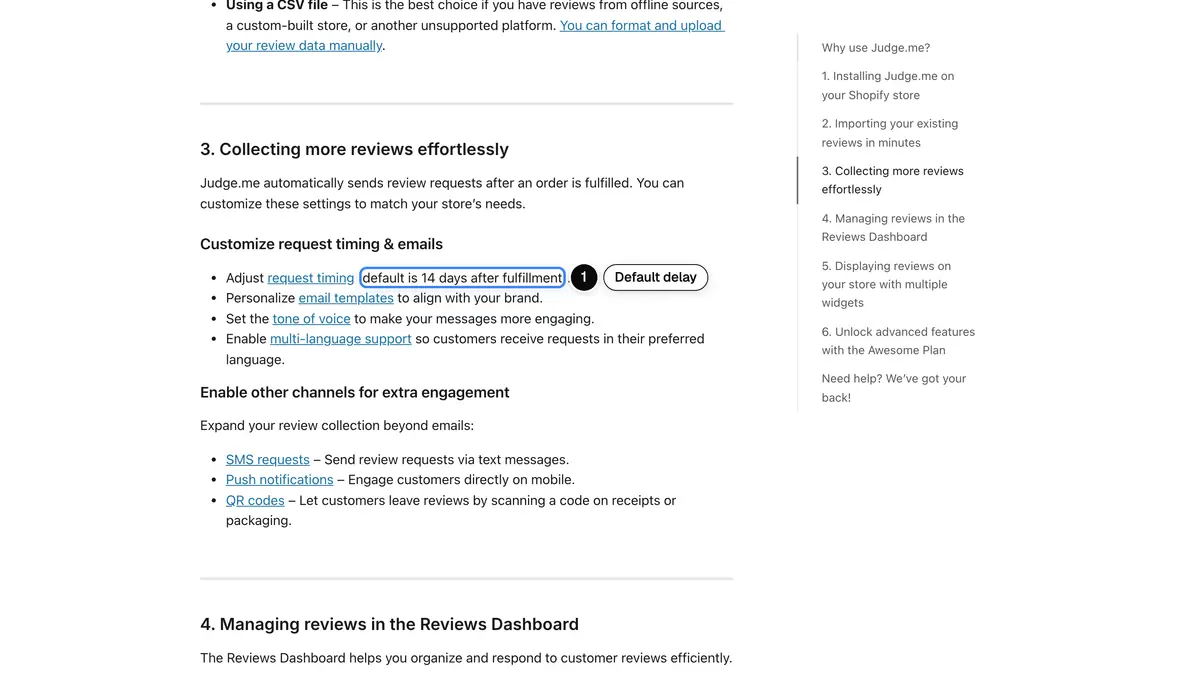 Source: Judge.me Help Center, "Getting started with Judge.me", updated August 19, 2026, read on November 9, 2026.
Judge.me's automatic review request page lists five triggers (Created, Paid, Fulfilled, Delivered and Archived) and warns that with Delivered, a request stays waiting if Shopify never receives a delivery update. Whatever the tool, check that your carriers send delivery events before you switch.
Email, SMS or WhatsApp: which channel should you use?
Email is the default channel of review apps such as Judge.me and Yotpo, and a message that is easy to leave unread in a busy inbox. Texts and WhatsApp messages land in the app customers open all day, and a reply costs one tap. Each channel has its own constraints:
| SMS | |||
|---|---|---|---|
| Consent | Your email marketing rules | Only customers who opted in to your texts | Only customers who opted in to WhatsApp messages |
| Length | No real limit | 160 characters per segment, 70 with an emoji | A short template, with the link on a button |
| Photo review | Through the review form | Through the review form | Reply with a photo in the chat |
| Approval | None | Sender registration in the US (10DLC or toll-free) | Template approved by Meta outside the 24-hour window |
| Best for | Long orders, several products | Short, mobile-first asks | Conversation, photos, follow-up questions |
The SMS limits come from Twilio's guide to character limits: 160 characters fit in one segment, an emoji switches the whole message to UCS-2 and the limit drops to 70. A review request with one emoji often costs two segments instead of one. For the US consent rules, read our guide to SMS marketing opt-in.
On WhatsApp, Meta sorts every template into a category. Its template categorization guidelines accept a feedback request as a utility template only when it refers to a specific order or interaction: "A general/generic survey or request for feedback will not be approved as utility", and a feedback survey with promotional content counts as marketing.
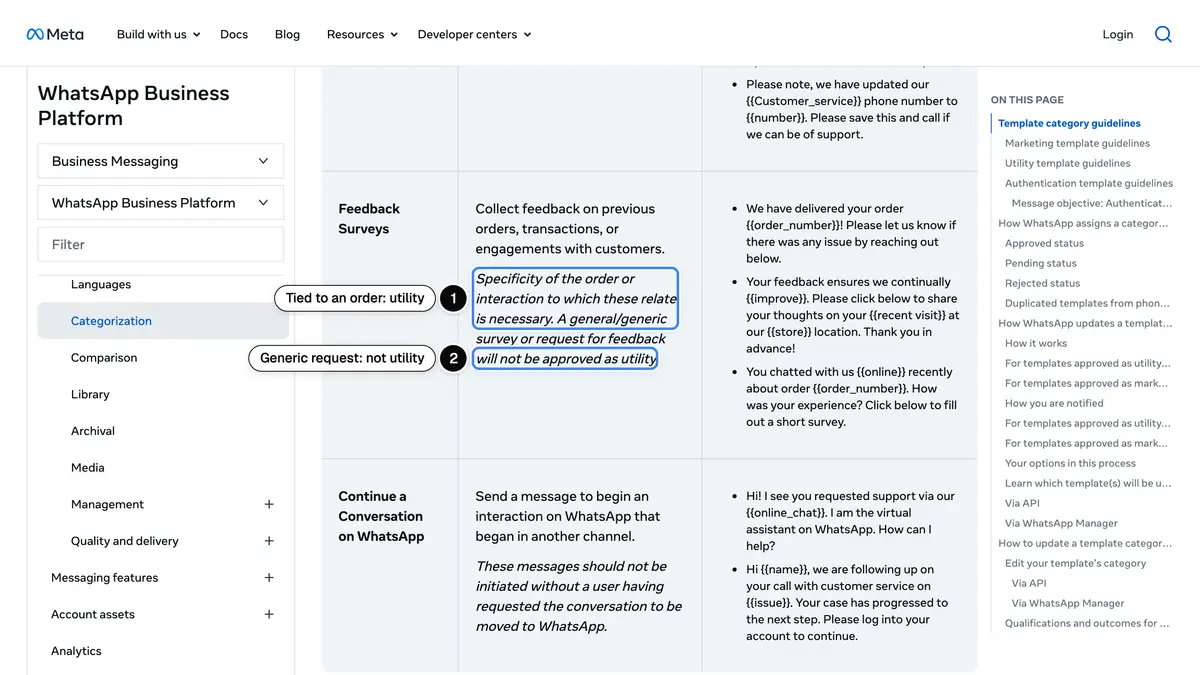 Source: Meta for Developers, Template categorization, Feedback Surveys row, read on November 9, 2026.
In practice, name the order and keep selling lines out of the review request, and send cross-sells in a separate message. Our WhatsApp template guide covers the three categories and the approval process.
How to ask for a review: six rules for a request that gets answered
The templates below all follow the same six rules:
- Name the customer and the product. "How is your linen shirt?" tells the customer at once what you are asking about; "How was your recent order?" does not.
- Ask one thing. A rating, a review or a photo, not all three in the same message.
- Say how long it takes. "Two minutes" or "five taps" lowers the cost of saying yes; only promise what your form delivers.
- Link straight to the form. Ideally a form with the product already selected, open on a phone, with no login.
- Give problems a way out. A line such as "Something wrong? Reply here and we'll fix it" catches issues before they become one-star reviews, without stopping anyone from posting a review.
- Sign as your store. Start texts with the store name, and sign emails with a person's name.
20 review request templates for SMS, WhatsApp and email
Replace the placeholders, adapt the tone to your brand and keep the facts true: only mention a reward or a reply time that you really provide.
WhatsApp review request templates (7)
Variables are written as named parameters, as in Meta's own examples. The link goes on a URL button, and the category in brackets is the one Meta's guidelines point to: Meta makes the final call at review.
1. After delivery (utility)
Hi {{first_name}}, your order {{order_number}} was delivered on {{delivery_date}}. How is the {{product}} working out? Tap below to rate it, it takes about a minute.Button: Rate my order (URL)
2. After first use, for products that take time (utility)
Hi {{first_name}}, you have had your {{product}} from order {{order_number}} for three weeks now. How is it going? Good or bad, your honest review takes two minutes.Button: Write my review (URL)
3. Rating first, in the chat (utility)
Hi {{first_name}}, a quick question about order {{order_number}}: how would you rate the {{product}} from 1 to 5? Just tap a number below.Buttons: 1 2 3 4 5 (quick replies)
The reply opens the 24-hour service window, so the follow-up is a free-form message. Send the review link to every score, and add a support line to the low ones:
Thank you! Here is the form to post your review: [link]Thank you for telling us. Here is the form to post your review: [link]. Sorry it fell short: reply with what went wrong and our team will fix it.4. Photo review (Meta decides between utility and marketing)
Hi {{first_name}}, thanks again for order {{order_number}}. If you would like to show how the {{product}} looks in real life, reply to this message with a photo and a few words.Button: Write a review instead (URL)
5. Repeat customer (marketing)
Hi {{first_name}}, thank you for order {{order_number}}, your {{order_count}} order with {{store}}. You know our products better than most. Which one would you review first?Button: Choose a product (URL)
6. After a support conversation (utility)
Hi {{first_name}}, you chatted with our team about order {{order_number}} this week. How was your experience? Tap below to tell us in a few words.Button: Rate our support (URL)
7. One reminder (utility)
Hi {{first_name}}, a last note about order {{order_number}}: if you have a minute, your review of the {{product}} helps us improve. No reply needed if you would rather not.Button: Leave my review (URL)
SMS review request templates (7)
Each text starts with the store name and fits in one 160-character segment with a short link, without emoji. Keep the opt-out line your SMS provider and your US carrier registration require.
8. After delivery
Nova: Hi Sarah, your linen shirt arrived on Monday. How do you like it? Leave a quick review here: nova.co/r/4821 Reply STOP to opt out9. After first use
Nova: Sarah, 3 weeks with your night cream now. Good or bad, your honest review helps other shoppers: nova.co/r/4821 Reply STOP to opt out10. Photo review
Nova: Hi Sarah, got a photo of your linen shirt in use? Add it to your review here: nova.co/r/4821 Reply STOP to opt out11. Rating in one tap
Nova: How was order #4821, Sarah? Rate it from 1 to 5 here: nova.co/r/4821 Something wrong? Reply to this text. STOP to opt out12. Repeat customer
Nova: Thanks for order #4821, Sarah. You know our range well: which product would you review first? nova.co/r/4821 Reply STOP to opt out13. Reminder
Nova: Last reminder, Sarah: your review of the linen shirt is still open here: nova.co/r/4821 Thanks either way! Reply STOP to opt out14. Google review, for a store with a physical shop
Nova: Thanks for visiting our Austin shop, Sarah! Would you share your experience on Google? g.page/r/nova/review Reply STOP to opt outReview request email templates (6)
Each email has a subject line, a preview line and a short body built around one button.
15. After delivery
Subject: How is your linen shirt, Sarah?
Preview: Two minutes to tell other shoppers what you think.
Hi Sarah,

Your linen shirt arrived a few days ago, and we would love to know how it fits and feels.

[Review my linen shirt]

It takes about two minutes, from your phone. If anything is wrong with your order, just reply to this email and I will sort it out.

Thanks,
Emma, Nova customer care
16. Order with several products
Subject: 3 products, 3 quick ratings
Preview: Rate each item from your order #4821.
Hi Sarah,

How are the items from order #4821 working out? You can rate each one separately, so other shoppers know which ones to pick.

Linen shirt [Rate]
Canvas tote [Rate]
Cotton socks [Rate]

Thanks for shopping with us,
The Nova team
17. Photo review with a disclosed reward (your own site only)
Subject: Show us your linen shirt
Preview: Add a photo to your review and get 10% off your next order.
Hi Sarah,

Photos from real customers help others choose the right size. Add one to your review of the linen shirt and we will send you a 10% code for your next order.

[Add my photo review]

The code is sent for every photo review, positive or negative, and your review will be marked as rewarded.
This one is for reviews published on your own store. Do not use it for Google, which forbids incentives, or for a platform whose rules you have not checked.
18. Repeat customer
Subject: Sarah, you know our products best
Preview: Your 4th order: which product deserves a review?
Hi Sarah,

This is your fourth order with Nova, thank you. Few customers know our range as well as you do. Is there one product you would tell a friend about, or warn them about?

[Write a review]

The Nova team
19. Reminder
Subject: Still a minute for your linen shirt?
Preview: Your review link is still open.
Hi Sarah,

A last note: your review of the linen shirt is still open if you have a minute. If not, no worries, this is the last email about it.

[Review my linen shirt]
20. Store review on a review platform
Subject: How did we do, Sarah?
Preview: A few words about your order from Nova.
Hi Sarah,

Your order #4821 was delivered on Monday. How was the experience with us, from the website to your door?

[Rate Nova]

Every review is published, good or bad, and we read all of them.
Send it to every customer, and check the platform's own rules on invitations before you automate it. For more texts beyond reviews, see our SMS marketing examples.
Can you offer an incentive for a review?
Yes for reviews on your own store, with two conditions. The FTC's rule on consumer reviews and testimonials went into effect on October 21, 2024. Its questions and answers page says that "The rule does not prohibit giving incentives for reviews", as long as there is no express or implied requirement that the review express a particular sentiment. The FTC's guide for marketers on online reviews adds that even then, the review should disclose the incentive.
Google is stricter. Its Business Profile help page on reviews says that offering incentives, like free or discounted goods or services, in exchange for posting, changing or removing reviews "is strictly prohibited".
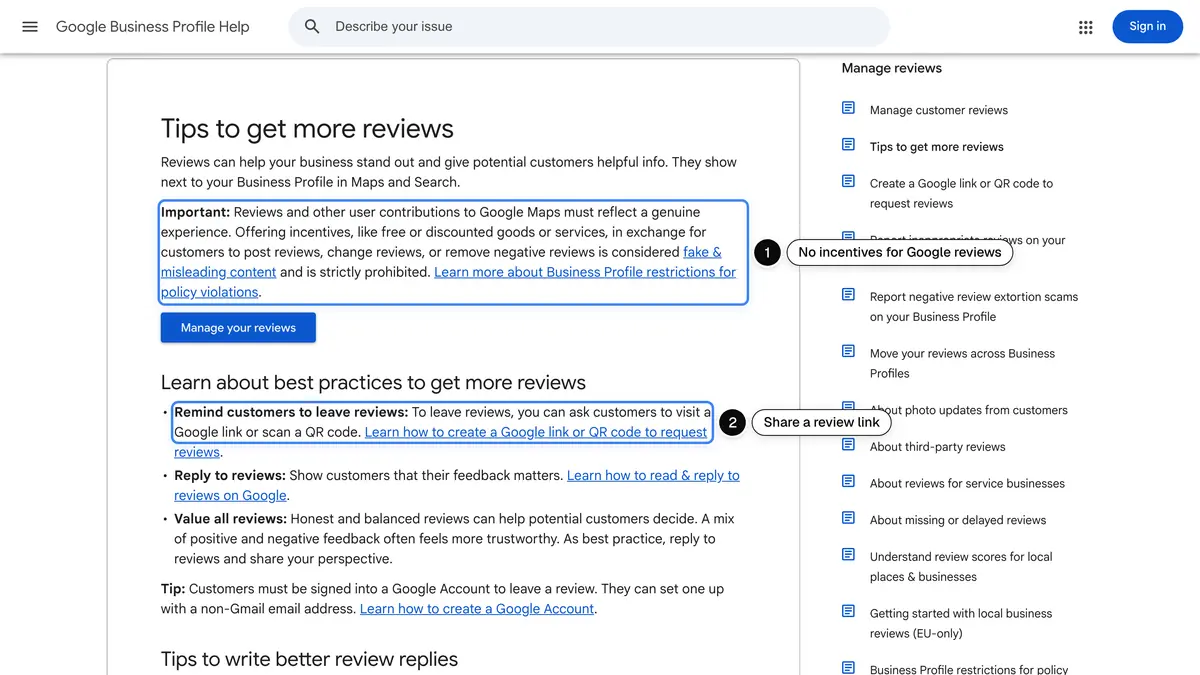 Source: Google Business Profile Help, Tips to get more reviews, read on November 9, 2026.
So keep rewards for reviews on your own product pages, give them for any honest review, and say so. Ask for Google reviews without any reward.
Review request rules: what the FTC and Google do not allow
The FTC announced its final rule banning fake reviews and testimonials on August 14, 2024, and its questions and answers page notes that the rule authorizes courts to impose civil penalties for knowing violations. Together with Google's Maps user-generated content policy, it draws the lines for a review program:
- Do not ask only the happy customers. The FTC guide says: "Don't ask for reviews only from customers you think will leave positive ones." Google does not allow merchants to "selectively solicit positive reviews from customers". The FTC rule itself has no specific ban on this practice, but the FTC says it could still violate the FTC Act. A satisfaction question that sends only the 4 and 5 scores to the review form crosses that line: send the link to everyone.
- No reward tied to a positive review. The rule prohibits incentives conditioned on a review expressing a particular sentiment, positive or negative.
- No fake or insider reviews. The rule prohibits fake reviews and reviews by company insiders that do not disclose their connection. The FTC guide says not to ask your staff to write reviews of your business, and not to ask family and friends without making sure they disclose the relationship.
- No suppression. The rule bars unfounded legal threats, intimidation and certain false accusations used to remove negative reviews. Organizing reviews on your page is allowed.
- No company-controlled review site presented as independent, under the same rule.
This is general information, not legal advice: check the rules of each review platform you use and of each country you sell to.
How many reminders should you send?
One. Send it three to five days after the first request, only to customers who have not reviewed, and say it is the last message about it. Then stop: the request should stay a courtesy, not a sequence. Measure two numbers on your own store, the review rate per channel and per delay, and change one thing at a time.
How to automate review requests on Shopify with Kanal
Kanal is a Shopify app, used by more than 500 brands, that turns WhatsApp into a sales channel. Its review collection flow covers the request itself:
- Sent automatically after delivery confirmation, at the delay you choose, so every customer is asked at the same point of their order.
- Answered in the chat. Customers reply with text, photos or videos directly in WhatsApp, which makes photo reviews easy to collect.
- The rest of the post-purchase journey in the same app: order notifications, post-purchase upsells and abandoned cart recovery.
- SMS too. From the Scale plan, the post-purchase SMS flow sends a review link after the order is delivered, to customers who agreed to receive your texts.
| Kanal plan | Price per month | What it covers |
|---|---|---|
| Pro | €89 | 1 user, chat widget and inbox, abandoned cart recovery, WhatsApp campaigns |
| Scale | €149 | 5 users, segments, unlimited and advanced automations, Klaviyo integration, SMS, RCS and iMessage |
| Business | €350 | Scale, plus flow setup and optimization by our experts |
Source: Kanal pricing and Kanal SMS page, read on November 9, 2026. Meta's WhatsApp fees and SMS messages are billed on top of the plan.
Kanal does not display reviews on your product pages: keep your review app for that. Our ranking of the best Shopify review apps compares the widgets, and our WhatsApp post-purchase playbook places the review request among the other flows that follow an order.
Review request checklist
| Step | What to do |
|---|---|
| Timing | A few days after delivery, two to four weeks for products that take time |
| Channel | WhatsApp or SMS for customers who opted in, email as the default |
| Message | First name, product, one question, time it takes, direct link |
| Who | Every customer, never only the ones you expect to be happy |
| Incentives | On your own site only, for any honest review, disclosed; never for Google |
| Tied to the order, no selling line, approved template | |
| Reminder | One, then stop |
Asking for reviews is a habit more than a campaign: the same short message, at the same moment, to every customer. If your store runs on Shopify and you want that message to go out on WhatsApp the day after delivery, book a Kanal demo and we will set up the flow on your store with you.
See Kanal on your own store
- Your campaigns and cart reminders on WhatsApp, starting from your own store
- Post-purchase offers, back-in-stock alerts, then the AI agent that advises your customers
- You leave with the plan that fits and its price
From €89/month
- brands
- 500+
- to set up
- 5 min
- open rate on WhatsApp
- +90%
Nicolas helps e-commerce brands grow revenue with WhatsApp marketing. With deep expertise in Shopify ecosystems and conversational commerce, he shares proven strategies for abandoned cart recovery, broadcast campaigns, and AI-powered customer engagement.