Klaviyo flows: the 7 core flows for Shopify stores (2026)
Klaviyo flows explained: triggers, filters, delays and splits, the 7 core flows a Shopify store needs, how to build one step by step, and adding WhatsApp.
 Nicolas ProvostOct 24, 2026 · 15 min read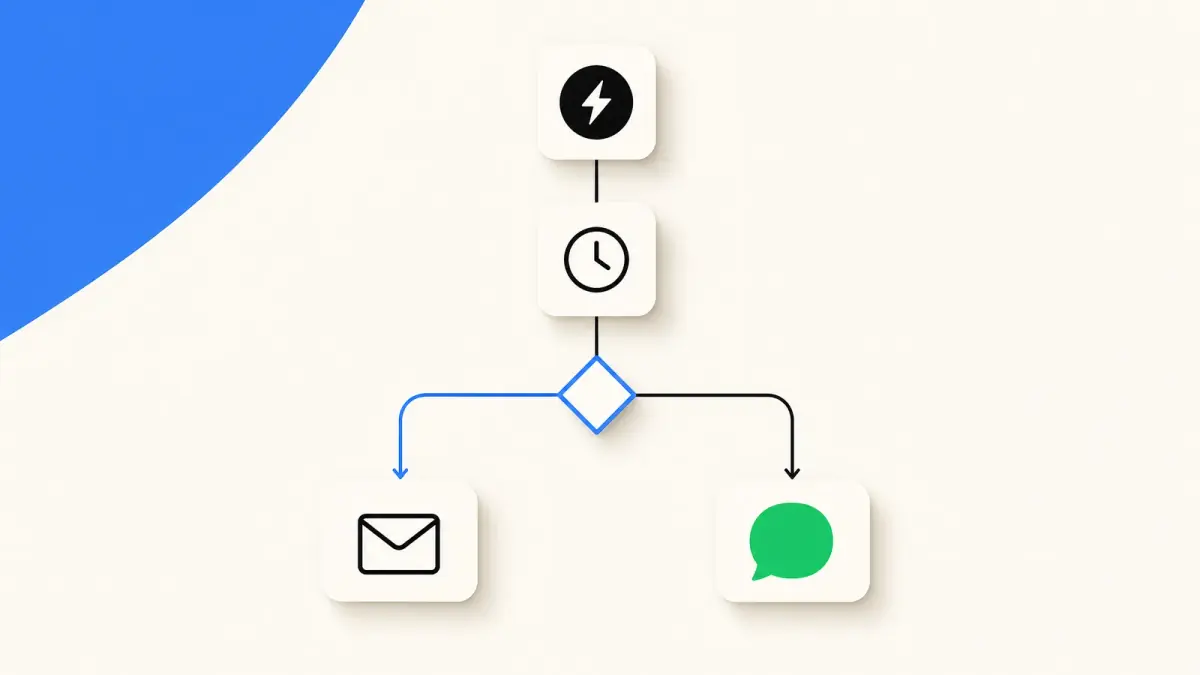
Summarize this article with an AI
 ChatGPT
 Claude
Table of contents (20)
Key takeaways
- A Klaviyo flow is an automated sequence that starts from a trigger (list, segment, metric, date property, price drop or low inventory), then uses filters, time delays and conditional splits to decide who gets which message and when.
- The core flows for a Shopify store are the welcome series, abandoned checkout, browse abandonment, post-purchase, win-back, back in stock and sunset flows, each with its own trigger and exit filter.
- Kanal adds WhatsApp to Klaviyo flows: a webhook step triggers a Kanal automation that sends an approved WhatsApp template, and delivered, read and clicked events go back to Klaviyo.
A Klaviyo flow is an automated sequence of messages and actions that starts on its own when a customer does something (joins a list, starts a checkout, places an order) or reaches a date. Every flow is built from the same parts: a trigger, filters that decide who stays in, time delays that set when each step runs, and conditional splits that send different people down different paths. For a Shopify store, seven flows cover the customer lifecycle: welcome series, abandoned checkout, browse abandonment, post-purchase, win-back, back in stock and sunset.
This guide explains each building block as Klaviyo's help center defines it (read on October 23, 2026), gives the trigger, filters and timing Klaviyo documents for each of the seven flows, then covers building one, the usual mistakes and where WhatsApp fits. For what Klaviyo costs, see our Klaviyo pricing guide.
What is a Klaviyo flow?
Klaviyo's Getting started with flows guide defines a flow as an automated sequence of actions, such as sending messages, that starts from a behavior, an event or a date. Other tools call the same thing an automation or a drip campaign. Don't confuse it with Shopify Flow, Shopify's own app for automating store operations such as tagging customers or orders.
The difference with a Klaviyo campaign is what sets the send in motion:
| Flow | Campaign | |
|---|---|---|
| Starts | When each person meets the trigger | At the date and time you schedule |
| Audience | Whoever enters, one person at a time | A list or segment, all at once |
| Runs | Continuously, until you turn it off | Once |
| Typical use | Welcome, cart reminders, post-purchase, win-back | Launches, promotions, newsletters |
Because a flow keeps running, a wrong filter keeps sending the wrong message for months. The building blocks matter more than the copy.
How a Klaviyo flow works: trigger, filters, delays and splits
The trigger
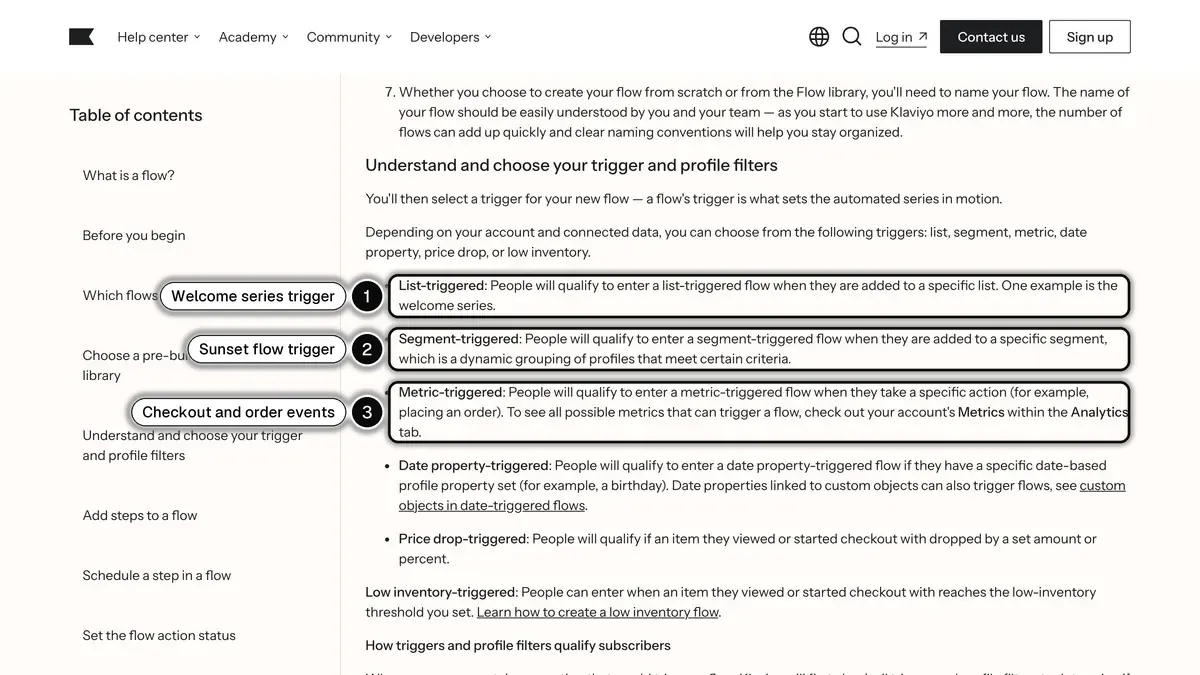
Every flow has exactly one trigger. Klaviyo lists six types:
| Trigger | A profile enters the flow when... | Shopify store example |
|---|---|---|
| List | It is added to a specific list | Welcome series on your newsletter list |
| Segment | It is added to a dynamic segment | Sunset flow for unengaged subscribers |
| Metric | It performs a specific action | Started Checkout, Placed Order, Viewed Product |
| Date property | A date on the profile is reached | Birthday offer |
| Price drop | An item it viewed or started a checkout with drops by a set amount or percent | Price drop alert |
| Low inventory | That item reaches your low-inventory threshold | "Almost gone" reminder |
Metric triggers depend on your integrations. Once Klaviyo is connected to Shopify, events such as Started Checkout and Placed Order appear under Metrics in the Analytics tab, and any of them can start a flow.
 Source: Klaviyo Help Center, Getting started with flows, read on October 23, 2026.
Trigger filters and profile filters
Klaviyo checks both kinds when the trigger fires and removes the profiles that fail them. The difference comes after:
- Profile filters are checked again before each step and at send time. "Placed Order zero times since starting this flow" is a profile filter: a customer who buys between two reminders drops out before the next one.
- Trigger filters work on the event that started the flow and are not checked again at send time. They suit conditions that won't change, such as only checkouts above a certain value.
Steps: messages, data and logic
Klaviyo groups flow actions into three types:
- Messages: email, SMS and the other channels set up in your account.
- Data: update a profile property or a list, send an internal alert to your team, or call a webhook.
- Logic: time delays and conditional splits.
Time delays
Steps with no delay between them run at the same time, so delays space your messages out. You set them in minutes, hours or days; Klaviyo counts days as 24-hour periods unless the delay includes a specific time of day, in which case it counts calendar days. You can also wait until a time of day or certain days of the week. A delay needs a live or manual action right after it to work.
Conditional splits
A split sends each profile down one of several paths based on conditions: profile data and, in metric-triggered flows, the data of the event that started the flow. Klaviyo allows up to 20 paths in one split. Unlike a filter, a split removes no one: each profile continues down the path that matches it.
Statuses: draft, manual and live
Draft schedules nobody. Manual holds each scheduled send in a Needs Review list until you approve it. Live sends automatically. Running a new flow in Manual for a day shows who it catches before you set it live.
The 7 core Klaviyo flows for a Shopify store
Klaviyo's getting started guide names four flows to set live first, in this order: welcome series, abandoned cart, post-purchase and winback. Shopify stores usually add three more once those run: browse abandonment, back in stock and sunset.
| Flow | Trigger | Key filter | Timing Klaviyo documents |
|---|---|---|---|
| Welcome series | List: your main subscriber list | None needed | 3 emails over a week |
| Abandoned checkout | Metric: Started Checkout | Placed Order zero times since starting this flow | First at 2 to 4 hours, second 20 to 48 hours later |
| Browse abandonment | Metric: Viewed Product | No order, checkout or recent pass through this flow | At least 1 hour |
| Post-purchase | Metric: Placed Order | Split first-time and repeat buyers | Delays before review and cross-sell emails, none before the thank-you |
| Win-back | Metric: Placed Order | Placed Order zero times since starting this flow | First delay a little longer than your buying cycle |
| Back in stock | Metric: Subscribed to Back in Stock | No trigger or profile filter | Waits until the item is restocked |
| Sunset | Segment: unengaged subscribers | Opened and Clicked Email zero times since starting | 1 to 3 emails |
1. Welcome series
The trigger is Added to list, on the list new subscribers join when they sign up through your popup or footer form. Klaviyo's email welcome series guide recommends three emails over a week: the first immediately, the second after 3 days, the third 4 days after the second. Its suggested content: introduce the brand and collect preferences, then invite people to follow you on social media, then show your best sellers.
If your signup form promises a discount, deliver the code in the first email. Keep the SMS welcome flow separate from the email one, since people subscribe to each channel separately. And turn the flow off before importing existing subscribers into the trigger list, or they all enter the welcome series.
2. Abandoned checkout
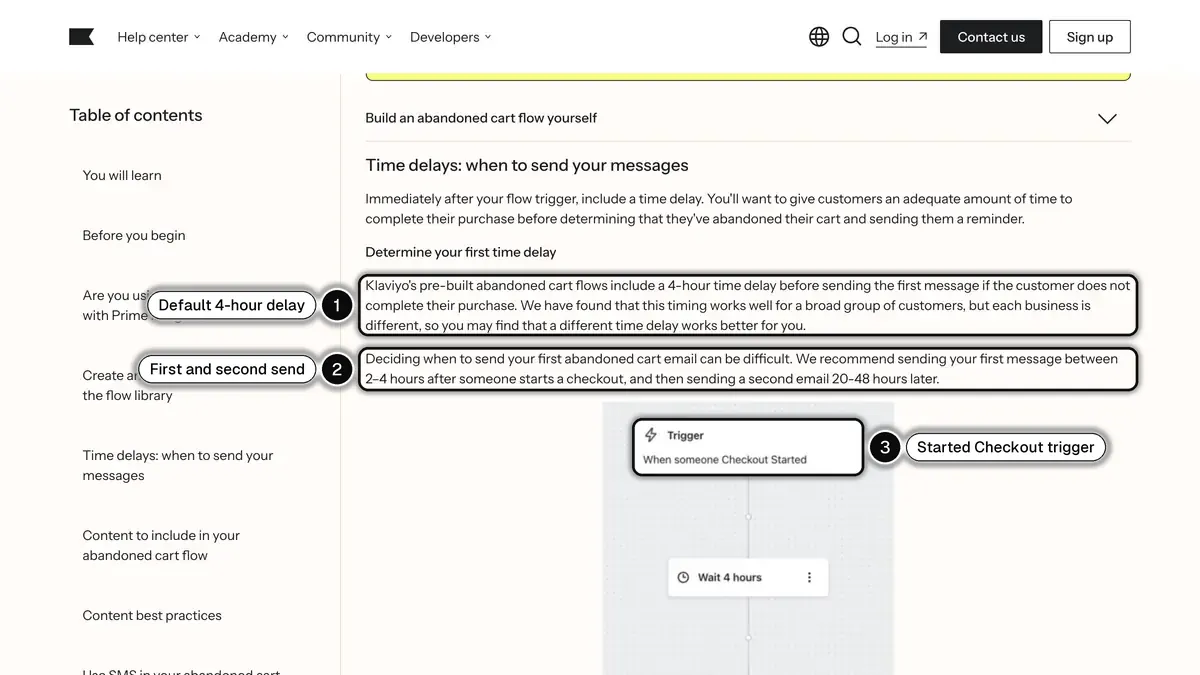
According to Klaviyo's abandoned cart guide, the most common version uses the Started Checkout metric as its trigger, with the profile filter Placed Order zero times since starting this flow. On timing, Klaviyo's pre-built abandoned cart flows wait 4 hours before the first message, and the guide recommends sending the first message 2 to 4 hours after someone starts a checkout, then a second email 20 to 48 hours later.
 Source: Klaviyo Help Center, How to create an abandoned cart flow, read on October 23, 2026.
Klaviyo also asks you to turn off any abandoned cart message your ecommerce platform already sends. On Shopify, the Shopify Help Center places that email in Apps > Messaging > Automations, in the automation called Abandoned checkout emails by Shopify. If both run, the customer gets two reminders for the same checkout.
An Added to Cart flow can catch people who never reached the checkout: Klaviyo suggests a separate flow with the filter Started Checkout zero times since starting this flow, and on Shopify the metric requires the Track behavioral events setting. For the offer and the copy, see our abandoned cart recovery strategies.
3. Browse abandonment
This flow starts on the Viewed Product metric. On Shopify, Klaviyo's app embed tracks it, only for visitors Klaviyo can identify and, depending on your Shopify customer privacy settings, not for visitors in the EU, EEA, UK and Switzerland who haven't given consent. The browse abandonment guide suggests these profile filters:
- Placed Order zero times since starting this flow
- Started Checkout zero times since starting this flow
- Has not been in this flow in the last 30 days
- Added to Cart zero times since starting this flow, if you also run an Added to Cart flow
Add a delay of at least one hour. Klaviyo describes browse abandonment as a "lighter touchpoint" than the abandoned cart flow: a viewed product shows less intent than a started checkout, so a reminder of the product works better here than a discount.
4. Post-purchase
The trigger is Placed Order. The most useful split is first order versus repeat order (Placed Order equals 1 over all time): a first-time buyer needs reassurance, a repeat buyer is ready for a cross-sell. Klaviyo advises keeping order and shipping confirmations in separate flows, and placing delays before review requests and cross-sells, not before a thank-you.
Shopify already sends order and shipping notifications, so this flow is the marketing layer on top: how to use the product, a review request once the parcel has arrived, then a complementary product. Our post-purchase playbook lists the messages for each stage.
5. Win-back
Same trigger, Placed Order, with the filter Placed Order zero times since starting this flow: anyone who orders again leaves. The key setting is the first delay. Klaviyo's advice is a little longer than your average buying cycle, which you can estimate by averaging the time between orders of your repeat customers. Then a short sequence: a light reminder with a few products, the incentive with a deadline, a last call. Products customers rebuy on a schedule (coffee, skincare, pet food) belong in a separate replenishment flow.
6. Back in stock
The trigger is the Klaviyo metric Subscribed to Back in Stock, logged when a shopper asks to be alerted about an out-of-stock product. According to Klaviyo's back in stock guide, subscribers then wait at a special back in stock delay until the item is restocked, and you should not add trigger or profile filters to this flow. Two settings control the sends:
- Restock minimum: how many units must be in stock before any notification goes out.
- Batching: how many subscribers to notify per restocked unit, and how often to send each batch, so a long waitlist is not alerted all at once for a handful of units.
7. Sunset
A sunset flow is a last attempt to re-engage subscribers who no longer open or click. It is segment-triggered. Klaviyo's sunset flow guide gives a segment of profiles that can receive email marketing, were created at least 180 days ago, received at least 5 emails in the last 72 weeks, and never opened, clicked or bought.
The flow holds 1 to 3 emails asking whether people still want to hear from you, with the filters Opened Email and Clicked Email zero times since starting this flow. The last step, a property update setting Unengaged to True, marks profiles without suppressing them: build a segment on Unengaged = True and use Suppress current members. Profiles that already matched the segment don't enter on their own: add them with Add past profiles.
How to build a Klaviyo flow step by step
Take the abandoned checkout flow. The same sequence applies to the other six.
- Check the data. In Klaviyo, open Analytics > Metrics and confirm that Started Checkout and Placed Order arrive from Shopify.
- Turn off the duplicate. In Shopify, disable the Abandoned checkout emails by Shopify automation.
- Create the flow. In Flows, click Create flow, then pick the abandoned cart template from the library or build your own. Give it a clear name.
- Set the trigger and filters. Started Checkout, plus the profile filter Placed Order zero times since starting this flow.
- Add the first delay and message. A 2 to 4 hour delay, then an email with a dynamic block showing the products left in the checkout.
- Split if needed. A split on the checkout value can keep the discount for large carts, so you don't train every customer to wait for a code.
- Add the second delay and message. 20 to 48 hours later.
- Test in Manual, check Needs Review for a day, then switch to Live with Review and turn on.
- Read the results with Show Analytics in the flow builder before changing the timing.
Common mistakes with Klaviyo flows
- Two tools sending the same reminder. Shopify's abandoned checkout email and Klaviyo's flow both live.
- No exit filter. Without Placed Order zero times since starting this flow, a customer who just bought receives "you forgot something".
- Steps with no delay between them. Two emails land together.
- A sunset flow that suppresses nobody. The property update only marks profiles; without the suppression step, you keep emailing them.
- Overlapping flows. A customer can be in browse abandonment, abandoned checkout and win-back the same week. The "since starting this flow" filters keep the messages from piling up.
Adding WhatsApp to your Klaviyo flows
Klaviyo has its own WhatsApp channel, with a WhatsApp action in the flow builder. The other route is to keep email and SMS in Klaviyo and let a dedicated WhatsApp platform handle WhatsApp, with its own inbox, opt-in tools and automations. That is what Kanal, a WhatsApp marketing and sales app for Shopify stores, does with its Klaviyo integration:
- Connection with a private API key. You create a private API key in Klaviyo and paste it in Kanal under Settings, then Integrations.
- Klaviyo segments as WhatsApp audiences. When you create a WhatsApp campaign in Kanal, you pick a Klaviyo segment as the audience, and template variables such as the first name come from the Klaviyo profile.
- A WhatsApp step inside a Klaviyo flow. You add a webhook action to the flow. It calls a Kanal automation that starts with an Incoming Webhook trigger and sends an approved WhatsApp template at that step, with the phone number and variables taken from the Klaviyo profile.
- WhatsApp events back in Klaviyo. Kanal sends WhatsApp events (delivered, read, clicked) to Klaviyo as metrics. You can use them in segments and in conditional splits of your flows.
 Source: Klaviyo Help Center, Understanding webhooks in flows, read on October 23, 2026.
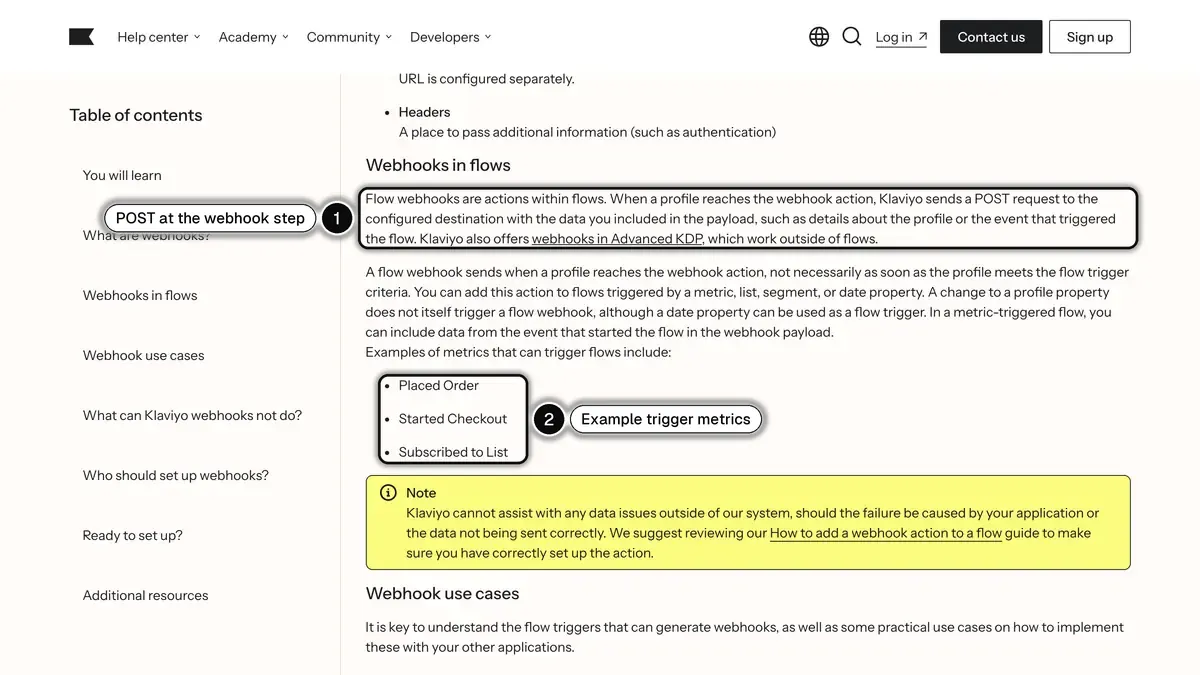
As Klaviyo's webhooks in flows article explains, when a profile reaches the webhook action, Klaviyo sends a POST request to the destination you set, with the profile or event data you include. Adding one requires flow-editing rights and multi-factor authentication on your Klaviyo user.
A common pattern: send the email first, then a WhatsApp message to the customers who did not open it, with a split on Opened Email. Another: a birthday or VIP flow that already runs in Klaviyo, with a WhatsApp template at the key step. Plan for three points:
- Consent is separate. Klaviyo email and SMS consent is not imported: contacts from Klaviyo arrive in Kanal with an unknown opt-in status. WhatsApp opt-in comes from Kanal's widget, popups, QR codes and WhatsApp links.
- Shopify flows can stay in Kanal. Kanal runs abandoned cart recovery, order and shipping messages and back in stock alerts on WhatsApp directly from your Shopify data.
- Plan level. The Klaviyo integration is included from Kanal's Scale plan, at 149 euros a month.
Our Klaviyo WhatsApp integration guide covers the setup in detail.
Klaviyo flows in short
- A flow is one trigger, filters, and a sequence of messages, data actions, delays and splits that runs for each person who enters.
- Profile filters are rechecked before every step; trigger filters only on entry.
- Start with four (welcome series, abandoned checkout, post-purchase, win-back), then add browse abandonment, back in stock and sunset.
- Avoid duplicates with Shopify's own abandoned checkout email, and give every sales flow an exit filter on Placed Order.
- WhatsApp fits as a webhook step inside a Klaviyo flow, with results sent back to Klaviyo.
Want to see a Klaviyo flow send a WhatsApp message on your store? Book a Kanal demo.
See Kanal on your own store
- Your campaigns and cart reminders on WhatsApp, starting from your own store
- Post-purchase offers, back-in-stock alerts, then the AI agent that advises your customers
- You leave with the plan that fits and its price
From €89/month
- brands
- 500+
- to set up
- 5 min
- open rate on WhatsApp
- +90%
Nicolas helps e-commerce brands grow revenue with WhatsApp marketing. With deep expertise in Shopify ecosystems and conversational commerce, he shares proven strategies for abandoned cart recovery, broadcast campaigns, and AI-powered customer engagement.