Ecommerce Customer Service Automation: What to Automate
Customer service automation for online stores: which requests to automate, which to keep human, the channels to offer and the tools that run it.
 Nicolas ProvostOct 24, 2026 · 15 min read
Summarize this article with an AI
 ChatGPT
 Claude
Table of contents (13)
Key takeaways
- Ecommerce customer service covers questions before the order, order and delivery status, returns, exchanges and refunds, and help with the product after delivery.
- Automate the answers that already exist in your order data, catalog or written policies, and keep a person for anything that moves money, makes an exception or handles a complaint.
- Shopify covers part of the work natively with store policies, Shopify Inbox, the order status page and self-serve returns, and Kanal handles the WhatsApp part with an AI agent that hands off to your team.
Ecommerce customer service is the help an online store gives shoppers before and after they buy: answering product, delivery and payment questions before the order, keeping customers informed about their order and its delivery, and handling returns, exchanges, refunds and problems afterwards. It runs on the channels customers already use, usually email, live chat on the store, messaging apps such as WhatsApp, and sometimes phone.
Good customer service for a store comes down to three things: answers that are right because they come from your order data and your written policies, answers that come quickly on the channel the customer chose, and a person who takes over when money, an exception or a complaint is involved. That split is also the rule for automation: automate what is a lookup or a written policy, keep people for judgment.
This guide maps the requests a store receives, compares the channels, shows what Shopify already does for you according to the Shopify Help Center (read on October 23, 2026), and sorts the work into what to automate and what to keep human. It then covers the metrics to track, the main types of tools and where WhatsApp fits. It gives no "good response time" benchmark: we found no primary source that publishes one for online stores, and a figure without its method cannot be compared with yours.
What does ecommerce customer service cover?
Requests follow the life of an order. Sorting them by moment shows what each answer needs and who can give it.
| Moment | Typical requests | What the answer needs | Who can answer |
|---|---|---|---|
| Before the order | Size, materials, compatibility, stock, delivery time and cost, payment methods, discount codes | Product catalog, shipping settings, policies | FAQ page, AI agent, staff |
| Order placed, not shipped | Change the address, add an item, cancel | The order and its fulfillment status | Staff, self-serve cancellation |
| In transit | Where is my order, delay, tracking link that shows nothing | Fulfillment and tracking data | Shipping notifications, order status page, AI agent with order lookup |
| Delivered | Missing item, damaged product, wrong item | The order, photos from the customer | Staff |
| After delivery | Return, exchange, refund status | Return rules, refund status | Self-serve returns, staff |
| Using the product | How to use it, care instructions, warranty | Product content, warranty terms | FAQ page, AI agent, staff |
Two observations from this table. First, most answers depend on data you already hold: the catalog, the order, the tracking number, the policy. Second, the requests that need a person are the ones where something has gone wrong or where money is involved. Both points shape how you organize the work.
Which customer service channels should an online store offer?
The Shopify Help Center's page on providing online customer service puts it plainly: "Offering multiple communication channels is essential for providing excellent customer service." The same section presents Shopify Inbox as a free app that lets visitors message you from the online store chat.
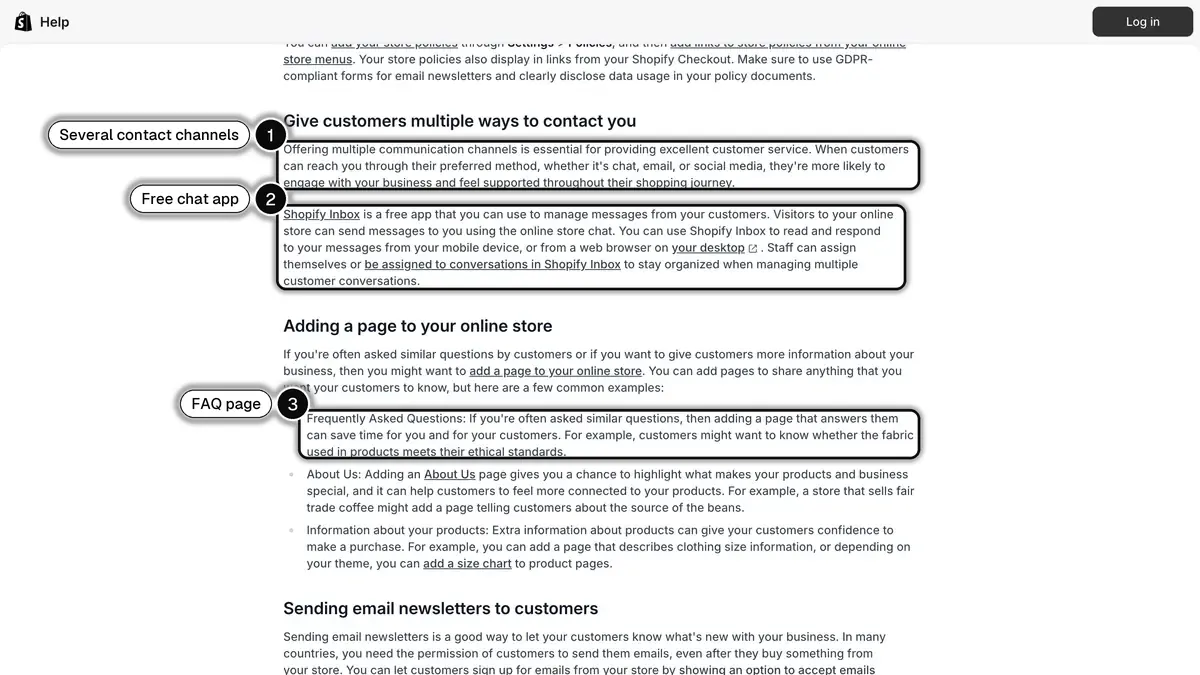
Source: Shopify Help Center, Providing online customer service, read on October 23, 2026.
Multiple does not mean every channel. Each channel you list is a promise to answer there, so pick the ones you can staff:
| Channel | Good for | Watch out for | On Shopify |
|---|---|---|---|
| Detailed cases, photos, a written record | Slow back-and-forth | Contact page, order notifications | |
| Chat on the store | Questions while the shopper browses | The conversation ends when the visitor leaves | Shopify Inbox |
| Conversations that continue after the visit, photos of a damaged item, order updates | Rules of the WhatsApp Business Platform (see below) | Through a WhatsApp app | |
| Phone | Urgent or complex cases | Staffing, no written trail | Number in your contact information |
| Self-service | Answers without contacting you | Pages must stay up to date | FAQ page, order status page, self-serve returns |
WhatsApp has one rule worth knowing before you choose it. Meta's WhatsApp Business Platform documentation states that non-template messages (free text, images and so on) can only be sent during an open 24-hour customer service window, which opens and resets each time the customer sends a message. Inside that window, your team or an AI agent replies freely. Outside it, the business has to send an approved template. Our guide to WhatsApp customer support on Shopify walks through the support flows that work on that channel.
Whatever you choose, write it down. In Shopify, Settings > Policies includes a Contact information policy next to the return, shipping and privacy policies, and the Help Center notes that store policies are automatically linked in the footer of your checkout pages.
What does Shopify already handle for you?
Before adding any tool, use what the platform does natively. Every question a page answers is a message nobody has to write.
Policies and a FAQ page
Your return, shipping and contact policies are the source for every later answer, written by a person or by an AI. Make them specific: return window, condition of items, who pays return shipping, refund method and timing. Our guide to the Shopify return policy covers the settings in detail.
The Help Center also suggests a FAQ page when customers often ask similar questions: Shopify's example is a shopper who wants to know whether the fabric meets their ethical standards. Build it from your real messages, not from a template.
The order status page
Shopify's page on order tracking lists three ways customers reach their order status page: signing in to their customer account, clicking the tracking link in the shipping confirmation email, or entering their order confirmation number and verifying their email or phone number. For supported carriers, the page displays updates on the location of the shipment. Without a tracking number, the order stays in the On its way status, and you can mark it as delivered from the order details page once the customer has it.
Adding tracking numbers to every fulfillment is one of the cheapest service improvements a store can make: it turns a question into a link. Our guide to WISMO requests shows how to measure them and cut them down.
Self-serve returns and cancellations
Shopify lets customers submit return and cancellation requests from their order status page. According to the setup page:
- From your Shopify admin, go to Settings > Customer accounts.
- In the Customer accounts section, turn on Self-serve returns and cancellations.
- In the request type menu, choose Return and cancel requests, Return requests only or Cancel requests only.
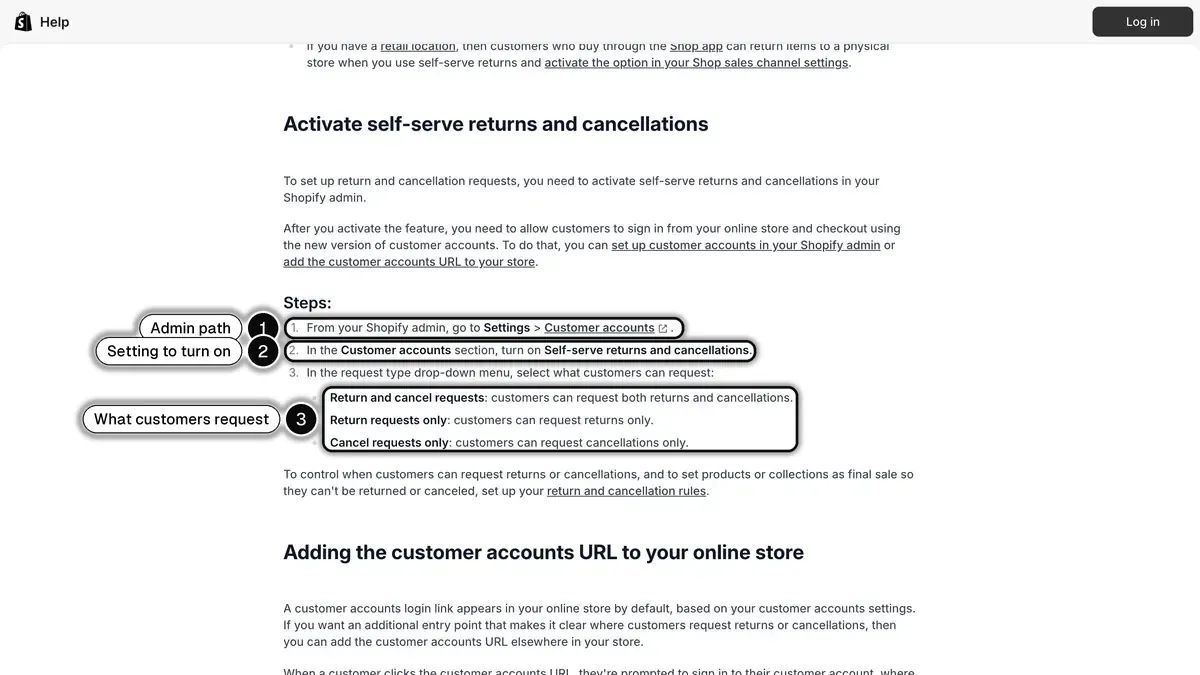
Source: Shopify Help Center, Setting up self-serve returns and cancellations, read on October 23, 2026.
The same page lists the limits. The feature doesn't work with legacy customer accounts. Customers can't request exchanges. Customers can return only fulfilled items and cancel only unshipped items. And a request doesn't act on its own: you review each one and approve or decline it. In other words, Shopify automates the intake, and the decision stays with you.
What should you automate, and what should stay human?
A simple rule sorts most requests:
Automate when the answer is already written down (in your order data, your catalog or your policies) and nothing changes hands.
Keep a person when money moves, when you make an exception, or when the customer is upset.
Applied to the usual requests:
| Request | Automate? | How | Why |
|---|---|---|---|
| Shipping cost and delivery time | Yes | FAQ page, AI agent reading your shipping policy | The answer is stable |
| Product and size questions | Mostly | AI agent trained on your catalog, with a handoff | Catalog-based, edge cases go to staff |
| Where is my order | Yes, after an identity check | Shipping notifications, order status page, AI agent with order lookup | It is a data lookup |
| Address change before shipping | Partly | Collect the request automatically, staff edits the order | Editing an order is an action |
| Return within the policy | Partly | Self-serve returns, staff approves | Shopify has you review each request |
| Refund, discount, goodwill gesture | No | Staff | Money moves |
| Damaged or wrong item | Intake only | Automation asks for the order number and photos, staff decides | Judgment and cost |
| Complaint or legal question | No | Staff, ideally a senior person | Relationship and risk |
| Message outside opening hours | Yes | After-hours reply, AI agent | Sets expectations |
An AI agent is the tool that moves the "Mostly" and "Yes" lines from your team to software. It answers from the sources you give it, so the quality of your policies and product pages sets the quality of its answers. Our guide to the AI chatbot for ecommerce explains how these agents work and how stores ground them in their own data.
Signs that an automation is hurting service
- Customers repeat their question in different words.
- Customers ask for a human early in the conversation.
- The same order generates a second contact a few days later.
- The bot states a policy that is not yours, or an old one.
When you see these signs, fix the source (policy, FAQ, product page) before tuning the bot, and always leave a visible way to reach a person.
How do you answer before customers ask?
Proactive service removes questions instead of answering them. The usual sequence for an order:
- Order confirmation, with the items, the delivery address and the expected delivery time.
- Shipping confirmation, with the tracking link.
- Delivery updates when the carrier reports them.
- A delay notice as soon as you know an order will be late, with the new date and the options.
Shopify sends order and shipping notifications by email. Other channels, WhatsApp included, are added through apps.
The delay notice is also a legal matter in the US. The FTC's business guide to the Mail, Internet, or Telephone Order Merchandise Rule explains that a seller must have a reasonable basis for shipping within the time it states, or within 30 days when it states none. When it cannot ship on time, it must offer the buyer a choice between accepting the delay and canceling the order for a prompt refund, and for most payment methods the refund is due within seven working days after the order is cancelled.
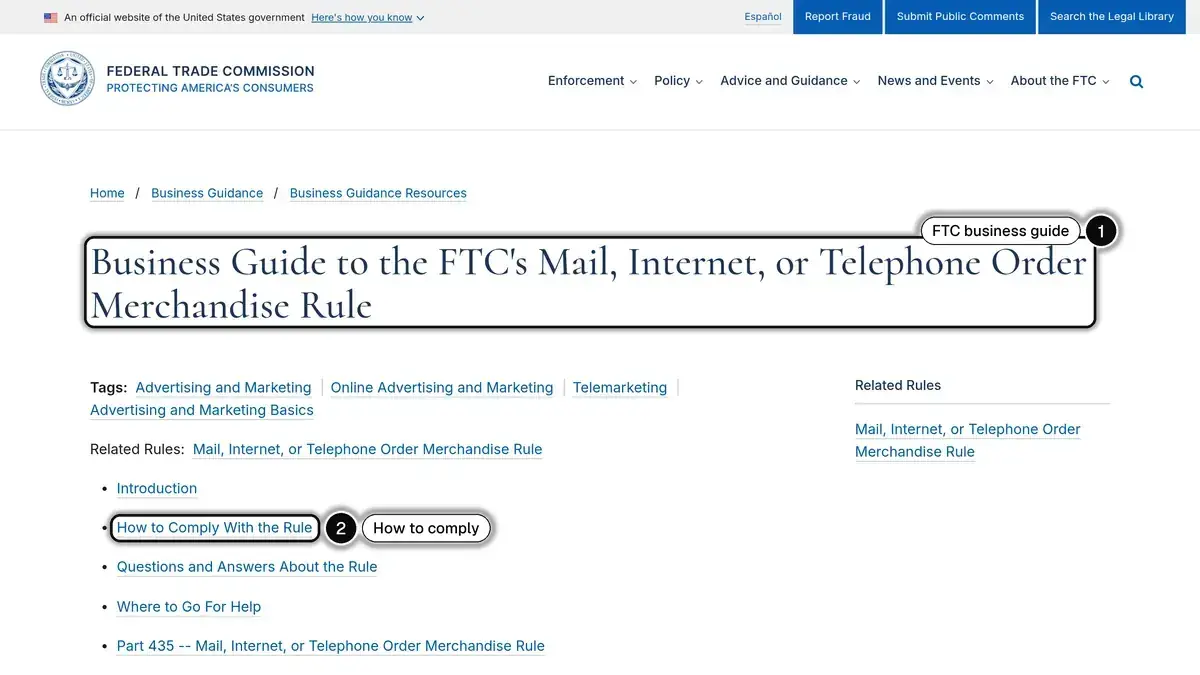
Source: Federal Trade Commission, Business Guide to the FTC's Mail, Internet, or Telephone Order Merchandise Rule, read on October 23, 2026.
This is a summary, not legal advice: read the guide for the cases that apply to your store. In practice, a delay notice template ready before peak season saves both a scramble and a compliance problem.
How do you measure ecommerce customer service?
Five metrics cover most of what a store needs. Compute them over the same period and per channel.
| Metric | Formula | What it tells you |
|---|---|---|
| Contact rate | Conversations ÷ orders × 100 | How many questions your store generates |
| First response time | Median time between the customer's first message and the first reply | How long customers wait |
| Automated resolution rate | Conversations closed without a person ÷ conversations × 100 | How much automation actually handles |
| Repeat contact rate | Orders with two or more contacts on the same issue ÷ orders with a contact × 100 | Whether answers solve the problem |
| Customer satisfaction (CSAT) | Positive survey answers ÷ survey answers × 100 | How customers felt about the answer |
A fictional example to show the arithmetic. A store ships 2,000 orders in a month and receives 300 conversations:
- Contact rate = 300 ÷ 2,000 × 100 = 15 conversations per 100 orders.
- 180 conversations are closed without a person: automated resolution rate = 180 ÷ 300 × 100 = 60%.
- 30 orders needed a second contact on the same issue, out of 250 orders with a contact: repeat contact rate = 30 ÷ 250 × 100 = 12%.
The contact rate is the one to watch after every change. If you add tracking links to all fulfillments or rewrite the return policy, a lower contact rate per 100 orders shows the change worked, without being distorted by a busy or quiet month. An automated resolution rate that rises while the repeat contact rate also rises means the bot closes conversations without solving them.
Which tools do online stores use for customer service?
Tools fall into a few categories. A small store often starts with Shopify Inbox and email, and adds a helpdesk when several people answer across several channels.
| Category | What it does | Examples |
|---|---|---|
| Helpdesk | Brings channels into one queue of tickets, with assignment, macros and reporting | Gorgias, Zendesk, Crisp |
| Chat on the store | A chat window on the storefront | Shopify Inbox |
| AI agent | Answers automatically from your catalog, policies and order data, then hands off | Shopify's Inbox agent, AI features of helpdesks, Kanal's AI Agent on WhatsApp |
| Returns | Return requests, labels, refunds | Shopify self-serve returns, dedicated return apps |
| WhatsApp platform | Access to the WhatsApp Business Platform, inbox, automations | Kanal |
A few facts from the vendors' own documentation. Shopify describes Shopify Inbox as a free app, with an optional Inbox agent that answers from your product catalog, policies and store content; our article on Shopify Inbox details what it does and its limits. Gorgias presents itself as a helpdesk built around ecommerce, and Zendesk as a customer service platform with a Shopify app; our Gorgias vs Zendesk comparison sets their plans and Shopify features side by side.
Choose by the job: the number of people answering, the channels your customers use and the data the tool must read from Shopify.
Where does WhatsApp fit, and what does Kanal do there?
WhatsApp suits the requests that need a back-and-forth: a size question before the order, a photo of a damaged item, an update on a delayed parcel. The conversation stays in the customer's phone, and it continues after they leave your site.
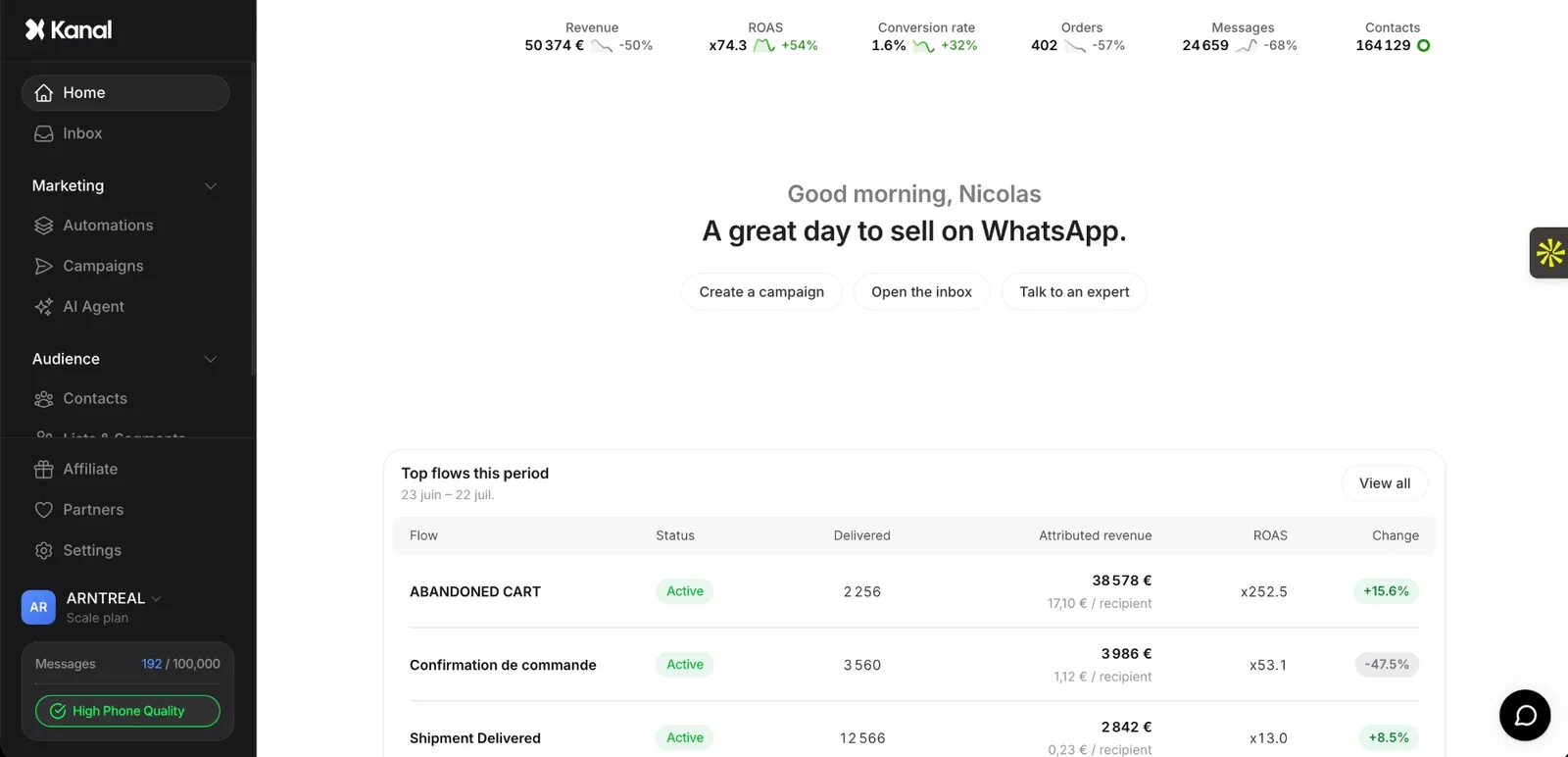
Kanal is a WhatsApp marketing and sales app for Shopify, used by more than 500 brands, set up in 5 minutes, with plans from 89 EUR per month. For customer service, it covers the WhatsApp side:
- An AI agent that answers on WhatsApp. Kanal's WhatsApp AI agent replies to customers' WhatsApp messages in your name and tone, day and night, from your website, your Shopify catalog, your documents and your questions and answers. It is part of the Scale and Business plans.
- Order questions with an identity check. When a customer asks about an order, the agent asks for the email address used for the order and the order number, and answers only if both match an order in your store.
- No money decisions. The agent never refunds, never grants a discount and never cancels an order. A refund, return, goodwill or cancellation request is escalated to your team.
- A handoff your team sees. In the Hand off to a human mode, the agent pauses on the conversation, flags it in the Kanal inbox and alerts the email addresses you chose. If Gorgias or Crisp is connected, the conversation is sent there, and your agents' replies reach the customer on WhatsApp. Kanal's help center describes the escalation modes in detail.
- Shipping updates on WhatsApp. Automations start from Shopify shipment statuses (shipped, in transit, out for delivery, delivered, ready for pickup), so WhatsApp order notifications carry the tracking link before the customer asks.
- An after-hours reply. Business hours settings send an automatic message when a customer writes while you are closed.
One point on consent. A customer who writes to you opens the conversation. Proactive messages such as shipping updates go to customers who opted in on WhatsApp, which Kanal records from its widget, pop-ups, QR codes and WhatsApp links, not from the marketing checkbox of the Shopify checkout.
Email, phone and your helpdesk stay where they are. Kanal adds WhatsApp to them, with the automation rules described above.
Ecommerce customer service in short
- Scope: questions before the order, order and delivery status, returns, exchanges and refunds, help with the product.
- Channels: the ones you can staff, listed in your contact information, plus self-service pages.
- Shopify first: policies, a FAQ page, tracking numbers on every fulfillment, self-serve returns.
- Automation rule: automate answers that already exist in your data or policies, keep people for money, exceptions and complaints.
- Proactive service: confirmation, shipping, delivery and delay messages remove questions before they are asked.
- Measure: contact rate per 100 orders, first response time, automated resolution rate, repeat contacts, satisfaction.
- WhatsApp: an AI agent for the repeated questions, a clear handoff for the rest.
To see how the WhatsApp side would work on your store, you can book a demo with the Kanal team.
See Kanal on your own store
- Your campaigns and cart reminders on WhatsApp, starting from your own store
- Post-purchase offers, back-in-stock alerts, then the AI agent that advises your customers
- You leave with the plan that fits and its price
From €89/month
- brands
- 500+
- to set up
- 5 min
- open rate on WhatsApp
- +90%
Nicolas helps e-commerce brands grow revenue with WhatsApp marketing. With deep expertise in Shopify ecosystems and conversational commerce, he shares proven strategies for abandoned cart recovery, broadcast campaigns, and AI-powered customer engagement.