WISMO: Where Is My Order Requests and How to Reduce Them
WISMO means "where is my order?". Why customers ask, how to measure what it costs your support team, and 8 ways to reduce it on Shopify.
 Nicolas ProvostOct 24, 2026 · 14 min read
Summarize this article with an AI
 ChatGPT
 Claude
Table of contents (14)
Key takeaways
- WISMO stands for "where is my order?": every message a customer sends to ask about the status or delivery of an order.
- Most WISMO starts with a gap in information: no tracking number on the fulfillment, a shipping email nobody saw, or a delivery problem the store noticed after the customer did.
- Measure your own WISMO rate (WISMO tickets divided by orders shipped) before and after each fix, instead of relying on industry percentages with no method behind them.
WISMO stands for "where is my order?". It is the support question about the status or delivery of an order, whatever the channel it arrives on: an email two days after checkout, a chat message about a tracking number that has not moved, a DM about a parcel marked as delivered that never arrived.
You reduce WISMO by answering the question before the customer asks it: a tracking number on every fulfillment, shipping notifications the customer actually sees, an update at each carrier status, a message from you first when a delivery fails, and self-service answers for the rest. This guide covers the causes, how to measure the cost, eight fixes based on the Shopify Help Center pages we read on October 23, 2026, and where WhatsApp fits. It gives no industry-wide WISMO percentage, since the figures that circulate rarely come with a method: it shows how to measure your own.
What does WISMO mean?
WISMO is support jargon, used by e-commerce, logistics and customer service teams. A "WISMO ticket" or a "WISMO call" is a contact whose reason is the location or status of an order. You will also see WISMR, for "where is my refund?", which covers the same kind of anxiety after a return.
The question changes with the stage of the order:
| Stage of the order | What the customer asks | What usually triggers it |
|---|---|---|
| Paid, not shipped | "Has my order shipped yet?" | A processing time nobody announced, a preorder or a made-to-order item |
| Shipped, no tracking | "Do you have a tracking number?" | A fulfillment created without tracking, or a shipping email that was never seen |
| In transit | "Where is my parcel?" | A tracking page that has not moved for days |
| Delivery exception | "The courier never came" or "It says delivered, I have nothing" | An attempted, delayed or failed delivery |
| Pickup point | "Is my parcel at the pickup point?" | No notice that the parcel is ready for collection |
Each row has a different fix: reducing WISMO means closing a series of small gaps.
Why do customers ask "where is my order"?
Customers write because the information they expected did not reach them. On Shopify, the usual causes are documented in the Help Center.
The shipping email never reached them. Shopify sends a Shipping confirmation email when you fulfill an order. Its own page on customer notifications tells merchants that customers who aren't receiving email notifications need to check their spam or junk folder.
They checked out with a phone number. According to the Shopify Help Center page Understanding order status pages, a customer who enters a phone number at checkout receives the order confirmation by SMS, and order and shipping updates aren't sent by SMS. You can offer these customers the option to receive updates by email; if they don't take it, Shopify's notifications send them no shipping update after the confirmation.
The order was fulfilled without a tracking number. The same page explains that without a tracking number no shipping updates are received, so the order status page stays stuck until you mark the order as delivered yourself.
The carrier's data is missing or late. With an unsupported carrier, the order status page only links to the carrier's website, without status or map updates. And Shopify notes that the sources, accuracy and timing of carrier tracking events vary by carrier.
The delivery promise was vague. "Fast shipping" invites questions on day three. Shopify's guidance on store policies is blunt: don't promise delivery or shipping times that you can't provide.
Something went wrong. A failed delivery attempt, a delay at a hub, a wrong address: the customer often learns about it before the store does.
How much does WISMO cost your support team?
There is no reliable universal figure, and you don't need one: compute your own with numbers you already have.
WISMO rate = WISMO tickets ÷ orders shipped × 100
Monthly WISMO cost = WISMO tickets × average handling time (in hours) × hourly cost of an agent + helpdesk fees for those tickets
To get the inputs:
- Tag tickets by contact reason in your helpdesk, with one tag for order status and tracking, and count them over a full month.
- Take the number of orders shipped over the same month from your Shopify admin.
- Measure the average handling time of tagged tickets.
- Check how your helpdesk bills. Some charge per ticket answered, so each WISMO ticket also counts toward your plan's allowance.
A worked example, with fictional figures to show the arithmetic:
| Input | Value |
|---|---|
| Orders shipped in the month | 4,000 |
| Tickets tagged WISMO | 360 |
| WISMO rate | 360 ÷ 4,000 × 100 = 9% |
| Average handling time | 4 minutes |
| Agent time spent on WISMO | 360 × 4 = 1,440 minutes, so 24 hours |
| Hourly cost of an agent | $30 |
| Monthly cost in agent time | 24 × $30 = $720, before helpdesk fees |
Every WISMO ticket also sits in the same queue as the questions that need a person, such as a damaged item, and pushes them back. Track the WISMO rate monthly: unlike the total number of tickets, it doesn't move with your sales, so it shows whether a fix worked.
How do you reduce WISMO on Shopify? 8 steps
1. Set a delivery promise you can keep
Write processing and delivery times where customers look before they buy: product pages, cart, shipping policy. Shopify manages the shipping policy in Settings > Policies, with an automated version built from your store settings (Shopify Help Center). Be specific about preorders, made-to-order items, peak periods and international shipments, and keep any delivery times shown at checkout consistent with the policy.
2. Add a tracking number to every fulfillment
Tracking is what every later step depends on. Shopify's order tracking page lists three cases:
- Label bought in the Shopify admin: the tracking number and the carrier are added to the fulfillment automatically.
- Carrier not integrated with Shopify: enter the tracking number during or after fulfillment. The carrier is usually detected; if it isn't, pick it from the Shipping carrier dropdown, or choose Other and enter the full tracking URL.
- Fulfillment app or 3PL: tracking is added if the service provides it in its Shopify integration. Ask them if you are not sure.
Audit a sample of last month's fulfilled orders: any order without tracking is a likely WISMO ticket.
3. Make the order status page the single place to check
The order status page is where Shopify customers follow their order. They reach it by signing in to their customer account, by clicking the tracking link in the shipping confirmation email, or by entering their order number and verifying their email or phone number. With a supported carrier, it updates in real time through these statuses:
| Status on the order status page | What it means |
|---|---|
| Confirmed | The order exists, but the shipment isn't in transit yet |
| On its way | You fulfilled the order and the carrier reported the shipment in transit |
| Out for delivery | The shipment is in the customer's area and out for delivery |
| Delivered | The customer received the shipment |
| Attempted delivery | The carrier tried to deliver to the address, without success |
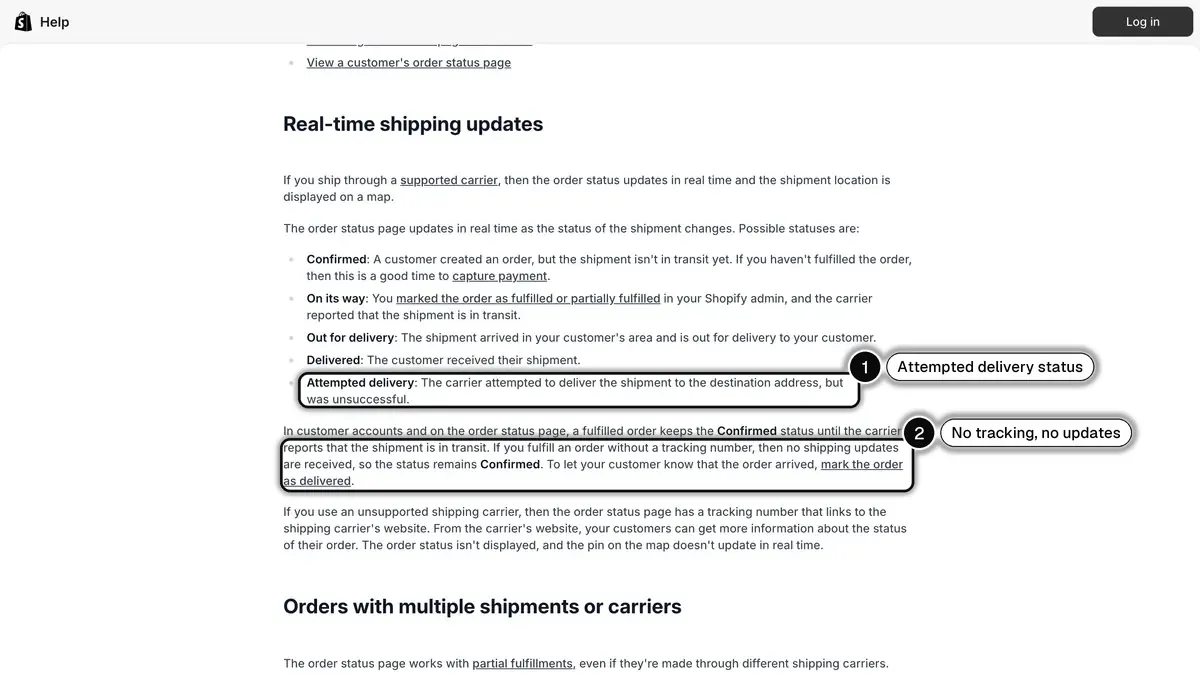 Source: Shopify Help Center, Understanding order status pages, read on October 23, 2026. In 1, the Attempted delivery status; in 2, no shipping updates without a tracking number.
One detail matters for WISMO: customers can open the page from the confirmation email without logging in for 3 weeks on the same browser (2 weeks across up to 5 browsers). After that, the tracking number stays hidden until they log in or enter their order number with the email or phone used at checkout. Say so in your FAQ.
4. Check that shipping notifications reach customers
The customer notifications page quoted above lists four shipping notifications you control:
| Notification | When Shopify sends it |
|---|---|
| Shipping confirmation | When you fulfill an order |
| Shipping update | When tracking information is updated on a fulfilled order |
| Out for delivery | When the carrier or fulfillment app sends that tracking event |
| Delivered | When the carrier or fulfillment app sends that tracking event |
Out for delivery and Delivered aren't available for local delivery orders, which use a separate delivery confirmation email sent when you mark the order as delivered. You manage the last two in Settings > Notifications > Customer notifications, in the Shipping updated section.
Then close the gaps:
- Keep "Send shipment details to your customer now" ticked when you fulfill.
- Give phone-only checkouts another channel, since Shopify doesn't send them shipping updates by SMS.
- Consider the Shop app, which syncs your orders to the customer's Shop account and sends push notifications at shipping milestones. A Track with Shop link can be added to the mobile order status page from Sales channels > Shop > Settings.
5. Send proactive updates at each carrier status
A message at the right moment removes the reason to ask:
| Moment | What to say | Question it prevents |
|---|---|---|
| Fulfillment created | Your order has shipped, here is your tracking link | "Has my order shipped?" |
| In transit | Your parcel is on its way with the carrier | "Where is my parcel?" |
| Out for delivery | Your parcel arrives today | "When will it arrive?" |
| Ready for pickup | Your parcel is waiting at the pickup point | "Is it at the relay point?" |
| Delivered | Your parcel has been delivered, reply if anything is wrong | "It says delivered, now what?" |
These messages only work if your carrier sends its statuses to Shopify. Open an order you know was delivered: if you see statuses such as "In transit" or "Delivered" under the tracking number, the data flows. If you only see the number, ask your carrier or shipping app to turn on status synchronization.
6. Catch delivery exceptions before the customer does
The Orders page of your Shopify admin has a Delivery status filter, documented in Filtering orders, with the values In transit, Out for delivery, Attempted delivery, Delayed, Failed delivery, Delivered, Tracking added and No status.
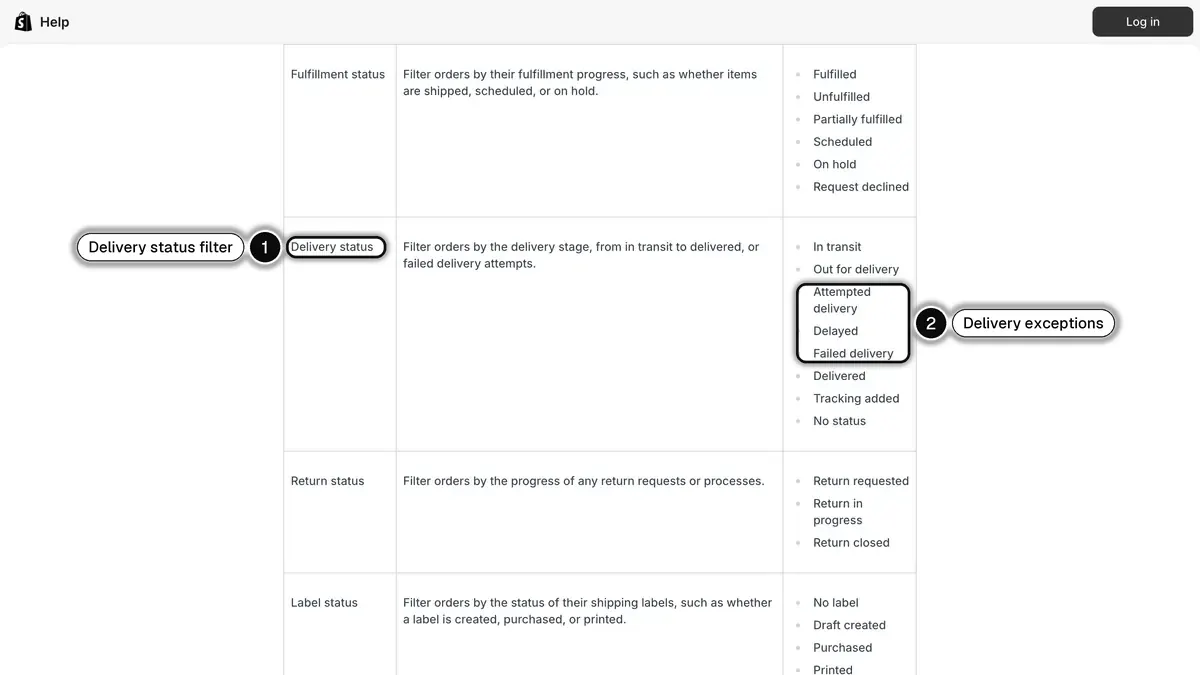 Source: Shopify Help Center, Filtering orders, read on October 23, 2026. In 1, the Delivery status filter; in 2, the delivery exception values.
Use it as a daily routine:
- From Orders, filter on Delivery status with the values Attempted delivery, Delayed and Failed delivery, then click Save to keep it as a view.
- Each morning, contact the customers in that view first, with what happened and what comes next: a new attempt, a pickup point, a reshipment.
- Before shipping, check the Address validation filter with the value Has issues, and fix addresses while it is cheap.
A customer who hears about a problem from you asks fewer questions than one who discovers it on a tracking page.
7. Publish self-service answers
Some questions will still come. Answer them where customers look first:
- A shipping and tracking FAQ: processing times, carriers, how to open the order status page with an order number, what to do when a parcel shows as delivered but isn't there.
- Instant answers in your chat, pointing to that FAQ. Our guide to Shopify Inbox covers the options of Shopify's own chat.
- A branded tracking page, if carrier pages confuse customers: see our comparison of Shopify order tracking apps.
8. Automate the remaining questions and hand off the rest
An AI agent that can read the order answers the remaining "where is my order?" messages at any hour, and a clear handoff rule sends refunds, claims and angry customers to your team. Our guide to WhatsApp customer support for Shopify details these flows and the helpdesk integration.
WhatsApp order updates with Kanal
Kanal is a WhatsApp marketing and sales app for Shopify stores. For WISMO, it sends order and shipping updates on WhatsApp and answers "where is my order?" with an AI agent. Brands on Kanal see open rates above 90%, which matters for a message whose only job is to be read.
Shipping updates triggered by Shopify. Kanal's order notifications start from Shopify events. The Shipment update trigger offers five statuses: Fulfillment created (the "your order has shipped" moment), In transit, Out for delivery, Delivered and Ready for pickup, with one automation per status. The Order created trigger, used for confirmations, fires whether the order is paid or not, cash on delivery included, and a condition can treat cash-on-delivery orders separately.
The customer's own tracking link. A shipment message can use the tracking number, tracking URL, carrier, Shopify order status page link and shipping address, with a button that opens the customer's own tracking page. Two prerequisites: the Shopify fulfillment must have both a tracking number and a tracking URL, or nothing is sent, and the later statuses only fire if your carrier passes them to Shopify (step 5).
Exceptions stay with your team. Attempted delivery, failed delivery and returned aren't available as triggers. Handle them from your Delivery status view (step 6). When customers reply on WhatsApp, the conversation lands in Kanal's shared inbox, and with the Gorgias integration it becomes a Gorgias ticket your agents answer from the helpdesk.
Utility templates, without promotion. A shipping update sent outside a conversation is a WhatsApp template. In Meta's template categorization, order management messages are utility templates and should not promote, recommend, upsell or cross-sell products, or include offers. A template that mixes an order update with a promotion is categorized as marketing, and Meta even lists an apology for a delayed package that comes with a credit as a marketing example.
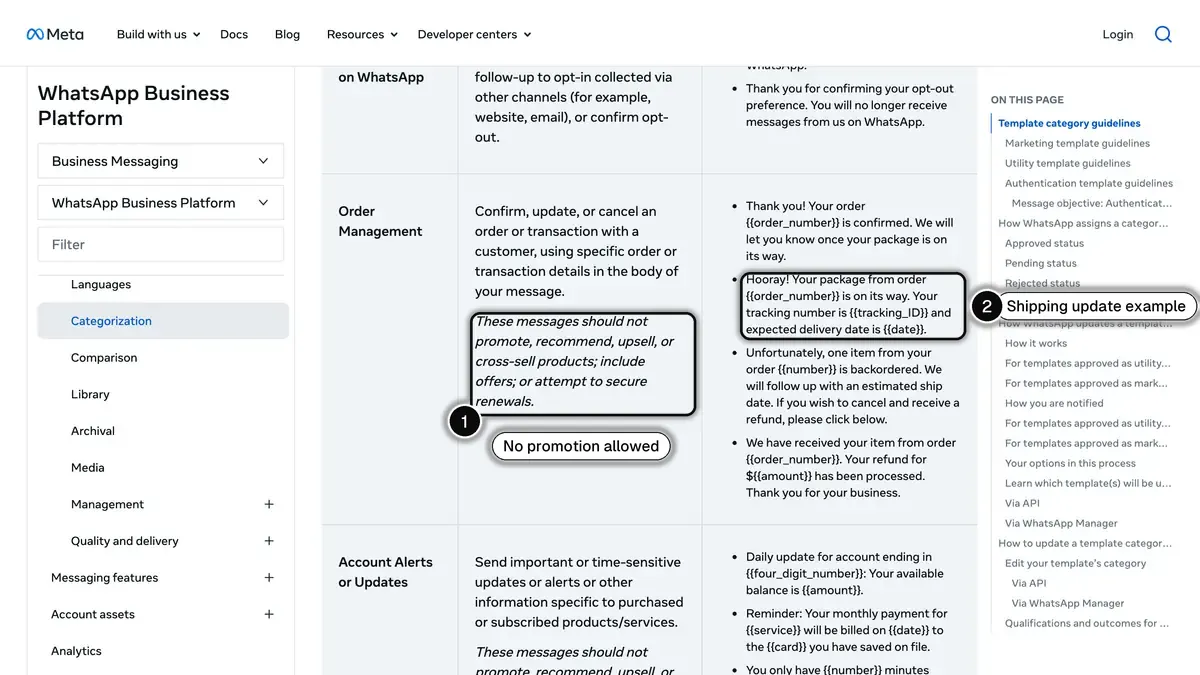 Source: Meta, WhatsApp Business Platform documentation on template categorization, read on October 23, 2026. In 1, no promotion in order management templates; in 2, Meta's shipping update example.
The AI agent answers "where is my order?". Kanal's WhatsApp AI agent, available on the Scale and Business plans with a connected Shopify store, looks up the order itself after checking who is asking. It asks for the email address and the order number used for the order. If both match an order in your store, it answers from that order and can send the Shopify tracking link; if they don't, it asks the customer to check, and after three failed attempts it escalates the conversation to your team. It never refunds, grants a discount or cancels an order: those requests, like complaints, go to your team.
Opt-in and costs. Meta requires businesses to obtain opt-in before messaging people on WhatsApp, and suggests an opt-in that covers the categories you will send, such as order updates. Kanal records WhatsApp opt-in from its widget, QR codes, WhatsApp links and popups; it doesn't import the marketing consent box of Shopify's checkout. According to its pricing documentation, Meta charges each delivered template message at a rate set by its category and the recipient's country. Under the pricing in effect since October 1, 2026, service messages (your free-form replies inside the 24-hour customer service window) are free for the first 1,000 per business phone number each month, then charged. Our WhatsApp Business pricing guide gives the rates by country. Kanal plans start at 89 EUR per month, and the AI agent comes with Scale (149 EUR per month) and Business (350 EUR per month).
WISMO in short
- Definition: every "where is my order?" contact, from "has it shipped?" to "it says delivered, I have nothing".
- Measure: WISMO rate = WISMO tickets ÷ orders shipped × 100, tracked monthly.
- On Shopify: tracking on every fulfillment, checked shipping notifications, a saved view of delivery exceptions and a clear shipping policy.
- On WhatsApp: an update at each carrier status and an AI agent that verifies the customer before reading the order.
To see shipping updates and the AI agent running on your own store, book a Kanal demo.
See Kanal on your own store
- Your campaigns and cart reminders on WhatsApp, starting from your own store
- Post-purchase offers, back-in-stock alerts, then the AI agent that advises your customers
- You leave with the plan that fits and its price
From €89/month
- brands
- 500+
- to set up
- 5 min
- open rate on WhatsApp
- +90%
Nicolas helps e-commerce brands grow revenue with WhatsApp marketing. With deep expertise in Shopify ecosystems and conversational commerce, he shares proven strategies for abandoned cart recovery, broadcast campaigns, and AI-powered customer engagement.