Ecommerce KPIs: What to Track, Formulas and Shopify Reports
The ecommerce KPIs to track by funnel stage, with each formula, the Shopify report that shows it, WhatsApp metrics and a weekly dashboard template.
 Nicolas ProvostOct 24, 2026 · 15 min read
Summarize this article with an AI
 ChatGPT
 Claude
Table of contents (28)
Key takeaways
- Revenue breaks down into sessions × conversion rate × average order value, so track one KPI per term, then retention, margin and acquisition cost.
- Shopify shows most of these KPIs under Analytics > Reports, and its fields reference notes that most stores display a returning customer rate of 20-40%.
- Measure WhatsApp with delivered messages, clicks, opt-outs, attributed revenue and ROAS on message cost, and never add channel attributions together.
Ecommerce KPIs are the handful of metrics that tell you whether your store is growing profitably. The core set follows the path of a sale: sessions (traffic), conversion rate, average order value, returning customer rate (retention), gross margin and customer acquisition cost (profitability), plus a few service and messaging-channel metrics. The first three explain revenue on their own: revenue = sessions × conversion rate × average order value.
Below, each KPI comes with its formula and the Shopify report that shows it, named as in the Shopify Help Center on October 24, 2026, followed by a weekly dashboard to copy. Benchmarks appear only where a primary source publishes one.
What makes a metric a KPI?
A metric is any number your tools can show. A KPI is a metric you have chosen to steer the business, with three things attached:
- A fixed formula. Same numerator, same denominator, same scope every week.
- A target or a reference. Your own last period, the same period last year, or a goal.
- An owner and an action. If the number moves, someone knows what to do about it.
Ecommerce KPIs at a glance
| Stage | KPI | Formula | Where in Shopify (Analytics > Reports) |
|---|---|---|---|
| Traffic | Sessions | Number of online store visits | Sessions over time |
| Traffic | Bounce rate | Bounces ÷ sessions | Analytics fields (metric) |
| Conversion | Conversion rate | Sessions that completed checkout ÷ sessions | Conversion rate over time |
| Conversion | Reached checkout rate | Sessions that reached checkout ÷ sessions | Conversion rate breakdown |
| Order value | Average order value | (Gross sales - discounts) ÷ orders | Average order value over time |
| Retention | Returning customer rate | Returning customers ÷ customers | New vs returning customers |
| Retention | Customer retention rate | Share of a cohort that ordered in a period | Customer cohort analysis |
| Profitability | Gross margin | Gross profit ÷ net sales | Profit margin by order |
| Profitability | Reversed quantity rate | Items removed from orders ÷ items ordered | Orders and reversals by product |
| Profitability | CAC and ROAS | Ad spend ÷ new customers, sales ÷ ad spend | Performance by marketing channel |
| Operations | Time to fulfill | Order received to order fulfilled | Shipping and delivery performance |
| Messaging | Revenue and ROAS per channel | Attributed revenue ÷ message cost | Your messaging tool |
The formulas come from Shopify's analytics fields reference when Shopify defines the metric. To open any report, go to Analytics > Reports in your Shopify admin and filter by Category. The Analytics dashboard shows the same metrics on cards, for the last 90 days by default, and clicking the title of a card opens the matching report.
Traffic KPIs
Sessions and visitors
Shopify defines a session as an online store visit and a visitor as a unique visitor: one person who visits five times counts as one visitor and five sessions. Read them in Sessions over time and Visitors over time (acquisition reports).
The fields reference adds that sessions are "only counted when visitors consent to cookies through your cookie banner", so compare sessions with your own history, not with another tool. Sessions by referrer splits traffic into direct, search and referral visits, and Sessions by device and Sessions by landing page (behavior reports) show where visits start. Track the share of each source weekly: a drop in conversion rate can come from a change in traffic mix rather than a problem on the site.
Bounce rate
Bounce rate = bounces ÷ sessions, a bounce being a visit that ended after a single page view. Shopify adds that a high bounce rate "isn't always bad", since a visitor may have found what they needed. Watch it mostly on landing pages that receive paid traffic, where every single-page visit was paid for.
Conversion KPIs
Conversion rate
Conversion rate = sessions that completed checkout ÷ sessions. Read it in Conversion rate over time, under the behavior reports. Shopify notes it might look lower than expected because of bot traffic, and suggests filtering on human traffic. Our ecommerce conversion rate guide covers the variants and the September 2026 change in how Shopify counts sessions.
Added to cart rate and reached checkout rate
These two rates locate the leak in the funnel:
- Added to cart rate = sessions with cart additions ÷ sessions
- Reached checkout rate = sessions that reached checkout ÷ sessions
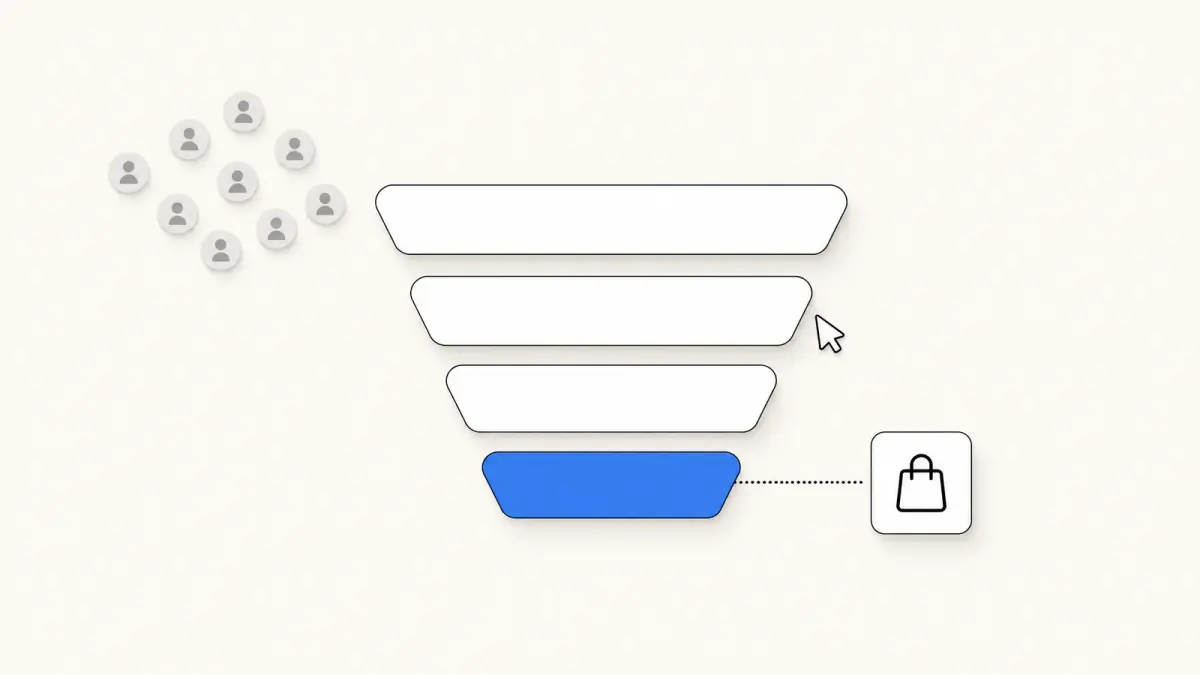
The behavior reports include Conversion rate breakdown, which shows the path as a funnel: all sessions, sessions with cart additions, sessions that reached checkout, sessions that completed checkout. A low added to cart rate points at product pages and prices. A low reached checkout rate points at the cart: shipping costs, delivery times, payment options.
Checkout completion
Checkout completion rate = sessions that completed checkout ÷ sessions that reached checkout. Its complement is the checkout abandonment rate. Shopify lists the checkouts themselves under Orders > Abandoned checkouts. Recovering part of them raises orders without any new traffic, which makes cart reminders a natural first automation, by email and on WhatsApp with tools such as Kanal's abandoned cart recovery.
Order value KPIs
Average order value
Average order value = (gross sales - discounts) ÷ orders, excluding post-order adjustments. Read it in Average order value over time (sales reports). Because returns are not subtracted, Shopify's figure is the value as ordered. Our guide to average order value explains the net version and how to raise it.
Net sales and discount share
- Net sales = gross sales - discounts - sales reversals. Shopify calls it the best approximation of actual revenue.
- Discount share = discounts ÷ gross sales. Not a Shopify metric, but both inputs are in the sales reports, and Sales by discount codes shows which codes drive it.
A rising average order value with a rising discount share can mean you are buying bigger baskets with margin.
Retention KPIs
Returning customer rate
Returning customer rate = returning customers ÷ customers, over a period. New vs returning customers shows both counts, and Returning customers lists every customer with two or more orders, in the customers reports.
This is one of the few KPIs with a benchmark from the platform itself: the fields reference notes that "most stores display 20-40%". Treat it as a sanity check, not a target. A store selling mattresses and a store selling coffee pods should not expect the same rate.
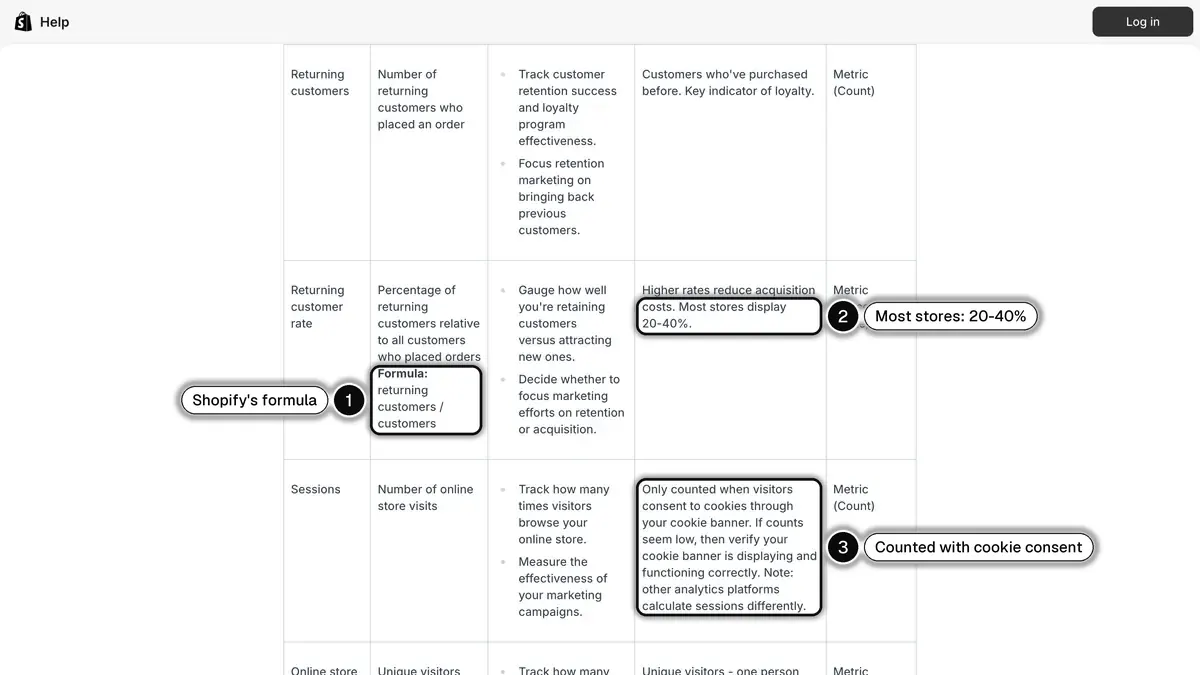 Source: Shopify Help Center, Analytics data points (fields) reference, read on October 24, 2026. In 1, the returning customer rate formula; in 2, the range most stores display; in 3, sessions only count visitors who accept cookies.
Customer retention rate and orders per customer
The Customer cohort analysis report groups customers into cohorts by the date of their first order. Two of its metrics are retention KPIs:
- Customer retention rate: the percentage of customers in a cohort who placed an order in a given period.
- Orders per customer: the average number of orders placed by customers in a cohort.
Compare cohorts at the same age. A cohort acquired three months ago cannot have the twelve-month retention of an older one yet.
Customer lifetime value
Shopify's closest metric is Amount spent per customer, in the same cohort report: the average cumulative amount customers in a cohort have spent at your store. The usual formula is average order value × purchase frequency × customer lifespan, times gross margin for a profit view, as our customer lifetime value guide shows. It moves too slowly for a weekly dashboard: review it monthly.
Profitability KPIs
Gross margin
- Gross profit = net sales - cost of goods sold
- Gross margin = gross profit ÷ net sales
The profit reports include Gross profit by product, Gross profit by product variant and Profit margin by order. They only work if you enter a cost per item on your products: Shopify reports profit only for products and variants that had a cost recorded at the time they were sold. Check that before trusting the number.
Reversed quantity rate (returns)
Shopify does not have a field called "return rate". The closest is the Reversed quantity rate in the Orders and reversals by product report: the percentage of items removed from orders compared with the total number of items ordered. The removed items include refunds, returns, cancellations and edits, per the order reports page. Sort by product: a high rate on one item can point to a sizing, description or quality issue.
Customer acquisition cost and ROAS
- Customer acquisition cost (CAC) = marketing spend ÷ new customers acquired
- ROAS = revenue attributed to ads ÷ ad spend
- CLV to CAC = customer lifetime value in margin ÷ CAC
The Performance by marketing channel report brings these into Shopify. Its metrics include ad spend, return on ad spend (ROAS), cost per acquisition (CPA) and customer acquisition cost (CAC), next to sessions, sales, orders and conversion rate. Spend-based metrics only appear for channels that report cost data to Shopify, such as a connected ad platform. A dash means no cost data, not a cost of zero. Our ROAS guide covers the calculation.
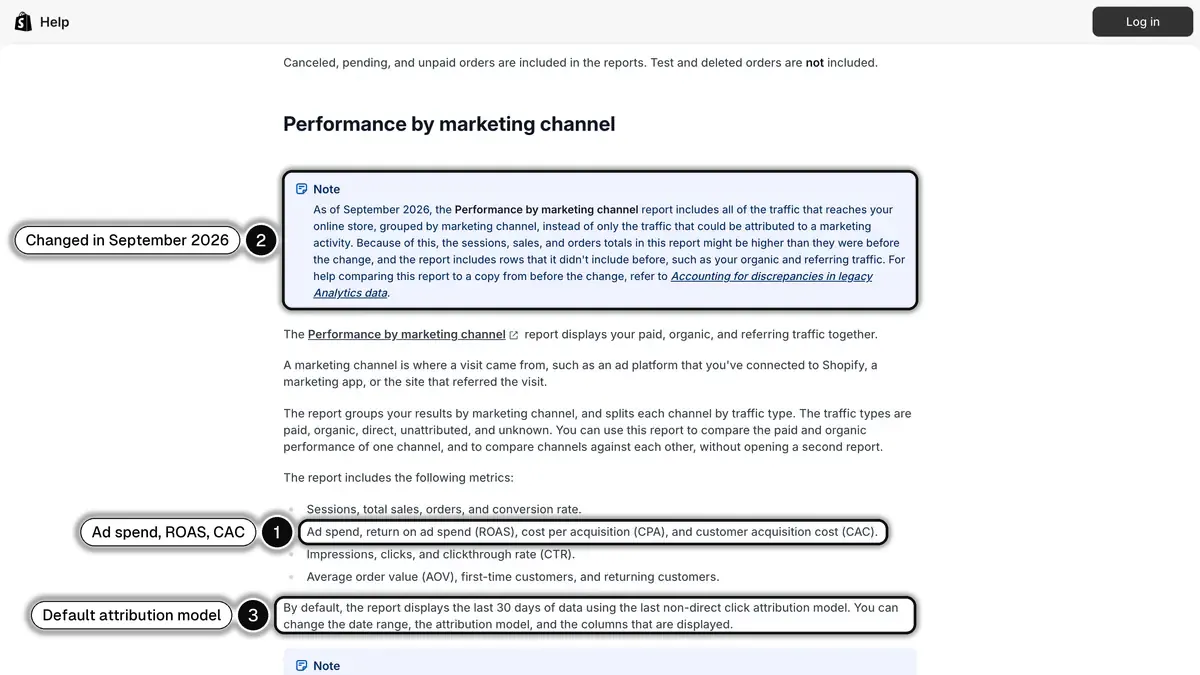 Source: Shopify Help Center, Marketing reports, read on October 24, 2026. In 1, the spend-based metrics; in 2, the September 2026 change to the report; in 3, the default 30-day window and attribution model.
Two details from the marketing reports page matter for your trend lines. Since September 2026, the report includes all the traffic that reaches the store, grouped by channel, so its totals can be higher than before. And it uses the last non-direct click attribution model over the last 30 days by default. Keep the same model when you compare periods.
Operations and customer service KPIs
Fulfillment and delivery time
The Shipping and delivery performance report (order reports) measures Time to fulfill, from when the order was received to when it was fulfilled, and Time to deliver, from when it was received to when it was delivered. Track the median weekly, and spot a slower week before customers start asking where their order is.
Response time and contact rate
Shopify's reports do not cover customer service. Read these KPIs in your help desk or shared inbox:
| KPI | Formula |
|---|---|
| First response time | Customer's first message to your first reply |
| Resolution time | First message to closed conversation |
| Contact rate | Conversations ÷ orders |
| Conversations with an order | Conversations followed by an order ÷ conversations |
Watching the contact rate before and after you add proactive shipping updates is a direct way to check that those updates work.
Messaging channel KPIs: WhatsApp, email and SMS
Every channel you send from (email, SMS, WhatsApp) has its own funnel. The KPIs are similar across channels: what changes is which events each platform reports back to you.
| KPI | Formula |
|---|---|
| Opted-in contacts | Contacts who agreed to receive marketing on the channel |
| Delivery rate | Delivered messages ÷ messages sent |
| Click-through rate | Clicks ÷ delivered messages |
| Opt-out rate | Opt-outs ÷ delivered messages |
| Conversion rate | Attributed orders ÷ delivered messages |
| Revenue per recipient | Attributed revenue ÷ recipients |
| ROAS | Attributed revenue ÷ message cost |
How Kanal measures WhatsApp
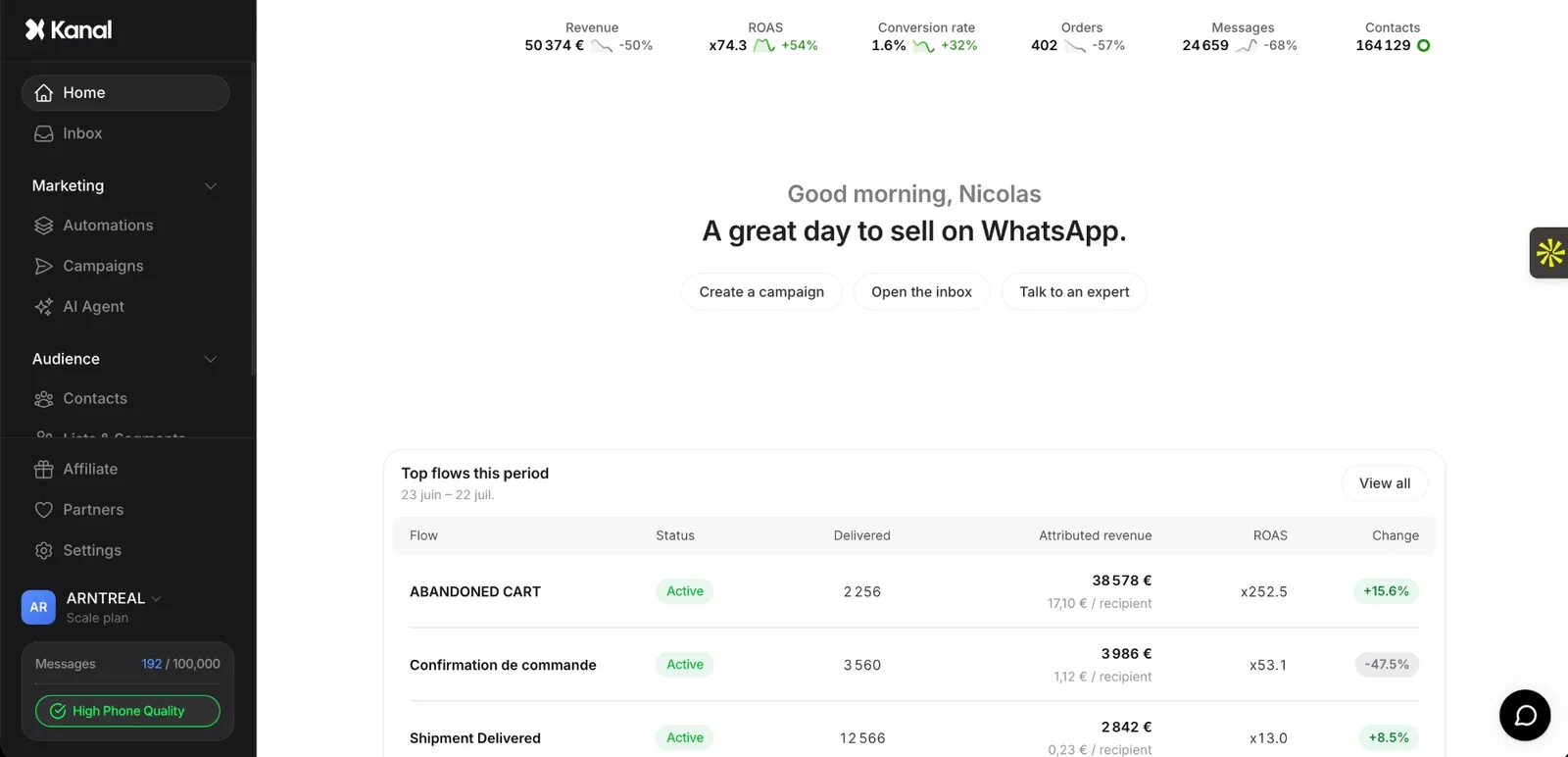
Kanal is a WhatsApp marketing and sales app for Shopify stores, used by more than 500 brands. Its Home page sums up WhatsApp's effect on sales with five indicators, defined in Kanal's analytics help article: revenue (orders attributed to Kanal), ROAS (attributed revenue ÷ the cost of your WhatsApp messages), conversion rate (attributed orders ÷ delivered messages), orders and delivered messages.
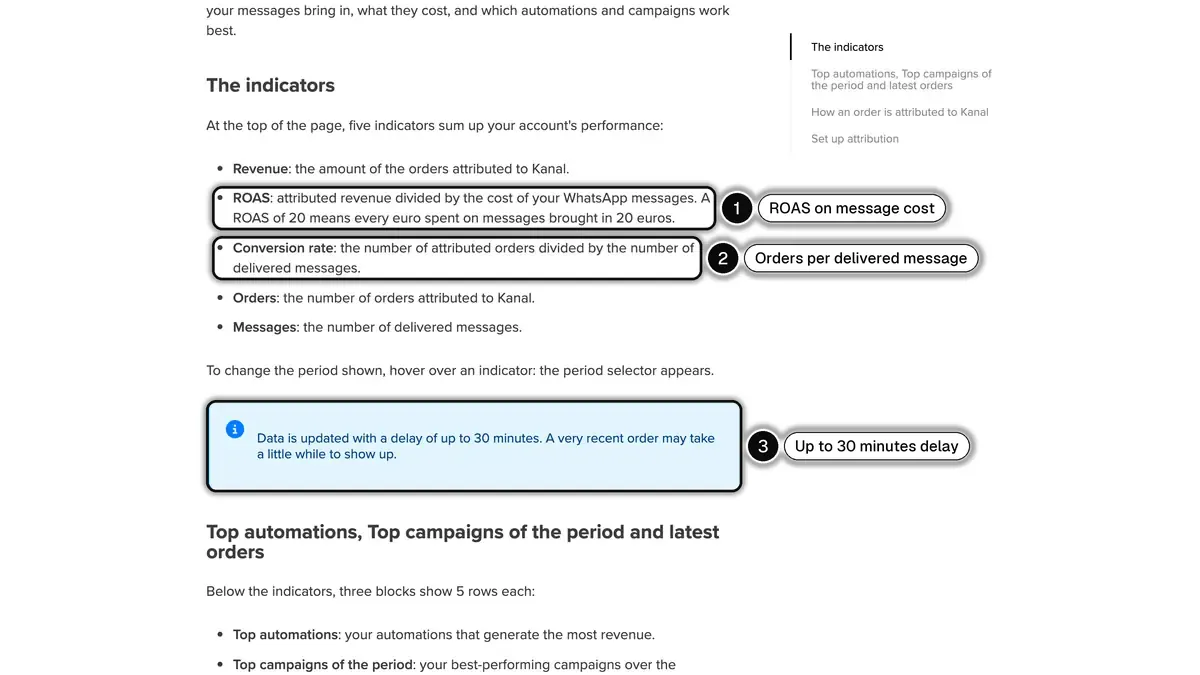 Source: Kanal Help Center, How does analytics work on Kanal?, read on October 24, 2026. In 1, ROAS is computed on message cost; in 2, conversion rate is attributed orders per delivered message; in 3, data can take up to 30 minutes to update.
Each WhatsApp campaign has a page with revenue, ROAS, message cost, revenue per recipient, unsubscribe rate and click-through rate, plus a delivery chart (delivered, sent, pending, failed). Each automation, such as a cart reminder, has a Performance page with revenue, orders, conversion rate, cost and ROAS, exportable to Excel.
How an order is counted matters as much as the count. In Kanal, an order goes to the last message the customer received before buying, within an attribution window you set from 12 hours to 5 days (5 days by default), and the window opens on a delivered, read or clicked message, as described in Kanal's attribution settings. With UTM tracking turned on, Kanal adds utm_source, utm_medium and utm_campaign to tracked links, so the same sales also show up in Shopify's marketing reports and in Google Analytics.
The two views will not match, and that is expected. The Performance by marketing channel report credits the last non-direct click by default, Kanal credits the last message. Never add the WhatsApp revenue from Kanal to the email revenue from your email tool and the ad revenue from Shopify: the same order can appear in all three. For the full list of WhatsApp metrics and how to build a ROI case, see our guide to WhatsApp marketing ROI and KPIs.
A weekly ecommerce KPI dashboard
Copy this table into a spreadsheet and fill one column per week, every figure over the same seven days. The formulas are in the sections above.
| KPI | Read it in | Week 1 | Week 2 |
|---|---|---|---|
| Sessions | Sessions over time | ||
| Conversion rate | Conversion rate over time | ||
| Reached checkout rate | Conversion rate breakdown | ||
| Orders and total sales | Total sales over time | ||
| Average order value | Average order value over time | ||
| New customers | New customers over time | ||
| Returning customer rate | New vs returning customers | ||
| Gross margin | Profit margin by order | ||
| CAC | Performance by marketing channel | ||
| Reversed quantity rate | Orders and reversals by product | ||
| Median time to fulfill | Shipping and delivery performance | ||
| WhatsApp revenue and ROAS | Kanal Home page | ||
| WhatsApp opt-out rate | Kanal campaign pages |
Once a month, add the slower KPIs: customer retention rate and amount spent per customer from Customer cohort analysis, gross profit by product, and the share of revenue per channel.
A quick check that the dashboard holds together, with fictional figures: 20,000 sessions × 2.5% conversion rate = 500 orders, and 500 orders × $60 average order value = $30,000. If your sales report says something very different, one of the three inputs is not measured on the same scope (online store only, the same dates, the same treatment of taxes and shipping).
Common mistakes when reading ecommerce KPIs
Mixing scopes. Conversion rate is measured on online store sessions, while sales reports can include other channels. Filter by sales channel before you divide one by the other.
Comparing across a measurement change. Shopify changed how it counts sessions in September 2026 and changed the Performance by marketing channel report the same month. A year-over-year comparison across those dates mixes two methods.
Reading a rate without its volume. A conversion rate of 4% on 200 sessions is eight orders. One order more or less moves it by half a point.
Optimizing one KPI against another. A deep discount lifts conversion rate and lowers margin. Watch revenue, margin and acquisition cost together, and compare with your own trend rather than a published average without its method.
Adding up attributed revenue across tools. Each tool credits itself with the orders it touched. Use Shopify's sales reports for the total and the tools for the split.
Ecommerce KPIs in short
- Revenue: sessions × conversion rate × average order value. Track one KPI per term.
- Funnel: added to cart rate and reached checkout rate show where visits stop.
- Retention: returning customer rate (most stores display 20-40%, per Shopify) and cohort retention.
- Profitability: gross margin needs a cost per item, CAC and ROAS need connected ad cost data.
- Messaging: delivered, clicks, opt-outs, attributed revenue and ROAS per channel, never added together.
- Rhythm: a short dashboard every week, cohorts and CLV every month.
If WhatsApp is one of your channels, Kanal tracks its revenue, ROAS and orders next to the campaigns and automations that produce them, from €89 a month. Book a demo to see the dashboard on your own store's data.
See Kanal on your own store
- Your campaigns and cart reminders on WhatsApp, starting from your own store
- Post-purchase offers, back-in-stock alerts, then the AI agent that advises your customers
- You leave with the plan that fits and its price
From €89/month
- brands
- 500+
- to set up
- 5 min
- open rate on WhatsApp
- +90%
Nicolas helps e-commerce brands grow revenue with WhatsApp marketing. With deep expertise in Shopify ecosystems and conversational commerce, he shares proven strategies for abandoned cart recovery, broadcast campaigns, and AI-powered customer engagement.