Customer Retention Rate: Formula, Calculation and Shopify
Customer retention rate formula, a step-by-step calculation, how it differs from repeat purchase rate and churn, and where to find it in Shopify.
 Nicolas ProvostOct 24, 2026 · 14 min read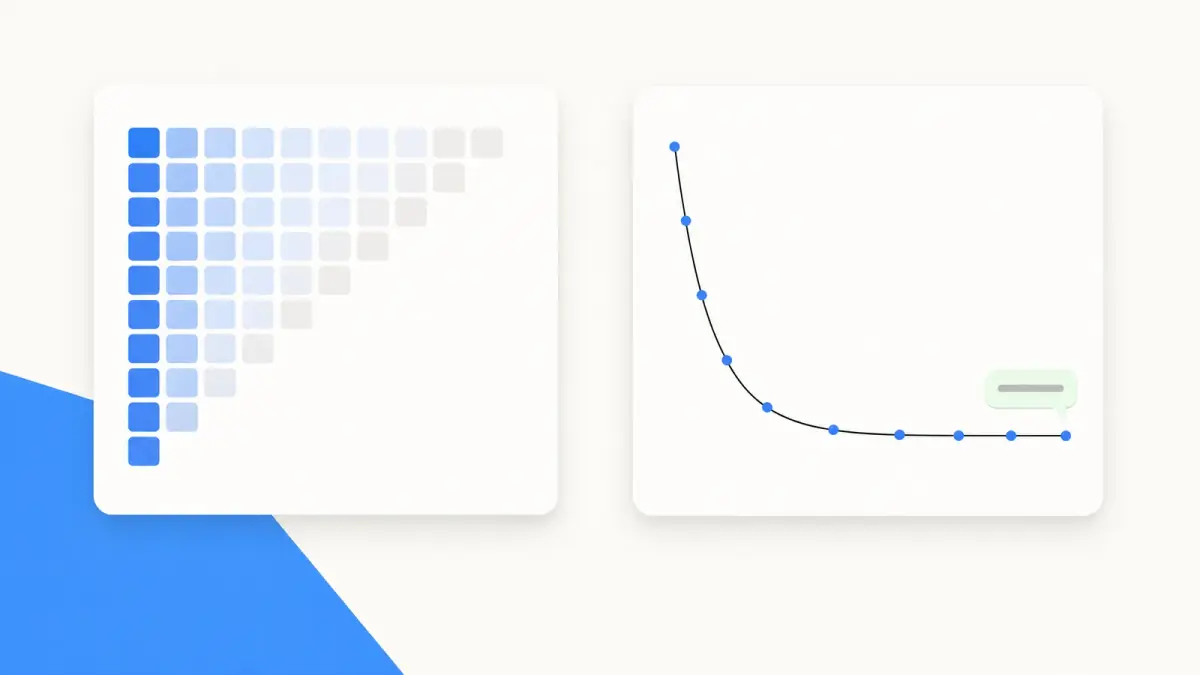
Summarize this article with an AI
 ChatGPT
 Claude
Table of contents (15)
Key takeaways
- Customer retention rate = (customers at the end of the period - new customers acquired during it) ÷ customers at the start × 100.
- In ecommerce there is no subscription to cancel, so a retained customer is one who orders again, and the period must cover at least one buying cycle.
- In Shopify, the Customer retention rate metric lives in the Customer cohort analysis report, under Analytics > Reports.
Customer retention rate is the share of your customers who keep buying from you from one period to the next. The standard formula: customer retention rate = (customers at the end of the period - new customers acquired during the period) ÷ customers at the start of the period × 100. In a fictional example, if you start with 2,000 customers and 520 of them order again during the period, your retention rate is 26%.
Online stores have no subscription that renews on its own, so a customer counts as retained only when they place another order. This guide works through the formula on a fictional store, separates retention from repeat purchase rate, churn and returning customer rate, and shows where Shopify reports these numbers, based on its Help Center as read on October 23, 2026. It ends with the most common calculation mistakes and the levers that move the rate.
What is customer retention rate?
Retention rate answers one question: of the customers you had, how many stayed?
In a subscription business, staying means not canceling. In an online store nobody cancels: a customer who doesn't come back simply stops ordering. An order is the only proof of activity you have, so a retained customer is someone from the previous period who ordered again in this one.
Conversion rate is measured per session and average order value per order. Retention rate is measured per customer, on a group you follow over time. It also feeds straight into customer lifetime value: the longer customers stay, the more they order, and the lifespan in that formula comes from churn.
What is the customer retention rate formula?
The standard formula uses three counts:
Customer retention rate = (E - N) ÷ S × 100
- S = customers at the start of the period
- E = customers at the end of the period
- N = new customers acquired during the period
New customers come out of the numerator because they weren't there at the start. Leaving them in would push the rate up every time you run an acquisition campaign.
For an online store, "customers at the end of the period" means "customers who ordered during the period". That leads to a more direct version that follows a defined group:
Customer retention rate = customers from the starting group who ordered again ÷ customers in the starting group × 100
The starting group can be "everyone who ordered in 2024" or "everyone whose first order was in January". The second one is a cohort, which is how Shopify looks at retention.
Which period should you use?
The period has to cover at least one normal buying cycle. A customer who reorders coffee every month can be measured quarterly. A customer who replaces a mattress every seven years can't be measured over one year. If you don't know your cycle, look at the usual gap between the first and second order of your repeat customers, and pick a period longer than that gap.
Then keep the same period everywhere: a quarterly rate and a yearly rate don't compare.
How do you calculate customer retention rate? A worked example
The store and the numbers below are fictional. They are here to show the math.
A coffee bean store compares 2024 and 2025:
| Input | Value |
|---|---|
| Customers who ordered in 2024 (S) | 2,000 |
| Customers who ordered in 2025 (E) | 1,500 |
| of which new customers in 2025 (N) | 900 |
| of which customers who had ordered before | 600 |
| among them, 2024 customers | 520 |
| among them, older customers with no 2024 order | 80 |
| Customers with 2 or more orders in 2025 | 330 |
Step by step:
- Standard formula = (1,500 - 900) ÷ 2,000 × 100 = 600 ÷ 2,000 × 100 = 30%
- Group formula = 520 ÷ 2,000 × 100 = 26%
- 2024 customers lost = 2,000 - 520 = 1,480
The 4-point gap comes from the 80 older customers who came back in 2025 after a year without ordering. The standard formula counts them as retained, yet they weren't among the 2,000 customers you started with. They are reactivated customers: good news, but not retention. The rule to keep: every customer in the numerator must also be in the denominator.
Retention rate vs repeat purchase rate vs churn: what's the difference?
Four metrics describe loyalty and get mixed up all the time. For the same fictional store, they give four different numbers:
| Metric | Formula | Value in the example | The question it answers |
|---|---|---|---|
| Customer retention rate | 2024 customers who ordered in 2025 ÷ 2024 customers | 520 ÷ 2,000 = 26% | What share of my customers stayed? |
| Churn rate | 2024 customers who didn't order in 2025 ÷ 2024 customers | 1,480 ÷ 2,000 = 74% | What share of my customers did I lose? |
| Returning customer rate | Customers who had ordered before ÷ 2025 customers | 600 ÷ 1,500 = 40% | What share of this year's buyers weren't first-timers? |
| Repeat purchase rate | Customers with 2+ orders in 2025 ÷ 2025 customers | 330 ÷ 1,500 = 22% | What share of this year's buyers ordered more than once? |
A few notes on the table.
Churn is the flip side of retention, as long as the base and the period match: 100% - 26% = 74%. Churn is also what gives you the average customer lifespan in a lifetime value calculation: 1 ÷ 0.74 ≈ 1.35 years in this example.
Returning customer rate depends on your acquisition. It looks at all buyers in the period, new ones included, so a big acquisition push lowers it even when your existing customers come back as often as before.
Repeat purchase rate doesn't follow anyone over time. Over one year, it counts customers who ordered several times within that year. Over the whole history, it counts customers who ever placed a second order. Always say which one you mean.
Returning customer rate is the one Shopify lists among its most helpful analytics fields. Its analytics fields reference defines it as the percentage of returning customers relative to all customers who placed orders, with the formula returning customers / customers. Shopify adds a note: "Most stores display 20-40%." That reference point is for this metric only, not for retention rate.
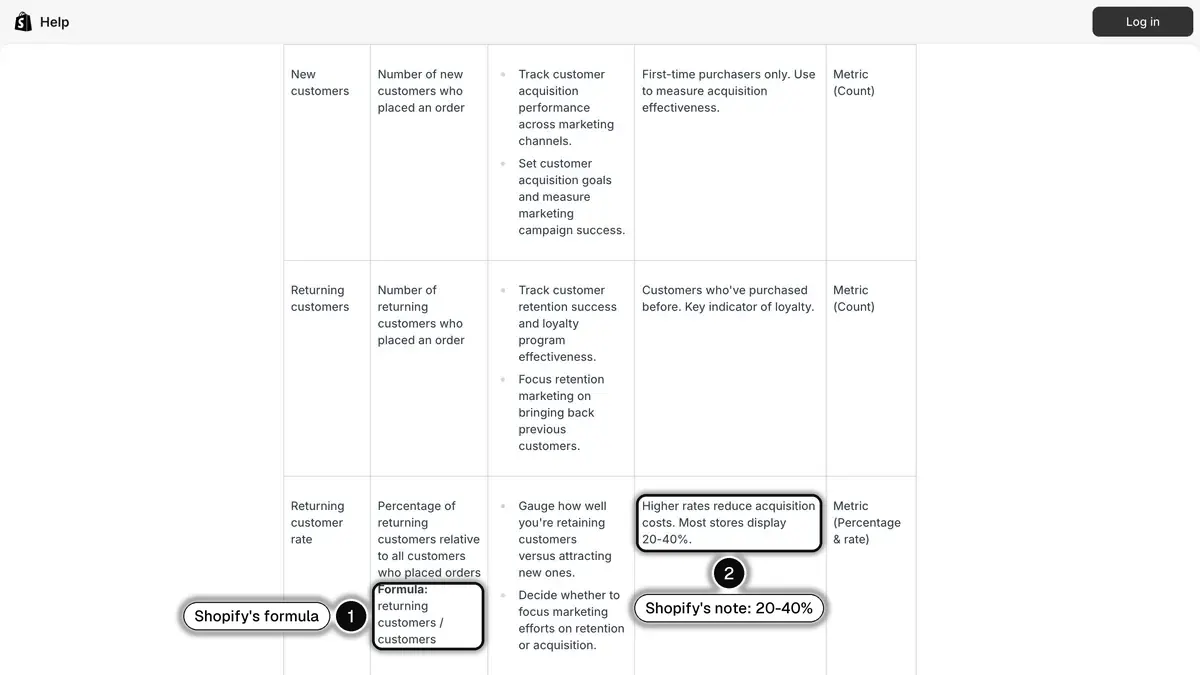
Source: Shopify Help Center, Analytics data points (fields) reference, read on October 23, 2026.
Where do you find customer retention rate in Shopify?
Customer retention rate in the Customer cohort analysis
The same reference defines the Customer retention rate metric as the "percentage of customers in the given cohort who placed an order in the given period". It is a cohort-based rate: each cohort groups customers by the date of their first order.
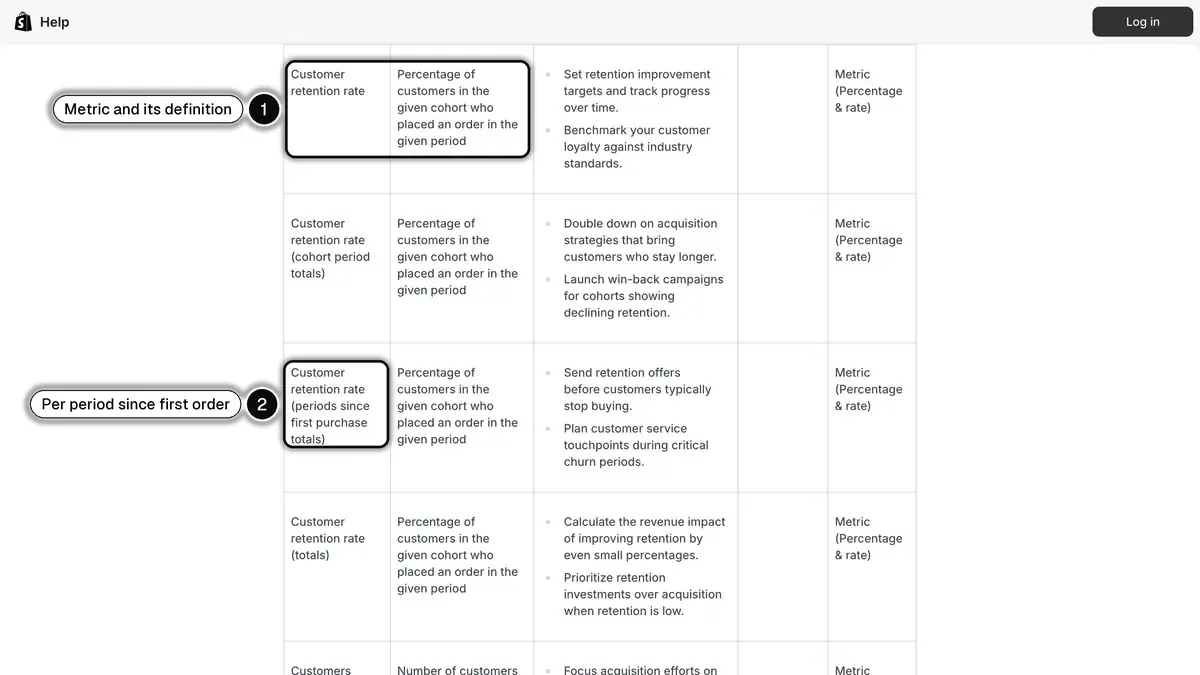
Source: Shopify Help Center, Analytics data points (fields) reference, read on October 23, 2026.
To open it, following the Customers reports page of the Help Center:
- From your Shopify admin, go to Analytics > Reports.
- Click the Category filter, then click Customers.
- Open Customer cohort analysis.
- In the configuration panel, use the Metric menu to select customer retention rate.
Each row of the table is a cohort, and the columns show the metric over the weeks, months or quarters since the first order. The Intervals menu changes that grouping. The period 0 column captures returning orders placed in the same period as the first order.
The Visualization menu switches between the Cohort grid (heatmap), shown by default, and the Retention curve. The Cohort definition menu filters customers by their first order: Sales channel, Marketing channel, Marketing type, Product name and Subscription. For a merchant, this is the setting that matters most: it shows whether customers who came from an ad, a discount code or an entry-level product come back as often as the others.
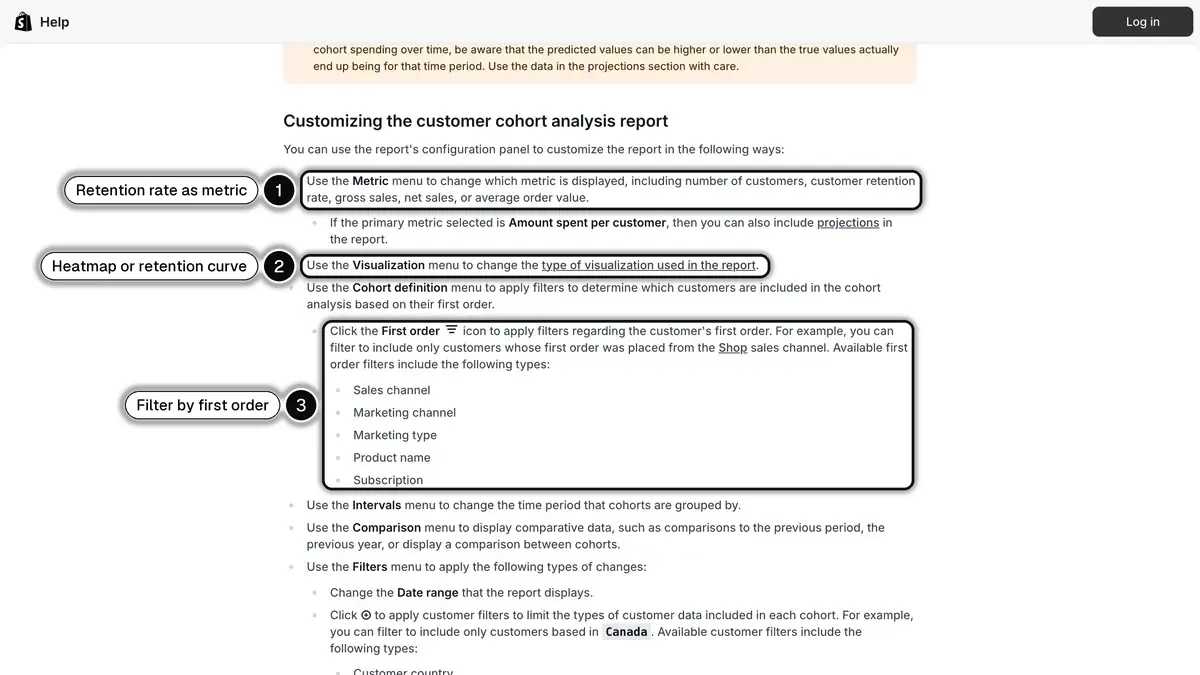
Source: Shopify Help Center, Customers reports, Customizing the customer cohort analysis report, read on October 23, 2026.
Reading a cohort without fooling yourself
Still fictional. The January 2026 cohort holds 400 first-time customers:
| Period since first order | Cohort customers who ordered in that period | Customer retention rate |
|---|---|---|
| Month 1 | 48 | 48 ÷ 400 = 12% |
| Month 2 | 36 | 36 ÷ 400 = 9% |
| Month 3 | 32 | 32 ÷ 400 = 8% |
Don't add these rates up. Under Shopify's definition, a customer who orders in month 1 and again in month 3 is counted in both columns, so 12% + 9% + 8% doesn't mean 29% of the cohort came back. To find the share of the cohort that has placed a second order so far, count those customers with a segment such as first_order_date BETWEEN 2026-01-01 AND 2026-01-31 AND number_of_orders >= 2, then divide by the cohort size.
Compare cohorts at the same age: January's month 3 against February's month 3, never a 12-month-old cohort against a 3-month-old one.
Other reports worth opening
- New vs returning customers counts, per time unit, first-time customers and customers whose order history already included an order.
- Returning customers lists every customer with two or more orders.
- One-time customers lists those with exactly one: the group to turn into second orders.
To act on them, Shopify's customer segment filters include last_order_date and number_of_orders. For example, number_of_orders >= 1 AND last_order_date < -90d returns customers who have ordered before but not in the last 90 days. Match the window to your buying cycle.
Why Shopify's number differs from yours
- A different question. Shopify follows first-order cohorts period by period, not "last year's customers who came back this year".
- The whole history. Customer reports are based on each customer's entire order history, not only the selected timeframe: a new customer from November shows as a repeat customer even if the second order came in December.
- Recent data. Customer reports might not display all the activity from the past 12 hours.
Predicted churn in Klaviyo
If you use Klaviyo, its Help Center describes a churn risk prediction for each profile, based on the customer's number and frequency of orders. It only appears once at least 500 customers have placed an order and you have at least 180 days of order history. It is a per-customer probability, useful for targeting, not a retention rate.
What are the common mistakes when calculating retention rate?
Counting new customers. That's the error the standard formula is built to avoid. A customer acquired during the period couldn't have been retained.
Counting reactivated customers. In the example, 80 returning older customers move the rate from 26% to 30%. If your starting group is "2024 customers", only they can appear in the numerator.
Using a period shorter than the buying cycle. A monthly rate for a product people rebuy every six months mostly shows customers who haven't needed to reorder yet.
Comparing cohorts of different ages. A recent cohort has had less time to come back. Compare cohorts at the same number of months since the first order.
Counting one person twice. A buyer stored under two customer records (two email addresses, for instance) shows up as one lost customer and one new customer, and your retention rate drops for no real reason.
Leaving canceled and refunded orders without a rule. Decide whether a fully refunded order counts as a return visit, and keep that choice from one period to the next.
Reading the rate without the value. Customers who only come back for a deep discount can lift retention while margin falls. Read the rate next to amount spent per customer and the average order value of repeat buyers.
Hunting for an industry average. We found no primary source that publishes an ecommerce retention benchmark with its method. Compare your cohorts against each other instead.
How do you improve customer retention rate?
The formula tells you where to act: bring the starting group back before they forget you. Our retention marketing guide details 8 strategies, and our ecommerce loyalty program guide covers points and tiers.
| Moment | Lever | Examples |
|---|---|---|
| After the first order | Win the second order | Clear shipping updates, how-to tips, review requests |
| When it's time to rebuy | Remind at the right moment | Refill reminders based on product life, back-in-stock alerts |
| During the relationship | Give a reason to return | New products, early access, perks for loyal customers |
| When a customer drifts | Win them back | A targeted offer to customers with no order for one buying cycle |
| Whenever they ask | Answer fast | Customer service on the channel they already use |
To measure the effect, change one thing at a time and keep a holdout group that doesn't get the action, then compare the share of customers who reorder in each group over the same period. Our guide to WhatsApp marketing KPIs explains how to set up a holdout test, and why the comparison should be between opted-in customers who get your messages and opted-in customers who don't.
Where WhatsApp fits in retention
Retention is won or lost between two orders, in the weeks when a customer either forgets your store or comes back. Kanal, a paid Shopify app that turns WhatsApp into a sales channel, works on those moments, with customers who have agreed to receive your WhatsApp messages.
- After the order. Kanal automations start from a Shopify order created or from a shipping status update, through delivery. A configurable wait then sends, for example, a review request or a refill reminder timed to how long the product lasts.
- Before a customer drifts away. Two ways to do it. An automation starts from the order, waits one buying cycle, then checks whether the customer has ordered since (a condition available on the Scale plan): if not, it sends the win-back message, and a setting stops it as soon as the customer replies. Or a WhatsApp campaign goes to a segment: Kanal segments filter contacts by number of orders, overall or over a period, such as customers who have ordered before but not in the last 90 days.
- When the product is back. Back-in-stock alerts notify customers who were waiting for an item.
- With Klaviyo. A Klaviyo segment, for instance one built on its churn predictions, can be used as a WhatsApp audience in Kanal, and WhatsApp events (delivered, read, clicked) flow back to Klaviyo. The Klaviyo integration page explains how.
A word on consent. Meta's documentation states that businesses are required to obtain opt-in before messaging people on WhatsApp. In Kanal, that opt-in comes from the WhatsApp widget, popups, QR codes and WhatsApp links, a CSV import with consent, or a reply inside an automation. The marketing checkbox at Shopify checkout isn't synced, and a customer who replies STOP is opted out.
More than 500 brands use Kanal, set up in 5 minutes. Plans start at €89 per month, plus Meta's fee for each delivered template.
Customer retention rate in short
- Formula: (customers at the end - new customers) ÷ customers at the start × 100.
- Base: every customer in the numerator must be in the denominator, so new and reactivated customers stay out.
- Period: at least one buying cycle, and the same one every time.
- Neighbors: churn = 100% - retention; returning customer rate and repeat purchase rate answer other questions.
- In Shopify: Customer retention rate in the Customer cohort analysis report, compared cohort to cohort at the same age.
To automate the messages that bring customers back on WhatsApp, install Kanal or book a demo: we'll walk you through post-purchase and win-back flows on your own store.
See Kanal on your own store
- Your campaigns and cart reminders on WhatsApp, starting from your own store
- Post-purchase offers, back-in-stock alerts, then the AI agent that advises your customers
- You leave with the plan that fits and its price
From €89/month
- brands
- 500+
- to set up
- 5 min
- open rate on WhatsApp
- +90%
Nicolas helps e-commerce brands grow revenue with WhatsApp marketing. With deep expertise in Shopify ecosystems and conversational commerce, he shares proven strategies for abandoned cart recovery, broadcast campaigns, and AI-powered customer engagement.