ManyChat Pricing in 2026: Plans, Contacts and Real Cost


Summarize this article with an AI
 ChatGPT
 Claude
ManyChat pricing explained: five plans from $0 to $199 a month, active contact limits, overage fees, annual discounts and WhatsApp message fees.
Table of contents (11)
Key takeaways
- ManyChat has five plans on monthly billing, from Free at $0 to Essential at $17, Pro at $39, Business at $99 and Advanced at $199.
- Each plan is limited by active contacts per month, from 25 on Free to 25,000 on Advanced, and one person counts once per billing month.
- Above the limit, automations keep running and each extra active contact costs $0.10 on Essential, $0.05 on Pro and $0.025 on Business.
- WhatsApp template messages are billed separately from a prepaid Wallet, per delivered message, by category and recipient country.
ManyChat has five plans: Free at $0, Essential at $17 a month, Pro at $39, Business at $99 and Advanced at $199 on monthly billing, or $14, $29, $69 and $139 a month when billed annually, according to ManyChat's pricing page as of October 8, 2026. Each plan includes a number of active contacts per month, from 25 on Free to 25,000 on Advanced, and every contact above the limit is billed as an overage.
This guide reads ManyChat's pricing page and Help Center as they stood on October 8, 2026, with prices in US dollars as displayed: what each plan includes, what makes the bill grow, what monthly and annual billing change, what is billed outside the subscription, and how to estimate your own cost. ManyChat describes itself as a tool that "helps creators and social-first businesses handle engagement at scale", across Instagram, WhatsApp, Messenger, TikTok, Telegram, email and SMS.
How much does ManyChat cost?
The pricing page opens on the plan cards, with a toggle between monthly and annual billing.
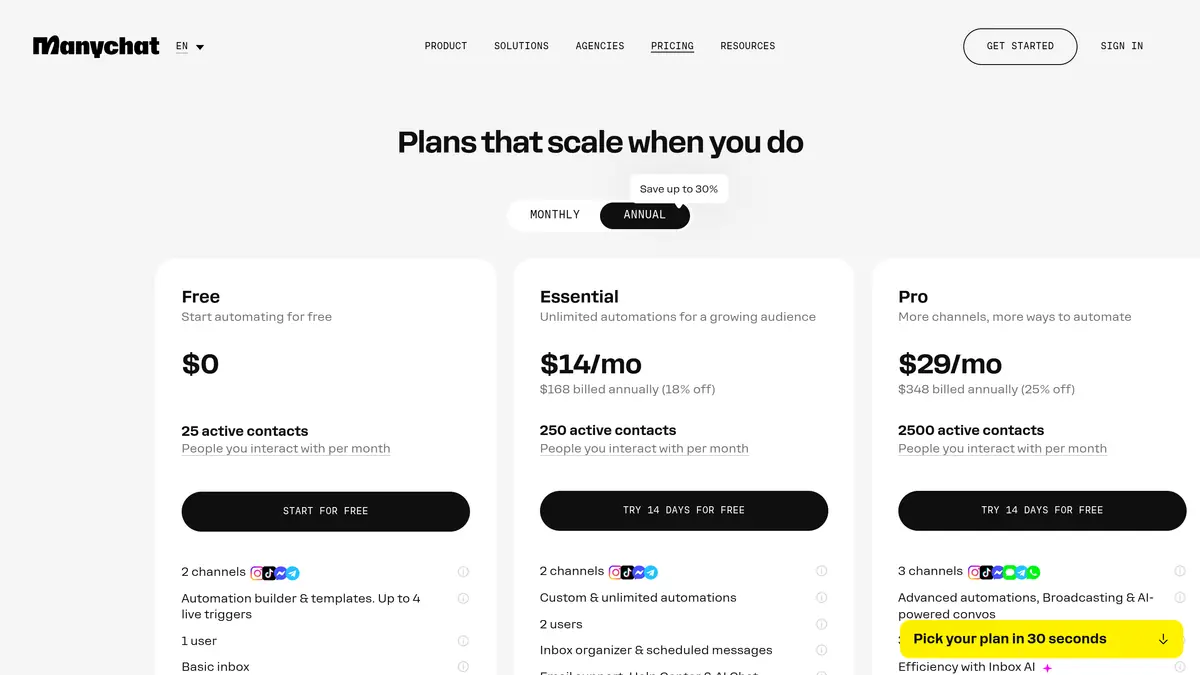
| Plan | Monthly billing | Annual billing | Active contacts per month | Channels | Users |
|---|---|---|---|---|---|
| Free | $0 | $0 | 25 | 2 | 1 |
| Essential | $17 a month | $14 a month ($168 a year) | 250 | 2 | 2 |
| Pro | $39 a month | $29 a month ($348 a year) | 2,500 | 3 | 3 |
| Business | $99 a month | $69 a month ($828 a year) | 7,500 | Unlimited | 5 |
| Advanced | $199 a month | $139 a month ($1,668 a year) | 25,000 | Unlimited | 10 |
Source: ManyChat pricing page, read on October 8, 2026. The page states that prices do not include tax and that the price is determined by the billing country, with the final price shown on the purchase page.
What the plan cards add to these numbers:
- Free lists the automation builder and templates with up to 4 live triggers, a basic inbox and ManyChat branding.
- Essential lists custom and unlimited automations, scheduled messages, email support and no ManyChat branding.
- Pro lists advanced automations, broadcasting, Manychat AI and an inbox with AI.
- Business and Advanced list a multi-user inbox, automation insights and priority support.
Two points of context from the Help Center. This price list is a new model introduced on March 2, 2026: it applies by default to accounts created on or after that date, and ManyChat says it is moving older accounts country by country. Plan availability can also vary by region, so the page you see is the reference for your account.
What makes a ManyChat bill grow?
Three things: the number of people you reach in a month, the channels you connect, and the seats you add.
Active contacts
The plan limit counts active contacts. ManyChat's Help Center defines an active contact as a contact who has interacted with you through ManyChat during the current billing month. The rules that follow from it:
- One person counts once. Several messages from the same person in the same billing month still count as one active contact.
- Your follower count is not your contact count. A contact is someone who sent a DM, commented, replied to a story or engaged with an automation.
- Inactive contacts stay stored. People who do not interact in a given month remain in your list and do not count that month.
- The count resets every billing cycle, including on annual plans.
- Imported contacts count only when messaged. A CSV import does not make a contact active until that contact sends or receives a message through an automation, AI, a broadcast or live chat.
When you pass the limit, automations keep running and an overage fee applies to each additional active contact:
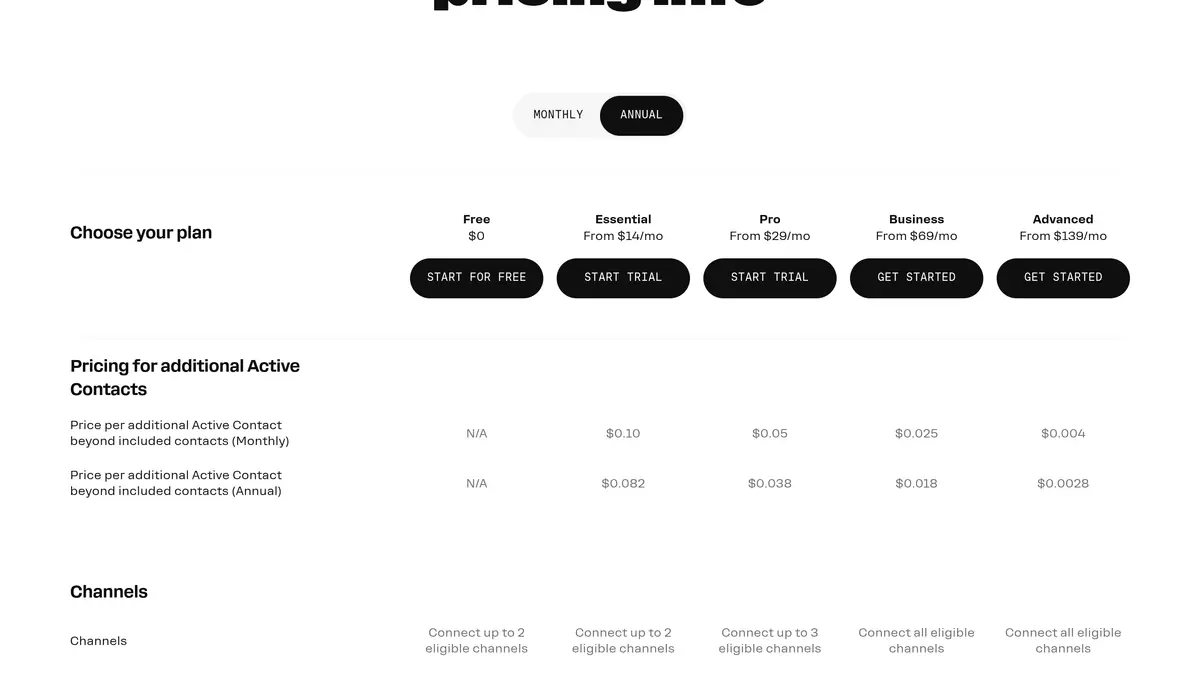
| Plan | Overage per additional active contact, monthly billing | Overage per additional active contact, annual billing |
|---|---|---|
| Free | Not available | Not available |
| Essential | $0.10 | $0.082 |
| Pro | $0.05 | $0.038 |
| Business | $0.025 | $0.018 |
| Advanced | $0.004 | $0.0028 |
Source: comparison table on the ManyChat pricing page, read on October 8, 2026. For the Advanced plan, the Help Center article on active contacts mentions custom overage pricing where the pricing page displays a rate: confirm it with ManyChat before you rely on it.
The Help Center adds that you are notified at 70%, 90% and 100% of your limit, that overage fees are added to your next bill, and that you can set an overage threshold in Settings, Billing, Subscription to decide whether overages are allowed and how many extra contacts you accept to pay for. If you upgrade within the same billing cycle, the pricing page says the overage fees incurred so far are forgiven and the extra contacts count toward the new plan's allowance.
Channels
Free and Essential connect up to 2 eligible channels, Pro up to 3, and Business and Advanced all of them. The Pro plan article in the Help Center names WhatsApp, SMS and email among the channels you can choose on Pro, and presents Pro as the starting point when WhatsApp is a key channel for your business.
Seats and AI
The comparison table lists inbox seats per plan: 1 on Free and Essential, 2 on Pro, 3 on Business and 5 on Advanced. An additional inbox seat costs $25 on Pro, Business and Advanced, up to a maximum of 3, 5 and 10 seats.
Manychat AI appears on the Pro, Business and Advanced plan cards. On October 8, 2026, the pricing page showed no separate price for AI.
What changes between monthly and annual billing?
Annual billing lowers the monthly equivalent by 18% on Essential, 25% on Pro and 30% on Business and Advanced, according to the pricing page. It also lowers the overage rate, as the table above shows. In exchange, you commit for the year:
- Active contacts are still counted monthly, and overages are billed monthly, even on an annual plan.
- You can upgrade at any time. A new billing period starts immediately, and the unused part of your current plan is prorated and credited.
- Downgrades wait. On a monthly plan, a downgrade takes effect at the next billing period. An annual plan cannot be downgraded, or switched to monthly, until the annual term ends.
- There is a trial and a refund window. Essential and Pro can be tried for 14 days, and ManyChat says you can cancel and get a refund if it has been under 30 days since you bought your plan.
What is not included in a ManyChat plan?
The subscription covers the platform. Messages on paid channels are billed separately through the ManyChat Wallet, a prepaid balance described in the Help Center.
WhatsApp. ManyChat's WhatsApp pricing guide says it charges for each template message delivered, at a rate that depends on the template category and the country of the recipient's phone number. Since October 1, 2026, service messages (non-template replies sent while the customer service window is open) are charged too, after 1,000 free service messages per WhatsApp Business phone number each calendar month. Messages sent to you by customers are not charged. Here are some of the per-message rates the guide listed on October 8, 2026:
| Destination | Marketing | Utility | Service |
|---|---|---|---|
| North America (United States, Canada) | $0.0287 | $0.0039 | $0.0034 |
| United Kingdom | $0.0730 | $0.0253 | $0.0220 |
| France | $0.0987 | $0.0345 | $0.0300 |
| Germany | $0.1569 | $0.0632 | $0.0550 |
| Brazil | $0.0718 | $0.0078 | $0.0068 |
| India | $0.0136 | $0.0016 | $0.0014 |
Source: ManyChat Help Center, WhatsApp pricing guide, rates in USD effective October 1, 2026, read on October 8, 2026.
The same guide recalls that Meta has paused marketing template messages to users in the United States since April 1, 2025. Our WhatsApp Business pricing guide explains how Meta builds these categories, and our article on WhatsApp marketing in the USA covers the pause.
Email. The comparison table lists email sends of up to 10k on Pro, 30k on Business and 100k on Advanced. The Wallet article, last updated on December 3, 2025, says emails beyond the allowance are charged $0.003 each from the Wallet balance.
SMS. We did not find a public ManyChat page stating a per-SMS price on October 8, 2026, so we give none here. If you plan to use SMS, ask for the rate for your countries before you choose a plan.
Tax. The pricing page states that prices do not include tax.
A worked example (fictional store)
The store below does not exist: the figures only show how the lines add up, using the rates read on October 8, 2026.
A store is on the Pro plan with annual billing. In a busy month, its automations reach 3,400 active contacts, and it sends 2,000 WhatsApp marketing template messages to customers in the United Kingdom.
- Pro plan, annual billing: $29 for the month ($348 paid for the year)
- Overage: 3,400 active contacts minus 2,500 included = 900 additional contacts. 900 x $0.038 = $34.20
- WhatsApp: 2,000 marketing messages x $0.0730 = $146.00, paid from the Wallet
- Total for the month: $29 + $34.20 + $146.00 = $209.20, before tax
The same month on monthly billing: $39 + (900 x $0.05 = $45.00) + $146.00 = $230.00.
When is the next plan cheaper? On annual billing, Business costs $40 more per month than Pro ($69 minus $29). At $0.038 per additional contact, the overage reaches $40 at 1,053 additional contacts ($40 / $0.038 = 1,052.6). A store that regularly passes 3,553 active contacts a month pays less on Business. On monthly billing, the gap is $60 ($99 minus $39), reached at 1,200 additional contacts ($60 / $0.05), or 3,700 active contacts.
How do you check your own ManyChat cost?
- Find your active contacts. ManyChat shows the count in the Insights section of the dashboard. Take your busiest month, not your average.
- Read the plan card for that number on the pricing page, with the billing toggle on the option you would choose.
- Add the overage for a month above the limit, and compare with the next plan up, as in the example.
- Set an overage threshold if you want a fixed ceiling.
- Add message fees. Multiply your WhatsApp template volume by the rate for each destination country in the WhatsApp pricing guide.
- Add inbox seats if your team needs more than the plan includes.
- Check the purchase page. ManyChat says the final price, set by your billing country, is shown there before payment.
To compare with tools that bill on other bases, see our list of ManyChat alternatives, how Klaviyo prices by active profiles and how Attentive builds its SMS prices.
Where does Kanal fit?
Kanal, our WhatsApp marketing app for Shopify, covers two channels: WhatsApp and SMS. It syncs with your Shopify store for campaigns, abandoned cart recovery and order notifications, and it does not send email. Plans are on the Kanal pricing page, and the Kanal and ManyChat comparison sets the two side by side.
ManyChat pricing at a glance
| Item | As of October 8, 2026 | Source |
|---|---|---|
| Free plan | $0, 25 active contacts a month, 2 channels, up to 4 live triggers | ManyChat pricing page |
| Essential | $17 a month, or $14 a month billed annually, 250 active contacts | ManyChat pricing page |
| Pro | $39 a month, or $29 a month billed annually, 2,500 active contacts | ManyChat pricing page |
| Business | $99 a month, or $69 a month billed annually, 7,500 active contacts | ManyChat pricing page |
| Advanced | $199 a month, or $139 a month billed annually, 25,000 active contacts | ManyChat pricing page |
| Overage on Pro | $0.05 per additional active contact, $0.038 on annual billing | ManyChat pricing page |
| Additional inbox seat | $25 on Pro, Business and Advanced | ManyChat pricing page |
| WhatsApp messages | Billed per delivered message from the Wallet, by category and country | ManyChat Help Center |
| Billing basis | Active contacts in the billing month | ManyChat Help Center |
ManyChat's price is set by the number of people you interact with each month, not by the size of your list. Read the plan card at your busiest month, add the overage and the message fees for your countries, and compare with the next plan up before you commit to a year.
Frequently asked questions
How much does ManyChat cost per month?
On ManyChat's pricing page on October 8, 2026, there were five plans: Free at $0, Essential at $17 a month, Pro at $39, Business at $99 and Advanced at $199 on monthly billing. Billed annually, the same plans came to $14, $29, $69 and $139 a month. Each plan includes a number of active contacts per month, from 25 on Free to 25,000 on Advanced.
Is ManyChat free?
ManyChat has a Free plan at $0. As of October 8, 2026, its pricing page lists 25 active contacts a month, 2 channels, up to 4 live triggers, 1 user, a basic inbox and ManyChat branding on messages. The Free plan does not require a credit card. Above 25 people reached in a month, you need a paid plan.
What is an active contact in ManyChat?
ManyChat defines it as a real person you interact with during a monthly billing period, through automations, AI, broadcasts or the inbox. The number of messages does not matter: one person counts once for the month. Contacts who do not interact stay in your list without counting. The count resets at each billing cycle, on monthly and annual plans alike.
What happens if I go over my ManyChat contact limit?
Automations keep running and ManyChat charges an overage fee per additional active contact. On October 8, 2026, the pricing page listed $0.10 on Essential, $0.05 on Pro and $0.025 on Business with monthly billing, and $0.082, $0.038 and $0.018 with annual billing. You can set an overage threshold to cap the extra contacts you accept to pay for.
Does ManyChat charge extra for AI?
On the pricing page read on October 8, 2026, Manychat AI is listed as part of the Pro, Business and Advanced plans, and the page shows no separate price for it. The Free and Essential plan cards do not list it. If AI replies matter to you, compare plans from Pro upward.
Are WhatsApp messages included in a ManyChat plan?
No. According to ManyChat's Help Center, WhatsApp template messages are billed per delivered message from a prepaid Wallet, separately from the subscription. The rate depends on the template category and the recipient's country: for the United Kingdom, the guide listed $0.0730 per marketing message and $0.0253 per utility message as of October 8, 2026.
See Kanal on your own store
- Your campaigns and cart reminders on WhatsApp, starting from your own store
- Post-purchase offers, back-in-stock alerts, then the AI agent that advises your customers
- You leave with the plan that fits and its price

- brands
- 500+
- to set up
- 5 min
- open rate on WhatsApp
- +90%
5/5 on the Shopify App Store (132 reviews)

Nicolas helps e-commerce brands grow revenue with WhatsApp marketing. With deep expertise in Shopify ecosystems and conversational commerce, he shares proven strategies for abandoned cart recovery, broadcast campaigns, and AI-powered customer engagement.
Glossary terms in this article
Quick definitions for the WhatsApp Business terms used above.
Customer Service Window (24-hour window)
The customer service window is a 24-hour timer that starts when a WhatsApp user messages or calls a business. While it is open, the business can reply with free-form messages; once it closes, it can only send approved message templates.
Read full definitionMarketing Template
A marketing template is a WhatsApp message template used for promotion: offers, product launches, back-in-stock alerts or cart reminders. It can be sent at any time to customers who opted in, and Meta charges each delivered message at the marketing rate of the recipient's country.
Read full definitionSuggested articles
LinkDM Review: Pricing, Features and 5 Alternatives (2026)
What LinkDM is, its Free, Pro and Platinum+ plans as displayed on October 11, 2026, what its pages cover and leave out, and five alternatives.
7 ManyChat Alternatives for Instagram DM Automation (2026)
Seven ManyChat alternatives compared for Instagram DM and WhatsApp automation, with the plans and prices each vendor displayed on October 11, 2026.
8 Best Instagram Automation Tools in 2026: Prices Compared
Eight Instagram automation tools compared, with prices displayed on October 11, 2026, and what Instagram allows: the official API versus login bots.
Shopify Instagram Integration: Connect Your Store (2026)
How to connect Shopify to Instagram with the Facebook & Instagram sales channel: requirements, steps, catalog sync, common errors and product tags.