Shopify vs Squarespace: Pricing, Fees and Selling (2026)
Shopify vs Squarespace compared for US merchants: plan prices, card rates, transaction fees, checkout, apps, support and how to move from one to the other.
 Nicolas ProvostOct 7, 2026 · 13 min read
Summarize this article with an AI
 ChatGPT
 Claude
Table of contents (14)
Key takeaways
- Shopify is a commerce platform built around the store and checkout, while Squarespace is a website builder whose plans all include selling tools.
- Squarespace Basic costs $25 a month against $39 for Shopify Basic, but adds a 2% commerce transaction fee that disappears from Core up.
- Published US card rates match at 2.9% + 30¢ on entry plans, so from Squarespace Core up the choice rests on the product.
Shopify is a commerce platform built around the store, the checkout and an app marketplace, while Squarespace is a website builder whose plans all include selling tools alongside pages, portfolios, scheduling and memberships. For a US merchant on October 7, 2026, Shopify Basic costs $39 a month ($29 paid yearly) with 2.9% + 30¢ per online card payment, and Squarespace Basic costs $25 a month ($19 paid annually) with 2.9% + $0.30 per card payment plus a 2% commerce transaction fee that disappears from the Core plan up.
Everything below comes from each company's own pages, read on October 7, 2026, with Shopify's prices read again on October 24, 2026: Shopify's pricing page, with the prices shown to US stores, and its Help Center, and Squarespace's pricing page, with the prices shown to US visitors, and its Help Center. Prices and fees can change: check both pages before you commit.
Shopify vs Squarespace at a glance
| Question | Shopify | Squarespace |
|---|---|---|
| How the company describes the entry plan | Basic, for solo entrepreneurs | Basic, to create your own custom website and get discovered online |
| Plans, paid monthly | Basic $39, Grow $105, Advanced $399 | Basic $25, Core $39, Plus $65, Advanced $139 |
| Plans, paid yearly (per month) | $29, $89, $359 | $19, $29, $49, $99 |
| US card rate, own payment service | 2.9% + 30¢ on Basic, 2.7% + 30¢ on Grow, 2.5% + 30¢ on Advanced | 2.9% + $0.30 on Basic and Core, 2.7% + $0.30 on Plus, 2.5% + $0.30 on Advanced |
| Platform fee on sales | None with Shopify Payments; 2%, 1% or 0.6% with another provider | 2% on Basic, 0% on Core, Plus and Advanced |
| Number of products | Unlimited on every plan | Unlimited on every plan |
| Add-ons | Shopify App Store, over 16,000 apps | Squarespace Extensions, built by third-party services |
| Trial | 3 days, then $1 a month for 3 months on most plans (promotion) | 14 days |
| Support | 24/7 live chat | Email and live chat, no phone support |
Sources: Shopify pricing page (US prices), Squarespace pricing page (US prices) and Squarespace Help Center, Transaction fees and payment processing rates. Shopify prices as of October 24, 2026, Squarespace as of October 7, 2026.
What is the difference between Shopify and Squarespace?
Shopify starts from the store. Its pricing page lists what every plan includes: unlimited products, themes, Shopify's checkout, selling on social media and marketplaces, discount codes, gift cards and abandoned checkout recovery, with hosting and an SSL certificate. Content pages and a blog exist, but the product, the order and the checkout are the center of the admin.
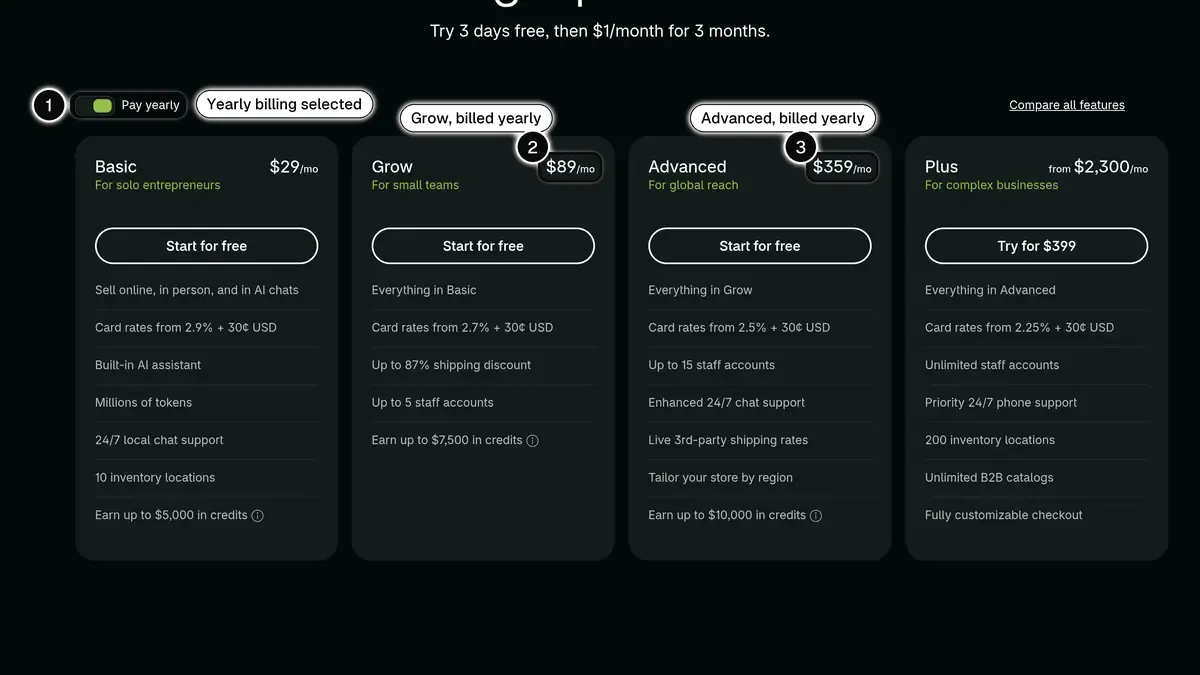 Source: Shopify pricing page, plan cards shown to a US visitor with Pay yearly selected, read on October 24, 2026. In 1, the yearly billing toggle; in 2, Grow billed yearly at $89 a month; in 3, Advanced billed yearly at $359 a month. Paid monthly, Basic, Grow and Advanced cost $39, $105 and $399.
Squarespace starts from the website. Its Help Center guide to choosing a plan describes a drag-and-drop editing system to lay out content, galleries of images or videos and navigation menus, and adds that you can invoice clients and sell products, content and memberships on any plan. The same guide presents Basic as well suited to smaller sites with one or two contributors, and Advanced as a good option for larger e-commerce stores that process many orders.
Both let you sell an unlimited number of products. The difference is where each product puts its effort, and you can see it in the price list.
How much do Shopify and Squarespace cost?
Subscriptions
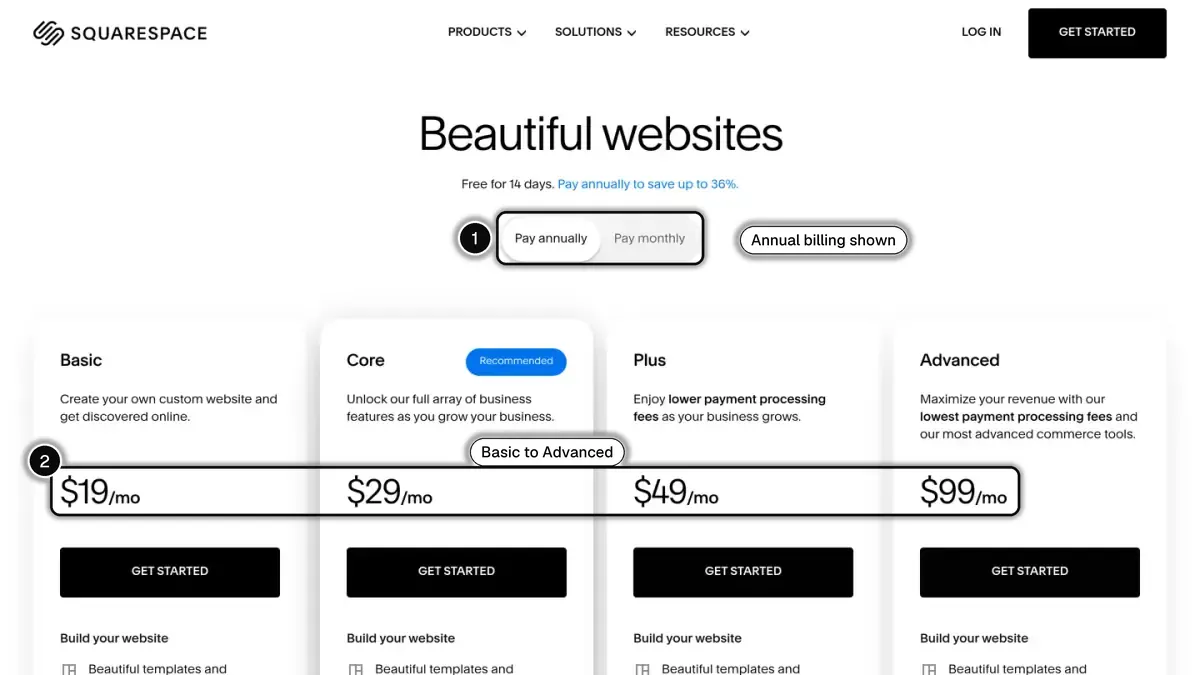 In 1, the annual billing toggle the prices depend on; in 2, the four plan prices.
| Shopify plan | Monthly | Yearly (per month) | Squarespace plan | Monthly | Annually (per month) |
|---|---|---|---|---|---|
| Basic | $39 | $29 | Basic | $25 | $19 |
| Grow | $105 | $89 | Core | $39 | $29 |
| Advanced | $399 | $359 | Plus | $65 | $49 |
| Plus | From $2,300 | Not displayed | Advanced | $139 | $99 |
Sources: Shopify pricing page and Squarespace pricing page, prices displayed to US visitors. Shopify as of October 24, 2026, Squarespace as of October 7, 2026.
Squarespace's plans purchased for an annual term include one year of domain registration on available domains. On Shopify, a custom domain is bought or connected separately, as detailed in our guide to Shopify pricing.
Fees on each sale
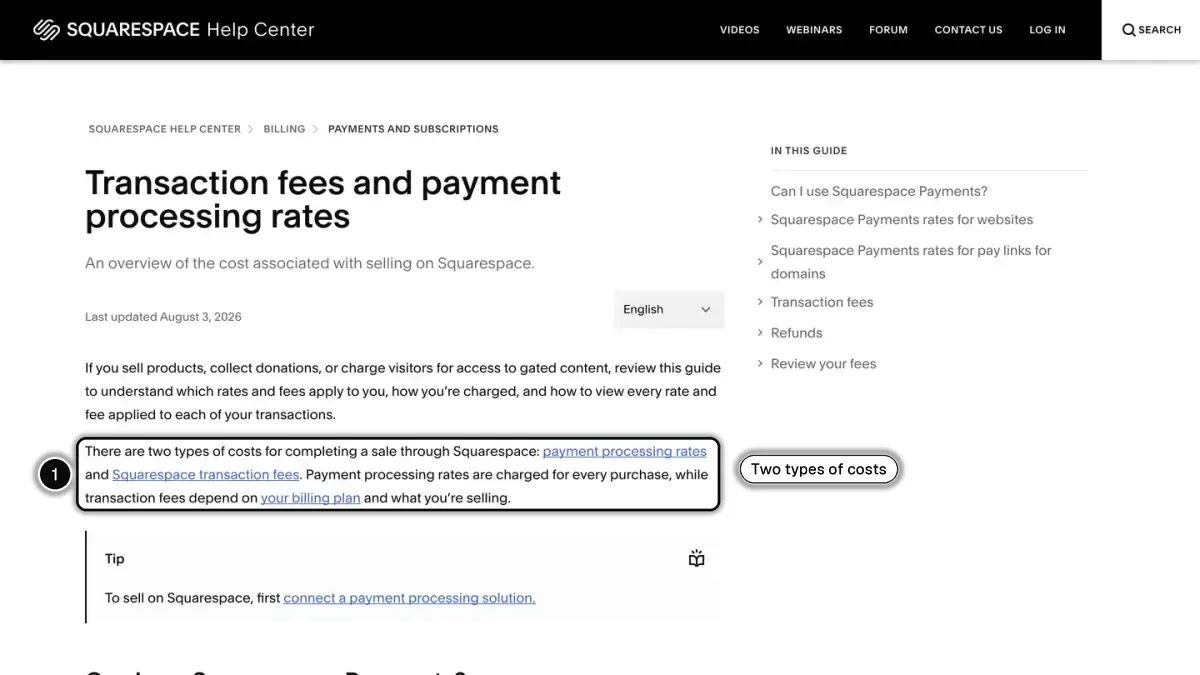
Squarespace's Help Center separates two types of costs: payment processing rates, charged on every purchase, and Squarespace transaction fees, which depend on your plan and on what you sell.
| Fee (US) | Shopify | Squarespace |
|---|---|---|
| Standard card online | 2.9% + 30¢ (Basic), 2.7% + 30¢ (Grow), 2.5% + 30¢ (Advanced) | 2.9% + $0.30 (Basic, Core), 2.7% + $0.30 (Plus), 2.5% + $0.30 (Advanced) |
| Premium card online | 3.5% + 30¢ (Basic), 3.3% + 30¢ (Grow), 3.1% + 30¢ (Advanced) | 3.2% + $0.30 on every plan |
| International card | + 1% | + 1.5% |
| Currency conversion | 1.5% | + 1% |
| Fee on physical products and services | None with Shopify Payments | 2% (Basic), 0% (Core, Plus, Advanced) |
| Fee on digital products (courses, memberships) | None with Shopify Payments | 7% (Basic), 5% (Core), 1% (Plus), 0% (Advanced) |
| Fee when you use another processor | 2% (Basic), 1% (Grow), 0.6% (Advanced) | The same transaction fees, plus that processor's own rates |
Sources: Shopify pricing page and Shopify Help Center; Squarespace Help Center, Transaction fees and payment processing rates, US tables for the Basic, Core, Plus and Advanced plans. As of October 7, 2026.
Squarespace notes that it is rolling these plans out in waves and that what appears on its pricing page is what you have access to. Sites on its older plans (Personal, Business, Commerce Basic, Commerce Advanced) follow a different fee table, with a 3% commerce transaction fee on Business.
Example: the monthly bill at three store sizes
The three stores are fictional. The amounts use the prices above, yearly billing on both sides, each platform's own payment service and standard US cards only. They leave out the domain, apps or extensions, sales tax services and promotions.
| Store | Shopify | Squarespace |
|---|---|---|
| 40 orders of $50 a month | Basic: $29 + 40 × $1.75 = $99 | Basic: $19 + 40 × $1.75 + 2% of $2,000 = $129. Core: $29 + 40 × $1.75 = $99 |
| 300 orders of $60 a month | Grow: $89 + 300 × $1.92 = $665 | Plus: $49 + 300 × $1.92 = $625 |
| 1,000 orders of $80 a month | Advanced: $359 + 1,000 × $2.30 = $2,659 | Advanced: $99 + 1,000 × $2.30 = $2,399 |
Card fees: 2.9% of $50 plus 30¢ = $1.75; 2.7% of $60 plus 30¢ = $1.92; 2.5% of $80 plus 30¢ = $2.30.
With the same card rates at each level, the gap in this example is the gap between subscriptions. What the example cannot show is the cost of what you add: apps on Shopify, extensions and third-party subscriptions on Squarespace.
What do they say about payments and checkout?
Shopify. Shopify Payments is Shopify's own provider, and its rates fall as the plan rises. In the United States you offer PayPal through PayPal Wallet inside Shopify Payments, at rates starting at 3.49% + 49¢. Every plan uses Shopify's checkout, and checkout customization is limited on Basic, Grow and Advanced and full on Plus, the plan covered in our guide to Shopify Plus pricing.
Squarespace. Squarespace Payments is described as its native payment solution, fully integrated within the platform. The same Help Center guide says you can also connect a third-party processor such as Stripe, PayPal or Square, with Square available for Squarespace point of sale in the iOS app only. Its US table lists Klarna at 5.45% + $0.30 and Afterpay at 6% + $0.30. For the checkout page, the guide to checkout on your domain explains that with a custom domain and SSL set to Secure, shoppers stay on a checkout URL that carries your domain, and that checkout on all plans is protected by SSL and is PCI compliant.
Both platforms state that abandoned checkout recovery is included from the entry plan.
How do apps and extensions compare?
The Shopify App Store lists over 16,000 apps. Each developer sets its price, and most charges appear on your Shopify bill. Our best Shopify apps comparisons group them by need.
Squarespace describes Squarespace Extensions as a collection of third-party tools, the equivalent of plugins, add-ons or apps, for tasks like sales tax compliance, drop shipping, SEO and social media marketing. You can connect them on all plans at no additional cost through Squarespace, though some services require their own subscriptions. Squarespace adds that extensions fall outside its scope of support, beyond connecting and disconnecting them. Custom code (JavaScript and iframes in code blocks, code injection) is listed among the premium features of Core and higher plans.
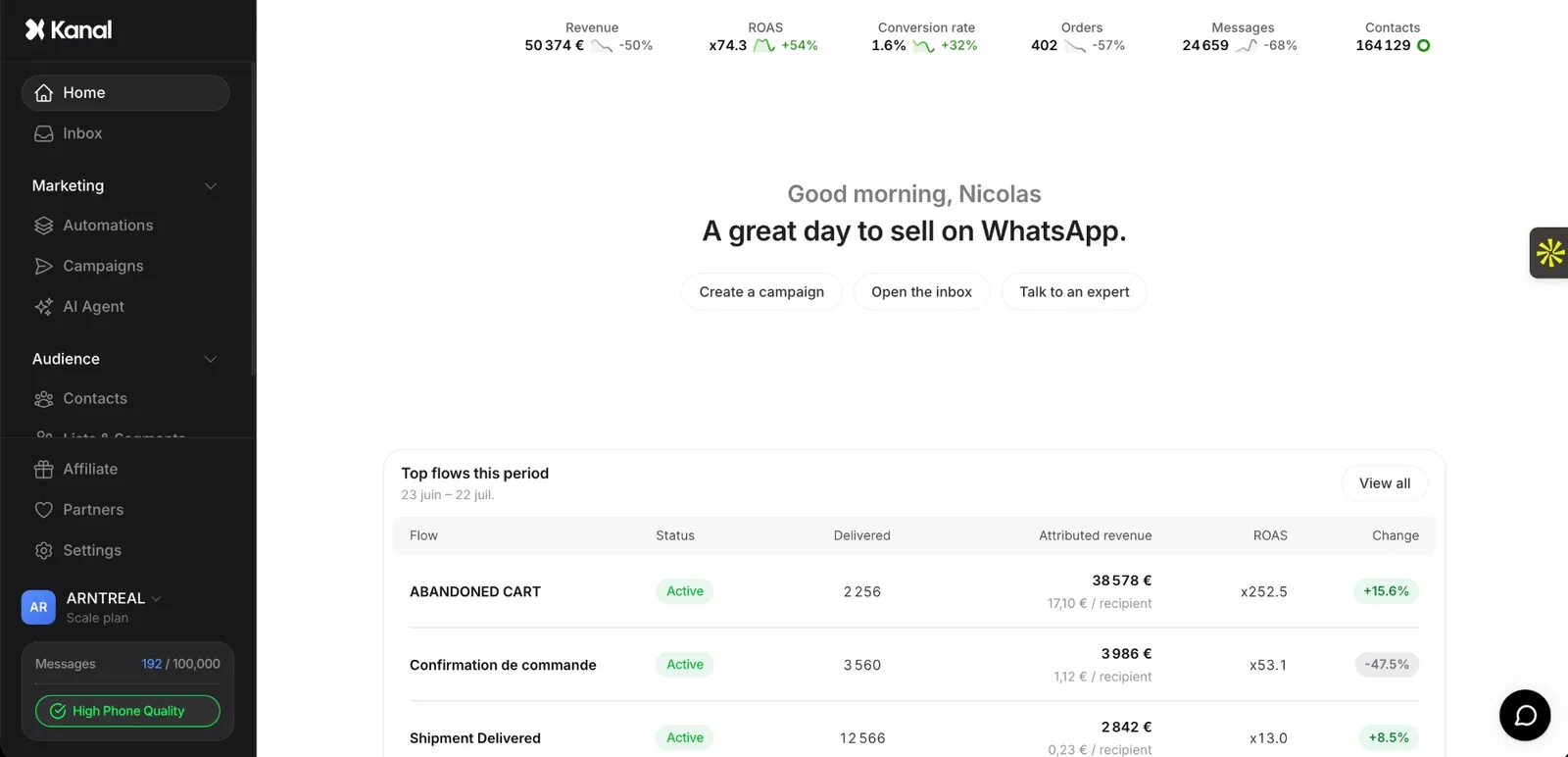
If a specific tool matters to your business, check where it runs before you choose. One example from our side: Kanal, the WhatsApp marketing and sales app we build, is a Shopify app, installed from the Shopify App Store.
Where can you sell beyond your own site?
Shopify's pricing page lists selling on social media, on marketplaces and in AI chats in every plan. For marketplaces connected to Shopify, the first 50 synced orders each month are free, then a 1% fee applies, capped at $99 a month. In-person selling is included for pop-ups and events, and POS Pro costs $89 a month per location.
Squarespace's plan guide lists Squarespace point of sale and syncing products with Facebook and Instagram from the Basic plan, and Google shopping from Core.
Who owns the customer relationship and the data?
On both platforms, the customers are yours.
- Shopify: its Terms of Service state that the services are not a marketplace, that any contract of sale is directly between you and the customer, and that you are the seller or merchant of record.
- Squarespace: customer contacts are created automatically after a customer checks out, with order history, email address and total spent, and you are responsible for helping customers with their accounts. The same page notes that it's not possible to create, import or edit customers manually at this time. Products export to a .csv file, up to 10,000 products, without customer reviews, featured images or variant images.
What support does each offer?
Shopify's pricing page lists 24/7 live chat support on Basic and Grow, enhanced live chat on Advanced and priority phone support on Plus.
Squarespace's Help Center says it offers support 24 hours a day, 7 days a week through email, live chat, X, Facebook Messenger and its mobile app, with live chat in English, French, German, Spanish and Portuguese. It does not offer assistance by phone, and does not provide support for custom code, SEO strategy, tax advice or third-party services.
Can you use both, or move from one to the other?
Together. Squarespace documents how to use Shopify with Squarespace: import Shopify products with a .csv file, link pages, buttons and navigation to your Shopify store, or transfer or point a Shopify domain. There is no built-in option for Shopify checkout buttons; the guide says they can be added with custom code, which Squarespace support can't help with.
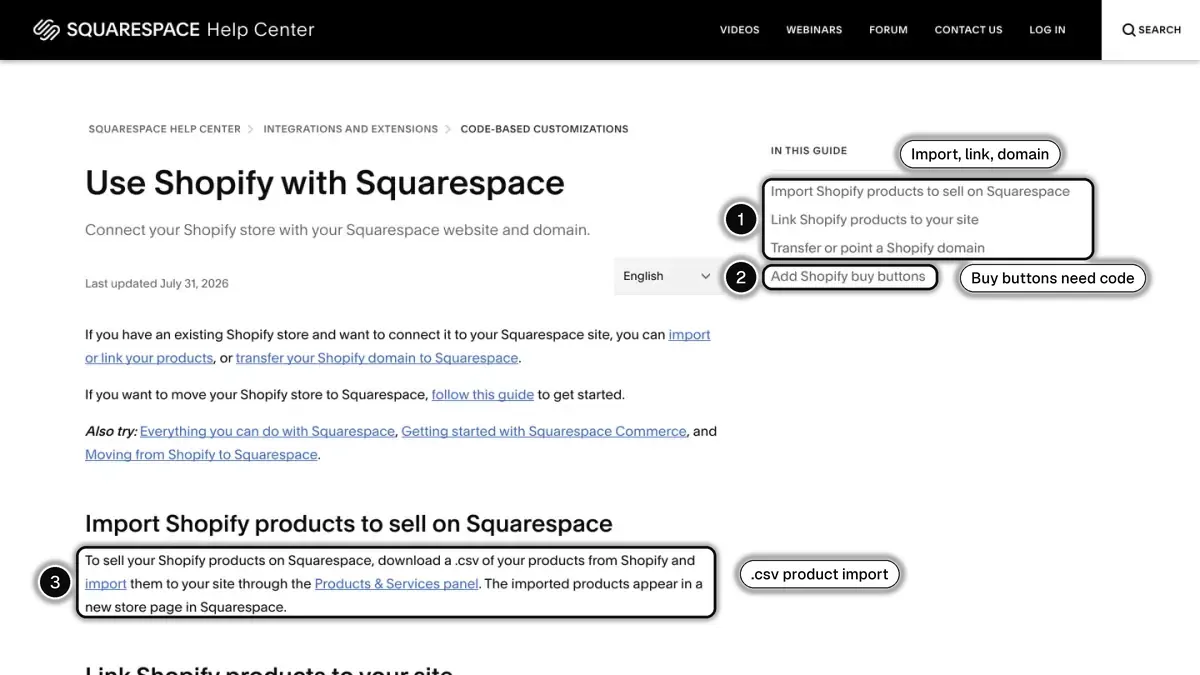 In 1, importing, linking and the domain; in 2, Shopify buy buttons, which need custom code; in 3, the .csv product import.
From Squarespace to Shopify. Shopify's migration guide runs through 18 steps. You export products from the Squarespace Products panel, edit the CSV file to match Shopify's product template, then import it. Customers, reviews and order history are optional steps, and Shopify warns that some data can't be migrated by CSV.
From Shopify to Squarespace. Squarespace's guide says you can transfer domains and import products and contacts by downloading each as a .csv. It's not possible to import your previous site's layout, design, fonts or other content. Squarespace recommends keeping the old site online until the new one is complete.
How to choose between Shopify and Squarespace
Start from what your site mainly does.
- Your site is mostly content, bookings or a portfolio, with a shop on the side: Squarespace's plans bundle the website, invoicing, memberships and selling. Check the 2% commerce transaction fee on Basic against the price of Core.
- The store is the business: Shopify's plans are organized around the catalog, the checkout, sales channels and the App Store. Read our Shopify review for its strengths and limits.
- You sell courses or memberships: compare Squarespace's digital products fee (7%, 5%, 1% or 0% by plan) with the cost of the app you would need on Shopify.
- You depend on a specific tool: check that it exists as a Shopify app or as a Squarespace extension before anything else.
- You already have a Squarespace site you like: Squarespace documents how to link it to a Shopify store, which lets you test a second setup without rebuilding the first.
If the alternative you are weighing is a different kind of platform, our comparisons of Shopify vs Wix and Shopify vs WooCommerce follow the same method.
In short
On October 7, 2026, Shopify Basic cost $29 a month paid yearly and Squarespace Basic $19 a month paid annually for US merchants, with the same published card rate of 2.9% plus 30 cents and a 2% commerce transaction fee on Squarespace Basic only. From Squarespace Core and Shopify Basic up, the fees on a standard card sale line up almost exactly, so the decision rests on the product: a website builder that sells, or a store platform with a large app marketplace. Price your own orders on both, list the tools you need, and check both pricing pages again before you sign up.
See Kanal on your own store
- Your campaigns and cart reminders on WhatsApp, starting from your own store
- Post-purchase offers, back-in-stock alerts, then the AI agent that advises your customers
- You leave with the plan that fits and its price
From €89/month
- brands
- 500+
- to set up
- 5 min
- open rate on WhatsApp
- +90%
Nicolas helps e-commerce brands grow revenue with WhatsApp marketing. With deep expertise in Shopify ecosystems and conversational commerce, he shares proven strategies for abandoned cart recovery, broadcast campaigns, and AI-powered customer engagement.