Shopify Review 2026: Strengths, Limits and Who It Fits
Shopify review for US merchants: ease of use, themes, apps, pricing and fees, SEO, support, reliability and platform risk, and who it fits in 2026.
 Nicolas ProvostOct 7, 2026 · 16 min read
Summarize this article with an AI
 ChatGPT
 Claude
Table of contents (17)
Key takeaways
- Shopify suits most merchants who want to sell online without a technical team, since hosting, security, checkout and updates are included.
- The main limits are a bill that grows with apps and payment fees, fixed URL paths and a checkout fully customizable on Plus alone.
- Public ratings diverge, with 1.3 out of 5 on Trustpilot against 4.5 on Capterra and 4.4 on G2, partly because shoppers review stores on Trustpilot.
Our review of Shopify in 2026 is positive for most merchants who want to sell online without managing technology: hosting, security, checkout and updates are included, plans start at $39 a month in the United States ($29 paid yearly), and an App Store of more than 16,000 apps covers most needs. The limits are real: a bill that grows with apps and payment fees, a checkout that is fully customizable on Plus alone, fixed URL paths and heavy dependence on Shopify's rules.
At Kanal, we build a WhatsApp marketing and sales app for Shopify, so we work with the platform, its APIs and the merchants who use it every day. For this review, we went back to Shopify's own pages for each criterion (ease of use, themes, apps, fees, SEO, support, reliability, platform dependence, Shopify Plus), with the prices shown to US stores, and read the public ratings on Trustpilot, Capterra and G2. Everything was read on October 7, 2026, and Shopify's prices again on October 24, 2026.
Our verdict on Shopify in brief
| Criterion | Our view | In short |
|---|---|---|
| Ease of use | Strong point | A store you set up without code, with a 3-day trial |
| Themes | Strong point | Themes by Shopify at no charge, paid themes you can try before buying but cannot return |
| Apps | Strong point, with care | Over 16,000 apps, each with its own price and its own support |
| Payments and fees | Fair | Simple with Shopify Payments, an extra fee with any other provider |
| SEO | Fair | Technical basics handled automatically, fixed URL structure |
| Support | Fair | 24/7 live chat, but no help with third-party apps or custom code |
| Technical reliability | Strong point | Hosting, security and updates run by Shopify |
| Platform dependence | Weak point | A closed platform whose rules and prices are set by Shopify |
| Room to grow | Strong point | From Basic to Shopify Plus without changing platform, at a price |
In one sentence: Shopify fits most brands that sell online and want to grow without a technical team. It fits less well if you want to control the code and the hosting of your store, or if your checkout must be customized without paying for Plus.
What do Shopify reviews say on Trustpilot, Capterra and G2?
Shopify's public ratings differ sharply from one site to the next. Here is what each page displayed on October 7, 2026:
| Site | Rating displayed | Number of reviews |
|---|---|---|
| Trustpilot | 1.3 out of 5 | 5,072 |
| Capterra | 4.5 out of 5 | 6,721 |
| G2 | 4.4 out of 5 | 5,144 |
Ratings read on each page on October 7, 2026. They change continuously.
Part of the gap comes from who writes on each site. Trustpilot's own summary of recent reviews mentions unhelpful customer support, but also missing deliveries, undelivered products and unexpected charges on bank statements: those are complaints from shoppers about a store that happens to run on Shopify, not from merchants about the software. Capterra and G2 are business software review sites, where reviews come from people who use the platform to sell.
Our advice: do not stop at the score. Filter for recent merchant reviews and read the ones that match your situation (products, country, sales volume). The platform risks worth checking before you sign up, such as held payouts or a deactivated payment account, are documented by Shopify itself. We come back to them in the section on platform dependence.
Is Shopify easy to use?
This is Shopify's first strength. You create an account and set up the store from one admin: no server to rent, no software to install or update. On October 7, 2026, Shopify offered a 3-day trial with no credit card required, then $1 a month for the first 3 months on most plans.
The Help Center provides a setup checklist that runs through the phases in order: set up your online store, organize it, test it, launch it, then add other sales channels and promote it. Shopify warns that, depending on your catalog, adding and organizing product listings can be the most time-consuming step. That is where your time goes, not into technical setup.
AI is built into the admin. Sidekick is an assistant that answers questions in everyday language, generates content such as product descriptions and blog posts, and presents changes for your review before applying them. Our guide to Shopify Magic explains what became of Shopify's AI features and what they do today.
A few points to know before you start, all taken from Shopify's checklist:
- your myshopify.com domain name can be changed a single time, so choose it carefully;
- the Basic plan allows no additional staff accounts, against 5 on Grow, 15 on Advanced and an unlimited number on Plus;
- store policy templates (refunds, privacy, terms of service) exist in English: adapt them to your business;
- Shopify calculates taxes, but tax compliance is your responsibility unless you use Shopify Tax automated filing.
Our view: for a merchant without a developer, ease of use is Shopify's best argument. The difficulty is not the tool but the choices: theme, apps, payment methods and shipping.
Are Shopify themes good enough?
The design of the store rests on a theme from the Shopify Theme Store, which listed 1,302 themes on October 7, 2026: 24 at no charge and 1,278 paid, priced from $100 to $500. According to Shopify's Help Center:

- themes offered at no charge are developed by Shopify, which supports help with their customization;
- paid themes are created by third-party developers, who provide their support and updates;
- you can try a paid theme in your store before you buy it, but the purchase is final: the developer cannot refund it;
- a paid theme is licensed to the store you bought it for;
- your library can hold 20 themes, or 100 on Plus.
Customization happens in the theme editor, without code: you add, remove and reorder sections and blocks. For Shopify's own themes, Shopify Support can help with certain predefined customizations, with 60 minutes of design support included on Basic and above, but it does not write custom code. Beyond that, you hire a Shopify Partner.
Our view: current themes are enough for most stores. Choose yours for the sections you need (filters, collection pages, editorial content), not for the demo, and test it with your real photos before you pay, since it cannot be returned.
Apps: Shopify's strength, and a cost to watch
What Shopify does not do natively is added through apps. The Shopify App Store lists over 16,000 of them, and most are built by third-party developers, not by Shopify. This is where both the depth and the cost of the platform are decided.
Check five things before you install an app:
- The price. An app can have a recurring monthly fee, a one-time fee or usage-based charges. Most charges appear on your Shopify bill, but some apps charge you directly outside of Shopify: track those separately.
- The support. Shopify provides support for apps made by Shopify. For the others, you go through the developer.
- The performance. The Built for Shopify badge marks apps that passed Shopify's testing, including a speed requirement: they cannot decrease your storefront's speed by more than 10 performance points.
- The exit. Some apps add code to your theme that isn't automatically removed when you uninstall them, and some store data that you can't recover afterward: export it first.
- The maintenance. Shopify releases new versions of its APIs every three months, and each version works for a year before developers must update: an app that is no longer maintained ends up breaking.
Our best Shopify apps comparisons rank the main apps by need, from reviews and loyalty to email, SMS and subscriptions. If you plan to sell without holding stock, start with the best dropshipping apps for Shopify.
Our view: the app ecosystem is one of Shopify's real strengths, but each app adds a subscription, a support contact and sometimes code. Review your apps every quarter and uninstall cleanly what you no longer use.
Pricing and fees: the essentials
This review does not go through every price: our guide to Shopify pricing does. On October 24, 2026, the plans for US stores ran from Basic, at $39 a month ($29 a month paid yearly), to Plus, from $2,300 a month, with Grow ($105, or $89 paid yearly) and Advanced ($399, or $359 paid yearly) in between. What matters is how the fees work:
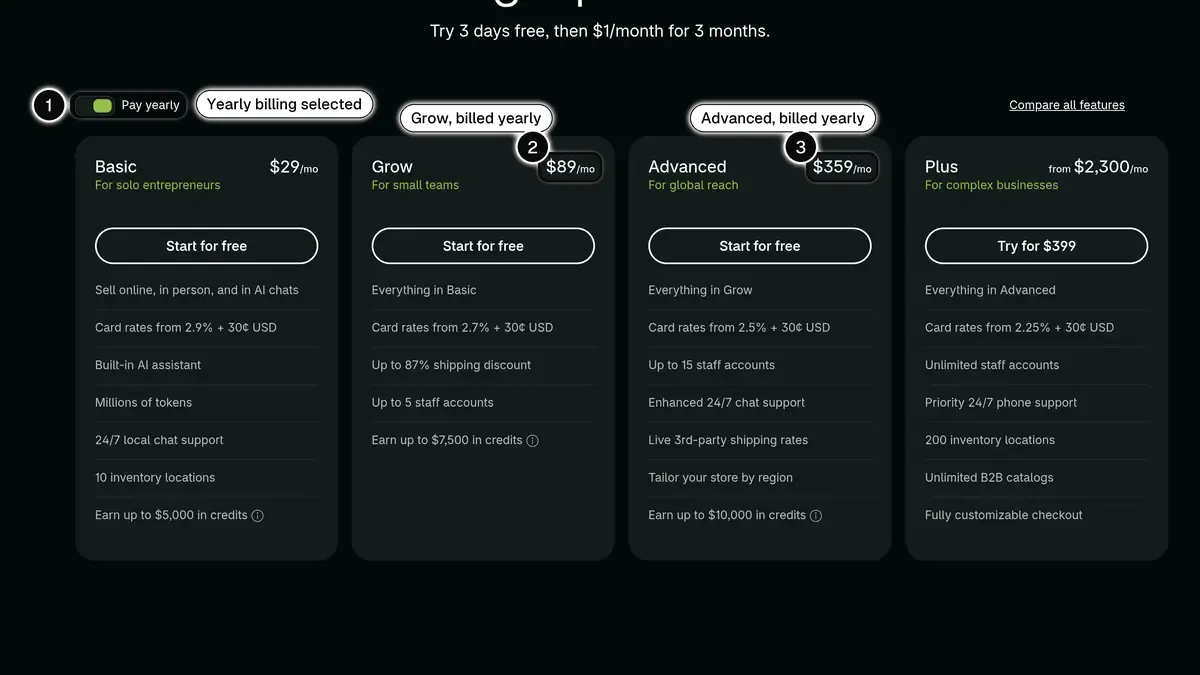 Source: Shopify pricing page, plan cards shown to a US visitor with Pay yearly selected, read on October 24, 2026. In 1, the yearly billing toggle; in 2, Grow billed yearly at $89 a month; in 3, Advanced billed yearly at $359 a month. Paid monthly, Basic, Grow and Advanced cost $39, $105 and $399.
- With Shopify Payments, you pay a rate per transaction that falls as the plan rises, for example 2.9% + 30¢ per online standard card payment on Basic.
- With another payment provider, Shopify adds a third-party transaction fee of 2% on Basic, 1% on Grow, 0.6% on Advanced and 0.2% on Plus, on top of that provider's fees.
- Some features require Shopify Payments: showing prices in local currencies, local payment methods and subscription products.
- Sales tax has its own fee: Shopify Tax is charged per order once a store passes $100,000 in sales.
The real budget of a Shopify store adds the subscription, the apps, a paid theme if you buy one and payment fees on your revenue. Put a number on it over twelve months, with your own volumes, before you choose a plan.
Is Shopify good for SEO?
Shopify handles most of the technical SEO automatically. According to its Help Center:
- canonical tags, the sitemap.xml file and the robots.txt file are generated automatically;
- SSL certificates are activated by default;
- title tags, meta descriptions and URLs can be edited for your pages, and alt text can be added to images;
- structured data is generated automatically.
The store also includes a built-in blogging engine. The robots.txt file can be customized through the robots.txt.liquid template, but it is a customization that Shopify Support does not help with.
The limit is the URL structure. Products and collections live under fixed paths, /products and /collections. When you migrate, plan a redirect for every old URL: Shopify accepts 100,000 of them, or 20,000,000 on Plus.
AI search is part of the picture too. If you sell through agentic storefronts such as ChatGPT or Microsoft Copilot, Shopify sends your product data to those channels through Shopify Catalog, independently of your robots.txt file. Our guide to selling your products in ChatGPT with Shopify covers that channel.
Our view: for most stores, Shopify's SEO is a sound base. The fixed structure is mainly a nuisance during a migration. Content, links and speed make the difference, not the platform.
How good is Shopify support?
Every plan includes 24/7 live chat support. Advanced moves to enhanced live chat, and Plus adds priority 24/7 phone support. The Help Center is detailed, and it is the source for most of this review.
The limits of support are clear:
- third-party apps and paid themes are supported by their developers;
- Shopify Support does not write custom code or make arbitrary code changes;
- for development work, you hire a Shopify Partner.
To answer your own customers, Shopify provides its own chat tool, covered in our guide to Shopify Inbox.
Our view: for a question about the platform, chat that is always open is a real comfort. For code, apps or sensitive cases, plan for a partner and keep a written record of your exchanges.
Reliability and platform dependence
A technically solid platform
Shopify hosts the store and manages platform security. Every plan includes hosting, unlimited bandwidth and an SSL certificate, and Shopify states that it is certified Level 1 PCI DSS compliant. On its Plus pricing page, Shopify claims 99.99% uptime on average across Shopify worldwide during the biggest sales events of the year.
A dependence you have to accept
With Shopify, you rent a platform. That is what makes it simple, and it is also its main limit.
- The rules are Shopify's. Its Terms of Service, last updated on August 1, 2026, allow it to suspend or terminate an account for any reason, without notice and at any time, unless otherwise required by law. The same terms commit Shopify to 30 days' advance notice before any change in fees.
- Your payouts can be held. With Shopify Payments, Shopify can place a reserve, a temporary hold on a portion, in some cases the full amount, of your transactions, if it identifies a higher level of risk: elevated chargeback activity, or extended delivery timelines such as custom orders and pre-orders. High chargeback rates can also result in Shopify Payments being deactivated.
- The checkout stays Shopify's. Checkout customization is limited on Basic, Grow and Advanced, and full on Plus.
- Not everything moves with you. The theme and the apps are specific to Shopify, and some app data can't be recovered after uninstalling.
To limit that risk:
- keep your domain at your current registrar and connect it to Shopify, which Shopify allows;
- export your products, customers and orders regularly;
- keep your contacts and their consent in your own tools (email, CRM, messaging);
- if you sell pre-orders or products with long delivery times, read the reserve rules before a big campaign.
Can Shopify grow with you?
Shopify follows a store that grows without a change of platform. As you move up, you gain staff accounts, lower card rates, lower third-party transaction fees and, on Advanced, live third-party shipping rates. The catalog follows: a product can have 2,048 variants. For physical retail, casual in-person sales are included in every plan, and POS Pro costs $89 a month per location.
Shopify Plus is for high-volume brands or complex needs (the apps these stores add are in our best Shopify Plus apps comparison). According to the Help Center, it costs $2,500 a month on a 1-year term or $2,300 a month on a 3-year term in the United States, and a variable platform fee might apply to more complex, higher-volume businesses. It brings a fully customizable checkout, unlimited staff accounts, 9 expansion stores, 200 inventory locations and unlimited B2B catalogs. Our guide to Shopify Plus pricing works out when it pays for itself.
Our view: Plus is justified when the checkout must be customized, when you run several stores or advanced B2B, or when your volume makes the lower card rate significant. Below that, Advanced is enough for most brands.
Shopify pros and cons
Pros
- A complete store without managing a server, security or software updates.
- Quick to learn, with an AI assistant built into the admin.
- An app ecosystem that covers most needs of a store.
- Technical SEO basics handled automatically.
- A path from a first sale to Shopify Plus without migrating.
Cons
- A bill that adds up: subscription, apps, paid theme and payment fees.
- A third-party transaction fee without Shopify Payments.
- Limited checkout customization below Shopify Plus.
- Fixed URL paths for products and collections.
- Support that stops at third-party apps and custom code.
- Dependence on Shopify's rules: possible account suspension, reserves on payouts.
Is Shopify right for you?
Shopify fits if:
- you want to launch or grow a brand online without a technical team;
- you prefer adding functions through apps to custom development;
- you also sell on social media, on marketplaces or in person and want to run everything from one tool.
Shopify does not fit if:
- you want to control the code, the hosting and the data from end to end: open-source software gives you more freedom, in exchange for maintenance;
- your checkout must be fully customized without moving to Plus;
- you refuse to depend on a platform's rules for your payouts.
Two comparisons help if you hesitate. Shopify vs WooCommerce sets the hosted model against an open-source store you run yourself. Shopify vs Etsy covers the choice between your own store and a marketplace. If your shortlist is different, Shopify vs BigCommerce looks at another hosted platform, and our Amazon comparison at the same question when the marketplace is Amazon.
Our final verdict on Shopify
In 2026, Shopify remains the platform we would point most merchants to when they want to sell without managing technology: it is quick to learn, the apps cover most needs, and the store can grow to Shopify Plus without a migration. Go in knowing the trade-offs: a budget to watch closely (apps, payment fees), a structure you do not choose (URLs, checkout) and rules set by Shopify. If controlling the code and the hosting matters more to you than convenience, look at an open-source store first.
See Kanal on your own store
- Your campaigns and cart reminders on WhatsApp, starting from your own store
- Post-purchase offers, back-in-stock alerts, then the AI agent that advises your customers
- You leave with the plan that fits and its price
From €89/month
- brands
- 500+
- to set up
- 5 min
- open rate on WhatsApp
- +90%
Nicolas helps e-commerce brands grow revenue with WhatsApp marketing. With deep expertise in Shopify ecosystems and conversational commerce, he shares proven strategies for abandoned cart recovery, broadcast campaigns, and AI-powered customer engagement.