Customer Segmentation for Ecommerce: RFM and 10 Segments
Customer segmentation for ecommerce: the criteria that matter, RFM analysis and Shopify's 11 RFM groups, the segment editor and 10 ready-made segments.
 Nicolas ProvostOct 24, 2026 · 15 min read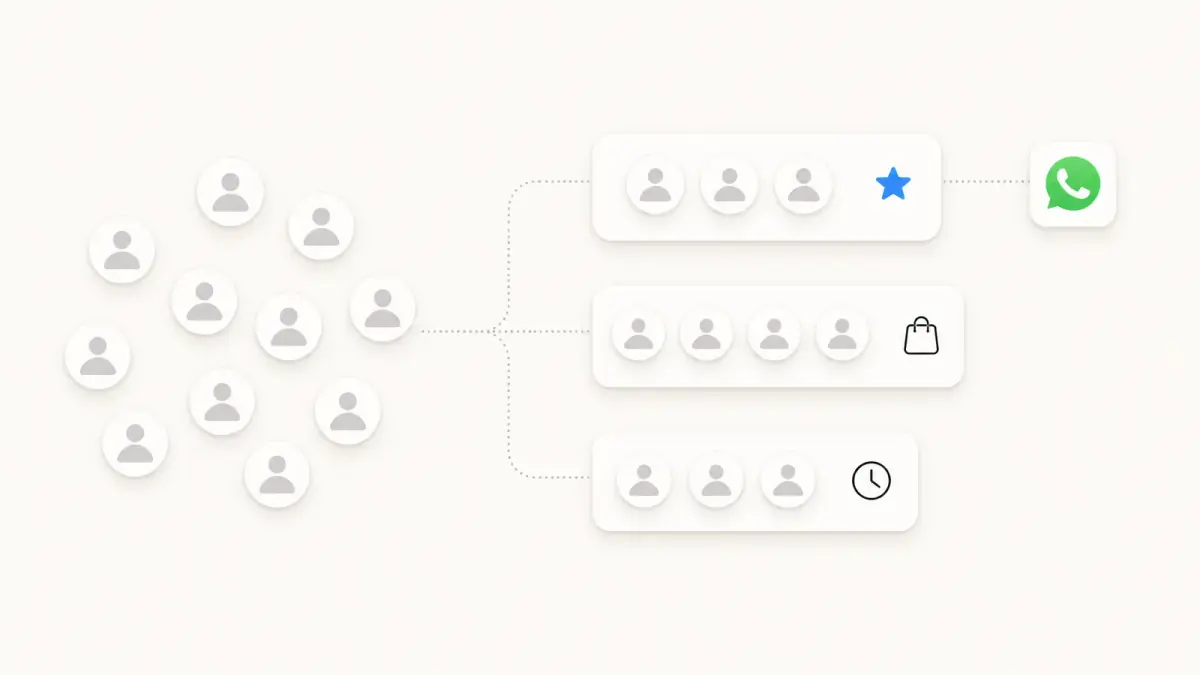
Summarize this article with an AI
 ChatGPT
 Claude
Table of contents (11)
Key takeaways
- For an online store, the most reliable segmentation criteria come from order data: last order date, number of orders, amount spent and products purchased.
- Shopify already sorts your customers into 11 RFM groups (Champions, Loyal, At risk, Dormant and more), and any group becomes a customer segment with the rfm_group filter.
- A segment is not consent: on WhatsApp, customers imported from a Shopify segment arrive in Kanal with the Unknown status, and WhatsApp does not currently deliver marketing templates to US phone numbers.
Customer segmentation for ecommerce means splitting your customers into groups that share traits or buying behavior, so each group gets the message that fits it. For an online store, the most useful criteria come from order data: last order date (recency), number of orders (frequency), amount spent and products purchased, plus location, sales channel and marketing consent.
Shopify gives you two tools to do it without an app: the RFM customer analysis report, which places every customer in one of 11 groups, and the segment editor, which turns filters into customer lists. This guide covers the criteria, RFM analysis, building a Shopify customer segment and 10 ready-made segments, based on the Shopify Help Center (read on October 24, 2026), then how to use them on WhatsApp. The strategies that bring each group back are covered in our guide to retention marketing.
What is customer segmentation?
A segment is a group of customers defined by a rule, such as "customers with at least two orders, the last one within 90 days." It is not the same as a static list, frozen at a point in time (everyone who joined the March private sale), or a persona, a profile that guides the tone of your messages.
In Shopify, segments are dynamic: according to the Help Center, new customers who meet the criteria join automatically, and customers who no longer meet them drop out. One customer can sit in several segments at once.
Why segment customers in ecommerce?
One message sent to the whole list serves everyone poorly. Segmentation does four jobs:
- The right message at the right time. A first-time buyer wants help using the product, a customer gone for a year needs a reason to come back.
- Margin protection. A discount sent to customers who would have bought anyway gives away margin.
- Fewer annoying mistakes. A promotion that lands the day after someone paid full price creates frustration: an exclusion segment prevents it.
- Results you can read. A result per segment can be compared, a store-wide average blends opposite behaviors. Our guide to the customer retention rate shows how to track repeat buying group by group.
Which segmentation criteria matter in ecommerce?
Criteria fall into four types: geographic, demographic, behavioral and psychographic. For an online store, behavioral criteria come first: your order data already holds them, and they describe what customers do, not what they say.
Here are the useful criteria and the matching Shopify filter, from the Shopify customer segment filters reference:
| Criterion | Shopify filter | Example use |
|---|---|---|
| Recency | Last order date (last_order_date) | Spot customers who are drifting away |
| Frequency | Number of orders (number_of_orders) | Separate one-time buyers from regulars |
| Orders in a period | Orders placed (orders_placed) | Customers with 3+ orders in 6 months |
| First order | First order date (first_order_date) | Welcome new customers |
| Monetary | Amount spent (amount_spent) | Isolate big spenders |
| Order value (one order, abandoned checkout) | orders_placed with amount, Abandoned checkout date (abandoned_checkout_date) | Follow up on a checkout, target large orders |
| Products purchased | Products purchased (products_purchased) | Cross-sell a complementary product |
| Sales channel (app or location) | orders_placed with app_id or location_id | Customers of your physical store (Shopify POS) |
| Location and language | Countries or regions (customer_countries), Customer language (customer_language) | Shipping offers by country, the right language |
| Consent | Email subscription status (email_subscription_status), SMS subscription status (sms_subscription_status) | Only message subscribers |
| Prediction | Predicted spend tier (predicted_spend_tier) | Find high-potential customers |
Predicted spend tier (High, Medium, Low) is only available once your store has made over 100 sales, and amounts use your store currency, with no symbol. How spend adds up to a customer's value over time is covered in our guide to customer lifetime value.
RFM analysis: how it works and Shopify's 11 groups
RFM analysis combines three criteria taken from order history:
- R for recency: how many days since the customer's last order.
- F for frequency: how many orders they have placed in total.
- M for monetary value: how much they have spent in total.
In the RFM customer analysis report, described on Shopify's customers reports page, each customer gets a 3-digit score, each digit from 1 to 5. Scores only compare your customers with each other: a 5 puts a customer in your store's top 20% on that dimension, a 1 in the bottom 20%. Individual scores are not shown; you see the group.
The group depends on the recency score (R) and the average of the frequency and monetary scores, FM = (F + M) / 2, rounded down. Shopify's example: a customer scored 154 (recency 1, frequency 5, monetary 4) has FM = (5 + 4) / 2 = 4.5 and lands in Previously loyal: they used to order often, but not lately.
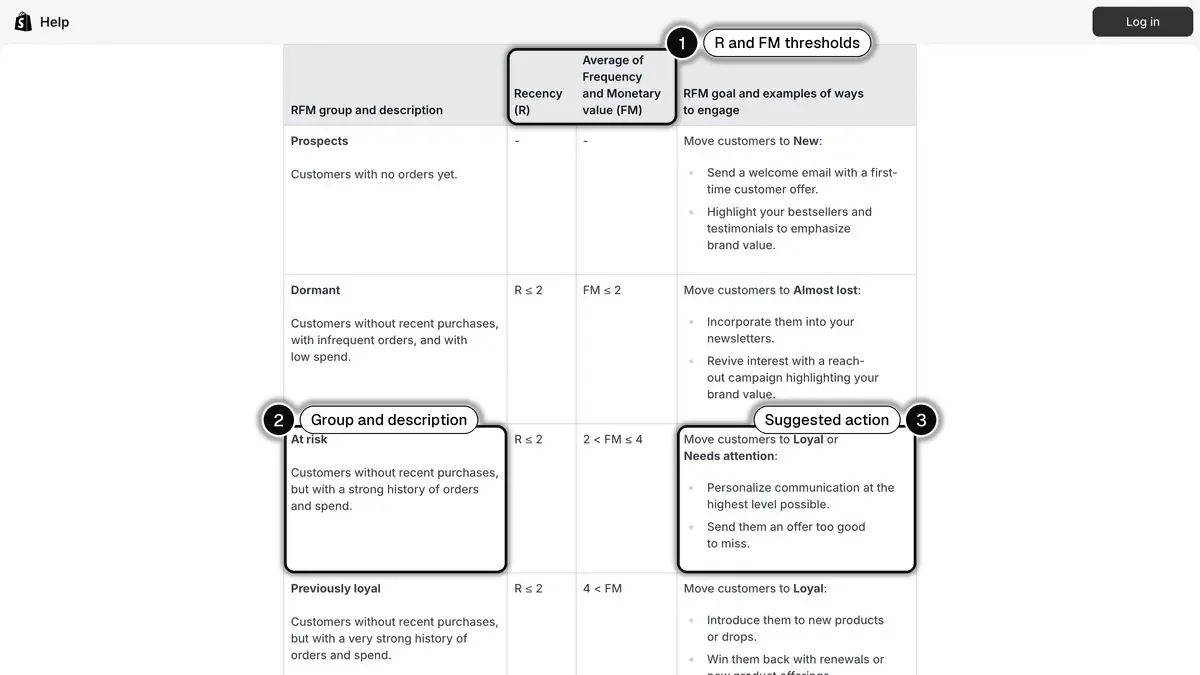
Source: Shopify Help Center, Customers reports, RFM groups section, read on October 24, 2026. In 1, the recency (R) and frequency-monetary average (FM) thresholds; in 2, the At risk group and its description; in 3, the action Shopify suggests for that group.
Here are the 11 groups, with their filter value, thresholds and the goal Shopify gives each one (full descriptions are in the capture above and in the Help Center):
| RFM group | Filter value | Thresholds | Shopify's goal |
|---|---|---|---|
| Champions | CHAMPIONS | R = 5, FM > 3 | Retain as brand advocates: exclusive deals, early access, referral program |
| Loyal | LOYAL | R 3 to 4, FM > 3 | Move to Champions: upsell higher-value products, ask for reviews |
| Active | ACTIVE | R ≥ 4, FM 2 to 3 | Move to Loyal or Champions: top product recommendations, loyalty programs |
| New | NEW | R = 5, FM ≤ 1 | Move to Active: onboarding support, start the relationship |
| Promising | PROMISING | R = 4, FM ≤ 1 | Move to Active: replenishment reminders, product education |
| Needs attention | NEEDS_ATTENTION | R = 3, FM = 3 | Move to Loyal or Active: limited-time offers based on past purchases |
| Almost lost | ALMOST_LOST | R = 3, FM ≤ 2 | Move to Active or Promising: useful resources, discounts on popular products |
| At risk | AT_RISK | R ≤ 2, FM 3 to 4 | Move to Loyal or Needs attention: highly personal communication, an offer too good to miss |
| Previously loyal | PREVIOUSLY_LOYAL | R ≤ 2, FM > 4 | Move to Loyal: new products or drops, new offers |
| Dormant | DORMANT | R ≤ 2, FM ≤ 2 | Move to Almost lost: newsletters, a reach-out campaign |
| Prospects | PROSPECTS | No orders | Move to New: welcome email with a first-time offer |
To open the report: Analytics > Reports, Category filter, Customers, then RFM customer analysis. For each group, it shows the share of your customers, average days since last order, total number of orders and total amount spent. Clicking a group name offers View report (the group's customer list) or Preview segment, which opens the segment editor with the group already applied.
How to create Shopify customer segments
A Shopify segment is a ShopifyQL query, but the editor suggests filter names, operators and values as you type. According to the Help Center page on creating customer segments, the default query has fixed clauses (FROM customers and SHOW ...) and you only edit the WHERE clause, where your filters go.
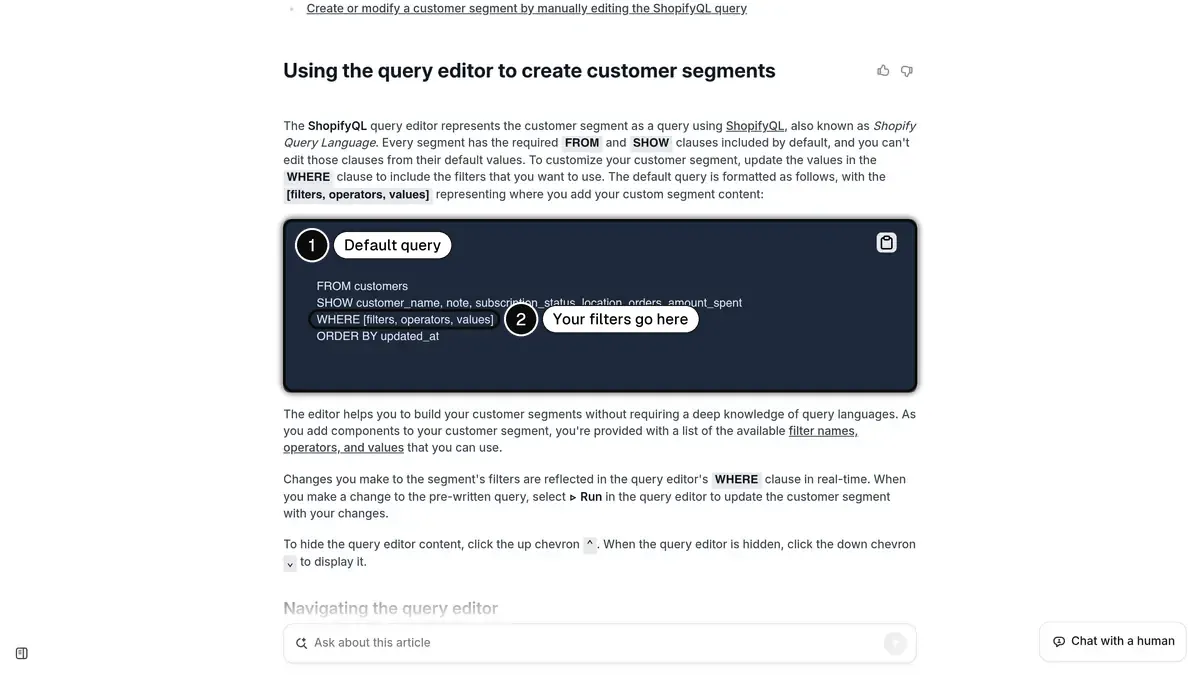
Source: Shopify Help Center, Creating customer segments, read on October 24, 2026. In 1, the default query every segment starts from; in 2, the WHERE clause where you add your filters.
The steps:
- From your Shopify admin, go to Customers, then Segments.
- Click Create segment, start from an existing segment, or click the Templates icon to insert a template's filters.
- Add your filters to the
WHEREclause: a filter name (number_of_orders), an operator (>=) and a value (2). - Click Run query: matching customers appear under the editor, with the count.
- Review the AI-generated description, then click Save segment and name it.
To combine filters, use AND (the customer must meet every condition) and OR (one is enough). Add brackets when you mix them: without brackets, Shopify applies AND before OR, which changes the result. The Help Center's example, (amount_spent > 100 OR number_of_orders >= 5) AND email_subscription_status = 'SUBSCRIBED', returns email subscribers who spent more than $100 or placed at least 5 orders.
Once saved, a segment is ready to use, according to the page on managing customer segments: Use segment > Email starts a Shopify Messaging campaign (only email subscribers receive it), Use segment > Discount creates a code for that segment, and More actions > Export produces a CSV file. Test orders and deleted orders are excluded from the calculations.
10 ready-made segments for an online store
These queries use filters documented by Shopify. The thresholds (30 days, 90 days, 300) are examples: set them to your buying cycle and average order value. For an email campaign, add AND email_subscription_status = 'SUBSCRIBED'.
| # | Segment | ShopifyQL query | What to do with it |
|---|---|---|---|
| 1 | New customers | first_order_date >= -30d AND number_of_orders = 1 | Usage tips, brand story |
| 2 | Second order to win | number_of_orders = 1 AND last_order_date BETWEEN -90d AND -30d | Complementary product, replenishment reminder |
| 3 | Active regulars | number_of_orders >= 2 AND last_order_date >= -90d | New arrivals, bundles, restocks |
| 4 | Best customers | rfm_group = 'CHAMPIONS' OR rfm_group = 'LOYAL' | Early access, review requests, referrals |
| 5 | Big spenders this year | orders_placed MATCHES (sum_amount >= 300, date >= -12m) | VIP perks without blanket discounts |
| 6 | Priority win-back | rfm_group = 'AT_RISK' OR rfm_group = 'PREVIOUSLY_LOYAL' | Personal message, what is new since their last order |
| 7 | Lapsed customers | number_of_orders >= 1 AND last_order_date < -180d | Short win-back series, then stop |
| 8 | Buyers of a product line | products_purchased MATCHES (tag = 'skincare', date >= -90d) | Cross-sell the neighboring line |
| 9 | Customers in one country | customer_countries CONTAINS 'CA' | Country-specific shipping terms and calendar |
| 10 | In-store customers | orders_placed MATCHES (app_id = 129785) | Invite point-of-sale customers to shop online |
A few notes:
- Segment 2 targets the moment that decides repeat buying: one-time buyers, during the window when a second order can still happen.
- Segments 4 and 6 follow the RFM groups and update on their own, with no threshold to maintain.
- Segment 8 relies on your product tags, and segment 10 on the Shopify POS app ID (129785), given as an example in the Help Center.
- Exclude recent buyers from promotional campaigns, for example with
AND last_order_date < -7d.
Using your segments on WhatsApp with Kanal
WhatsApp carries short messages, read on the phone, that customers can reply to. Three of Meta's rules make segmentation matter even more there.
- Consent first. Meta requires businesses to get opt-in before messaging people on WhatsApp, with the business name stated clearly, according to its page on getting opt-in for WhatsApp.
- Per-user limits. WhatsApp may limit how many marketing messages a person receives when they are less likely to engage, based in part on their recent marketing read rate, according to Meta's page on per-user marketing template message limits. An engaged segment gets through better than a blast to the whole list.
- US phone numbers. The same page states that WhatsApp does not currently deliver marketing template messages to users with US phone numbers (a +1 dialing code and a US area code). For a US store, WhatsApp marketing campaigns only reach customers with non-US numbers, so filtering by phone number country is part of every audience.
Kanal is the WhatsApp app built for Shopify stores. According to its help article on choosing a campaign audience, a WhatsApp campaign can target five audience sources:
| Source | What it brings | Good to know |
|---|---|---|
| Kanal segment (Scale plan) | Order and WhatsApp engagement criteria | Recalculate before sending |
| Shopify customer segment | Every Shopify filter, RFM groups included | Imported when you select it, contacts arrive as Unknown |
| Klaviyo segment (Scale plan) | Your existing Klaviyo segments | Imported once, no real-time sync |
| List | A fixed group of contacts | Filled by import, automation or segment |
| CSV or Excel import | A one-off file | Only contacts who agreed to WhatsApp marketing |
Kanal segments
Kanal segments are built on orders and WhatsApp engagement, according to the article on understanding and using segments on Kanal:
- Orders: the Placed an order event, with a frequency (at least once, zero times, at least 3 times...) and a period (whole period, last X days, between two dates), which gives the number of orders and orders placed within a period.
- WhatsApp engagement: Read, Clicked, Received, Sent you a WhatsApp message.
- Phone number country and list membership.
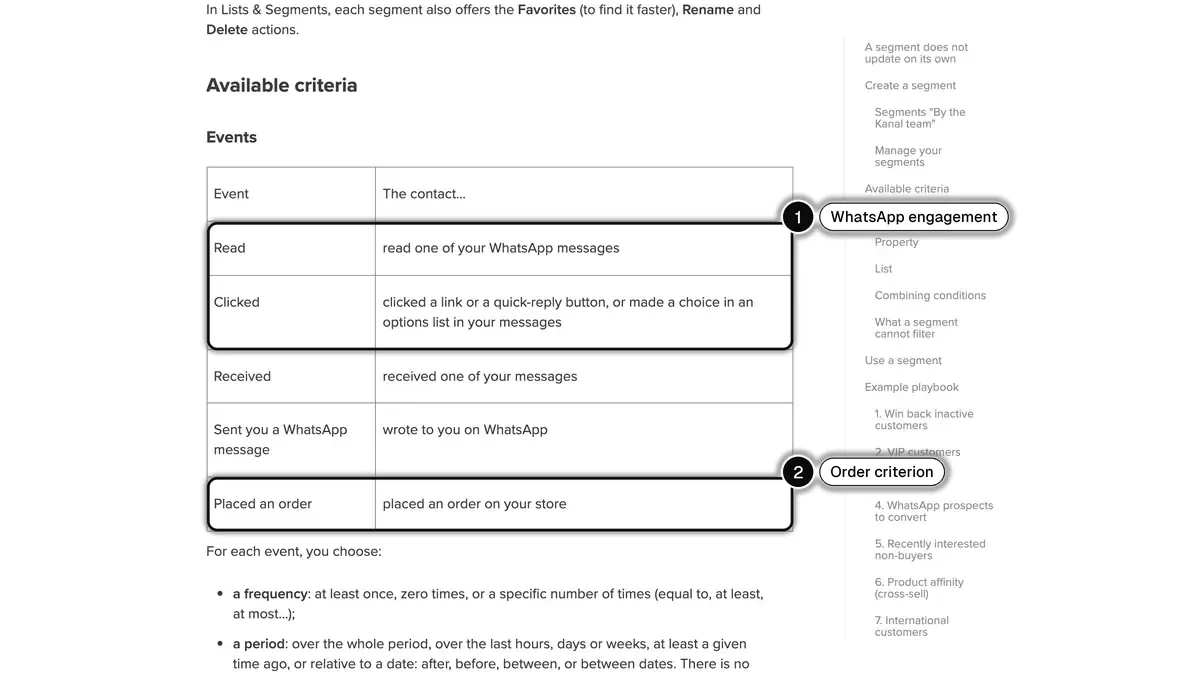
Source: Kanal Help Center, Understanding and using segments on Kanal, read on October 24, 2026. In 1, the WhatsApp engagement criteria (Read, Clicked); in 2, the order criterion.
There is no amount spent or last order date criterion. For win-back, combine "Placed an order at least once" over the whole period with "zero times" over the last 90 days, and add "Phone number country: exclude US" if you have US customers. For a spend threshold or an RFM group, use the Shopify customer segment as the audience.
A Kanal segment does not update in real time: click Recalculate, or tick Recalculate the segment before sending at the Audience step. And add engagement when it matters: "at least 3 orders" plus "Read at least once in the last 90 days" gives you VIPs who still read your messages.
Consent, segment by segment
Kanal does not import Shopify's marketing consent: customers from a Shopify segment arrive with the Unknown status. Unsubscribed contacts are excluded automatically, Unknown contacts are not: check their consent. WhatsApp opt-in comes from the website widget, a popup, a QR code, a prefilled WhatsApp link, an opt-in step in an automation, or an import with consent. A STOP reply opts the customer out.
With the Klaviyo integration, Klaviyo segments become WhatsApp audiences, and WhatsApp events (delivered, read, clicked) flow back into Klaviyo. For a wider look at tools that organize customer data around WhatsApp, see our comparison of the best WhatsApp CRM options.
More than 500 brands use Kanal, rated 5/5 on the Shopify App Store and set up in 5 minutes. Brands on Kanal see open rates above 90% on WhatsApp, and plans start at €89 a month, with Meta's message fees billed separately.
Segmentation mistakes to avoid
Too many segments. A segment without its own message is dead weight: start with the few groups that call for a different action.
Copied thresholds. "Lapsed after 180 days" means nothing for a coffee store selling one-month bags. Set recency and frequency to the real time between your customers' orders.
Treating a segment as consent. Being in a segment does not mean someone agreed to hear from you: always cross-check with the channel's subscription status.
Stale audiences and no holdout. A segment imported into another tool reflects the day of the import: recalculate before each send. And keep a small holdout group, or a lift may just be the season.
Customer segmentation in short
- Definition: groups of customers defined by a rule, so each one gets the message that fits it.
- Criteria: start with orders (recency, frequency, spend, products), then location, channel and consent.
- In Shopify: the RFM customer analysis report sorts customers into 11 groups, the segment editor turns a rule into a dynamic list.
- On WhatsApp: target an engaged segment, check consent, exclude US numbers from marketing campaigns and recalculate the audience before sending.
To send your Shopify segments on WhatsApp with Kanal, book a demo: we will show you second-order, VIP and win-back segments on your own store.
See Kanal on your own store
- Your campaigns and cart reminders on WhatsApp, starting from your own store
- Post-purchase offers, back-in-stock alerts, then the AI agent that advises your customers
- You leave with the plan that fits and its price
From €89/month
- brands
- 500+
- to set up
- 5 min
- open rate on WhatsApp
- +90%
Nicolas helps e-commerce brands grow revenue with WhatsApp marketing. With deep expertise in Shopify ecosystems and conversational commerce, he shares proven strategies for abandoned cart recovery, broadcast campaigns, and AI-powered customer engagement.