Best WhatsApp Automation Tools for Online Stores (2026)
The best WhatsApp automation tools for Shopify stores: 6 tools compared on triggers, AI, Shopify integration and prices read on October 25, 2026.
 Nicolas ProvostOct 25, 2026 · 16 min read
Summarize this article with an AI
 ChatGPT
 Claude
Table of contents (15)
Key takeaways
- A WhatsApp automation tool sends messages on store events: abandoned checkouts, new orders, shipping updates, back-in-stock alerts and keywords customers type.
- Meta bills each delivered template by category and country, a cart reminder counts as marketing, and since October 1, 2026 service replies are billed after 1,000 free ones per number each month.
- Kanal, our pick for Shopify stores, runs WhatsApp flows on checkouts, orders, five shipping statuses, keywords and Klaviyo webhooks, from $89/month (Pro) and $149/month (Scale).
The best WhatsApp automation tool for a Shopify store is Kanal, a Shopify app that sends WhatsApp messages on store events: abandoned checkouts, new orders, each shipping status, back-in-stock alerts, keywords customers type and webhooks from tools such as Klaviyo. On the Scale plan, an AI agent also answers customers from your catalog and policies, and hands off to your team when a person is needed.
WhatsApp automation means messages that go out on their own when something happens in your store or in a conversation, on the official WhatsApp Business Platform. Below, we compare six tools, Kanal included, on what they automate, the channels they cover, how they connect to Shopify and the starting price each vendor displays, read on October 25, 2026.
This page compares tools that automate WhatsApp for a store. To pick an AI chatbot that holds conversations, read our comparison of the best WhatsApp chatbots. To see how a bot is built step by step, read WhatsApp bot for ecommerce. For email, SMS and WhatsApp planned together, see our guide to ecommerce marketing automation.
WhatsApp automation tools compared
| Tool | What it automates | Channels | Shopify connection | Starting price (official page, read October 25, 2026) |
|---|---|---|---|---|
| Kanal | Flows on abandoned checkouts, orders, five shipping statuses, keywords, webhooks and Recharge events; AI agent on Scale | WhatsApp; SMS and RCS on Scale | Native Shopify app | Pro $89/month, Scale $149/month (Shopify App Store), Meta fees at cost |
| Klaviyo | WhatsApp messages inside Klaviyo flows (abandoned cart, browse abandonment, welcome, post-purchase) and campaigns | Email, SMS, WhatsApp | Klaviyo's own Shopify integration | Free plan; WhatsApp draws on a prepaid Mobile Messaging plan |
| Wati | Cart recovery, drip campaigns on Pro, one builder for chatbots, automation rules and AI agents | WhatsApp, with RCS and SMS in the inbox | Shopify app | Growth $69/month (Shopify App Store), messages extra |
| Zoko | 11 pre-built Shopify flows on every plan, custom flows billed per flow | WhatsApp, Instagram, Messenger | Built for Shopify | Starter $49.99/month plus $0.015 per conversation |
| Interakt | Order updates, abandoned checkout reminders, winback notifications, COD-to-prepaid flow | WhatsApp, Instagram | Shopify integration | Growth $55/month billed monthly (Starter covers Instagram only) |
| respond.io | Workflows and AI Agents from Growth, webhooks and HTTP requests on Advanced | Many messaging channels, WhatsApp included | No store integration named on its pricing page; Zapier and Make from Growth | Starter $79/month billed yearly, workflows on Growth at $159/month billed yearly |
Prices are the entry plans shown on each vendor's page, in US dollars as displayed. Automation and AI often sit on a higher plan or are billed as credits, so read each tool's section. Meta's message fees come on top for every tool.
What should a WhatsApp automation tool do for an online store?
Most store automations come down to a handful of flows. Each one starts from a trigger, and each message belongs to a Meta category that sets its price and its rules.
| Flow | Trigger | Message type | What to check in the tool |
|---|---|---|---|
| Abandoned checkout reminder | A checkout left unpaid | Marketing template | The flow stops as soon as the customer orders |
| Order confirmation | Order created | Utility template | Whether it fires on unpaid orders (cash on delivery) |
| Shipping updates | Shipped, out for delivery, delivered | Utility template | One message per status, with the customer's tracking link |
| Back-in-stock alert | The product is available again | Template sent to subscribers | How customers subscribe from the product page |
| Welcome offer | A keyword, a QR code or a popup | Template, then in-window messages | That the opt-in is recorded |
| Customer questions | The customer writes first | Service message (free-form reply) | AI answers, handoff to a person |
The categories come from Meta itself. Its pricing documentation uses a cart abandonment reminder as its example of a marketing template and an order confirmation as its example of a utility template. Free-form replies, whether a person or a third-party AI writes them, are service messages, and they can only be sent inside the 24-hour customer service window that opens when the customer writes to you. Outside that window, every message has to be an approved template.
How did we compare these tools?
We read each vendor's pricing page, Shopify App Store listing or help center, and Meta's pricing documentation, in a browser on October 25, 2026. We looked at the triggers, the logic inside a flow (waits, conditions, exits), the Shopify connection, the AI and the pricing model, and copied prices as displayed, without conversion. Kanal is our product: it leads this list because it is the tool we recommend for Shopify stores, and every other entry is factual.
The 6 best WhatsApp automation tools
1. Kanal, WhatsApp automations built on Shopify events
Kanal is a WhatsApp marketing and sales app for Shopify stores, used by more than 500 brands and installed in 5 minutes. Its flow builder starts from what happens in the store, not from a list you upload.
Triggers you can start a flow from:
- Shopify abandoned checkout: the flow stops on its own as soon as the customer orders. This is the base of Kanal's abandoned cart recovery.
- Shopify order created, paid or not, useful for cash-on-delivery confirmations.
- Shopify shipment status, one flow per status: fulfillment created (shipped with a tracking number), ready for pickup, in transit, out for delivery, delivered.
- A keyword received on WhatsApp, usually sent through a pre-filled link or a QR code.
- An incoming webhook, which a Klaviyo flow or any other tool can call.
- Recharge subscription events, a HubSpot dynamic list, and events from a custom store API, which is how PrestaShop stores connect.
Inside a flow: templates, in-window messages with buttons and waits on every plan. Scale adds conditions (order placed since the flow started, tags, cash on delivery, products, checkout total, number of orders, phone country), A/B splits, unique Shopify discount codes and customer tags. A flow can stop when the customer replies, and quiet hours keep messages out of the night.
Klaviyo: with a private API key, a Klaviyo segment can be a WhatsApp campaign audience, a Webhook block in a Klaviyo flow can trigger a Kanal automation, and Kanal sends WhatsApp events (sent, delivered, read, clicked, inbound, undeliverable) back to Klaviyo. See the Klaviyo integration.
Price: Pro at $89/month and Scale at $149/month on the Shopify App Store on October 25, 2026. Conditions, A/B tests, the AI agent, SMS and RCS campaigns, and the Klaviyo, Gorgias, Recharge and Crisp integrations come with Scale. Meta's WhatsApp fees are passed through at cost.
What to plan for: opt-in. Shopify's checkout marketing consent is not synced, so Shopify contacts arrive as Unknown. Opt-in comes from the WhatsApp widget, popups, QR codes and pre-filled links, an opt-in step in a flow or a CSV import with consent; STOP opts a customer out.
2. Klaviyo, WhatsApp inside your email and SMS flows
Klaviyo is an email and SMS platform that has added WhatsApp as a channel, with help articles for adding WhatsApp to abandoned cart, browse abandonment, welcome and post-purchase flows. For abandoned carts, the Klaviyo guide places a conditional split after the first delay, so profiles who can receive WhatsApp marketing get a WhatsApp message, and recommends one WhatsApp reminder per recipient for a single abandoned cart event.
- Automation: WhatsApp in flows, WhatsApp campaigns and transactional WhatsApp messages
- Price: a free plan to start; WhatsApp messages are paid from a prepaid Mobile Messaging plan, at rates that follow Meta's categories and the recipient's country, as explained in Klaviyo's WhatsApp billing guide
Built for: brands that want WhatsApp in the same flows as email and SMS. Kanal also connects to Klaviyo when WhatsApp needs its own inbox and Shopify flows.
3. Wati, cart recovery plus a flow builder with AI agents
Wati's Shopify app, Wati: WA Cart Recovery & AI, starts with abandoned cart recovery, then puts chatbots, automation rules and AI agents in one flow builder. It syncs Shopify segments, and its inbox covers WhatsApp, RCS and SMS.
- Automation: cart recovery and standard promotions on Growth; multi-step drip campaigns, an AI agent for FAQs and product assistance, and third-party checkout apps on Pro
- Price: on its Shopify App Store listing, Growth at $69/month, Pro at $149/month and Business at $349/month, with a 7-day free trial. Pro and Business list automation at $40 per 1,000 credits and AI at $30 per 1,000 credits. Message charges are extra and vary by country
Built for: stores that start with cart recovery and want AI agents and a shared inbox in the same app.
4. Zoko, pre-built Shopify flows priced per flow
Zoko presents itself as WhatsApp for Shopify. Every plan includes 11 pre-built flows: abandoned checkout recovery, review collection, double confirmation of cash-on-delivery orders, COD-to-prepaid conversion, reorder reminders, product upsells and order notifications.
- Custom flows: editing a pre-built flow, or building your own, makes it a premium flow at $5.99 a month per flow, with 500K flow steps a month included
- AI: add-on agents at $24.99/month plus $0.09 per resolution for FAQs or order tracking, and a sales agent at $24.99/month plus 3% of order value
- Price: on Zoko's pricing page, Starter at $49.99/month plus a $0.015 markup on every conversation, Plus at $79.99/month with the first 5K conversations free of markup, Elite at $139.99 and Max at $499.99. WhatsApp fees follow a rate card, and there is a 7-day trial
Built for: Shopify stores that want ready-made flows and pay for customization flow by flow.
5. Interakt, Shopify notifications and checkout reminders
Interakt sells WhatsApp and Instagram automation. On its US pricing page, the Shopify integration covers order update notifications and abandoned checkout reminders, and the Growth plan adds multiple abandoned checkout reminders, winback notifications and a flow that turns cash-on-delivery orders into prepaid ones.
- Automation: linear workflows and a basic chatbot builder on Growth; chatbots with branching, logical flows and API calls, and branched workflows, on Advanced
- Price (monthly billing): Growth at $55/month for WhatsApp and Instagram, Advanced at $69/month. The $12 Starter plan covers Instagram only. Message costs are extra, and quarterly and yearly billing are discounted
Built for: stores that want order notifications and checkout reminders on WhatsApp, with Instagram in the same tool.
6. respond.io, workflows across many channels
respond.io is a customer conversation platform for many messaging channels, WhatsApp among them. Automation starts on the Growth plan: broadcasts, workflow automation and AI Agents, with Zapier and Make integrations and a developer API. Advanced adds HTTP requests inside workflows and incoming and outgoing webhooks.
- Shopify: its pricing page names no store integration, so store events would come in through Zapier, Make, its developer API or webhooks
- Price: on respond.io's pricing page, Starter at $79/month, Growth at $159/month and Advanced at $279/month, each billed yearly and priced by monthly active contacts, with a 7-day free trial and no credit card needed
Built for: teams that answer customers on several channels and build their own workflows around them.
What does WhatsApp automation really cost?
Plan for three lines:
- The plan: flat (Kanal, Wati, Interakt), per active contact (respond.io), or per custom flow plus a markup per conversation (Zoko).
- Usage add-ons: automation or AI credits (Wati), AI resolutions (Zoko), a prepaid messaging balance (Klaviyo).
- Meta's fees, charged per delivered message at a rate set by the message category and the recipient's country calling code.
The monthly Meta bill of an automation program follows one formula:
Meta fees = Σ (delivered templates of each category × that category's rate in the recipient's market) + (service messages beyond the 1,000 free ones × the service rate)
Two changes took effect on October 1, 2026: Meta resumed charging for service messages, with 1,000 free service messages per business phone number each month that do not roll over, and utility templates sent inside an open customer service window, free since July 1, 2025, are billed again. When a customer writes from a click-to-WhatsApp ad and you reply within the customer service window, a free entry point window opens for up to 7 days, and Meta does not charge marketing, utility, authentication or service messages while it stays open.
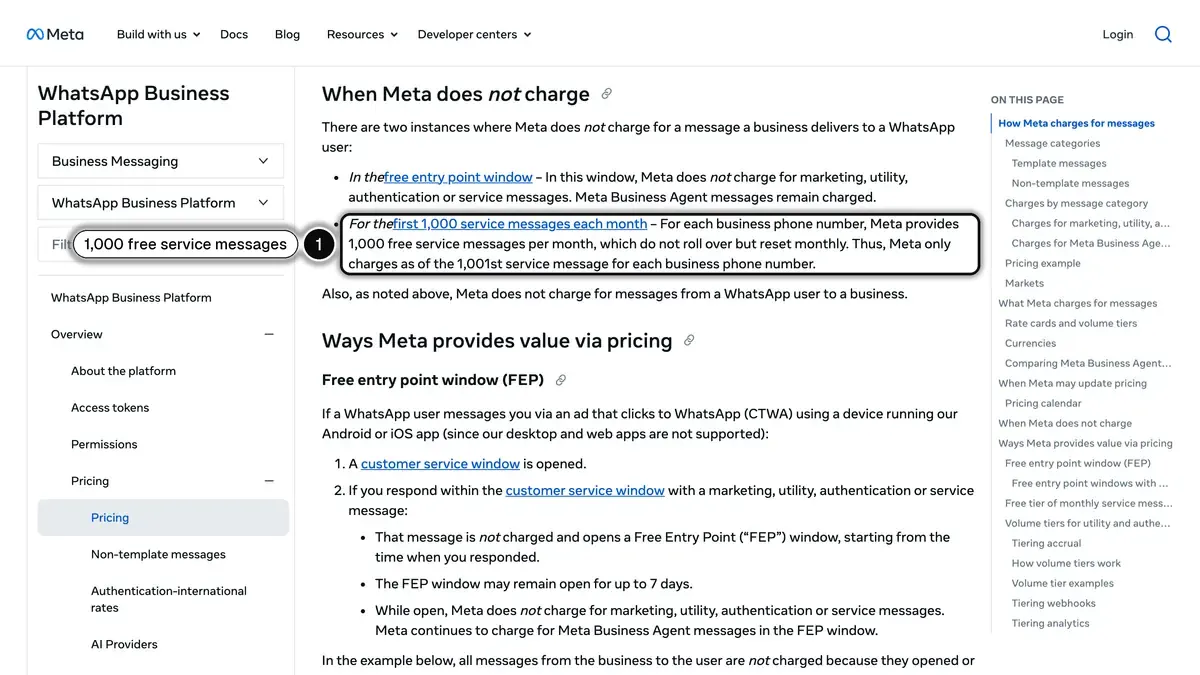 Source: Meta for Developers, Pricing on the WhatsApp Business Platform, read on October 25, 2026. In 1, the free tier of 1,000 service messages per business phone number each month.
For an automation program, this means an AI agent that replies to customers is no longer free beyond the first 1,000 replies a month per number, and order updates sent while a conversation is open are billed again.
Can you automate WhatsApp cart reminders for US customers?
Not with WhatsApp marketing templates. Meta's page on per-user marketing limits states that WhatsApp does not currently deliver marketing template messages to users with United States phone numbers (a +1 dialing code with a US area code), and that trying returns an error.
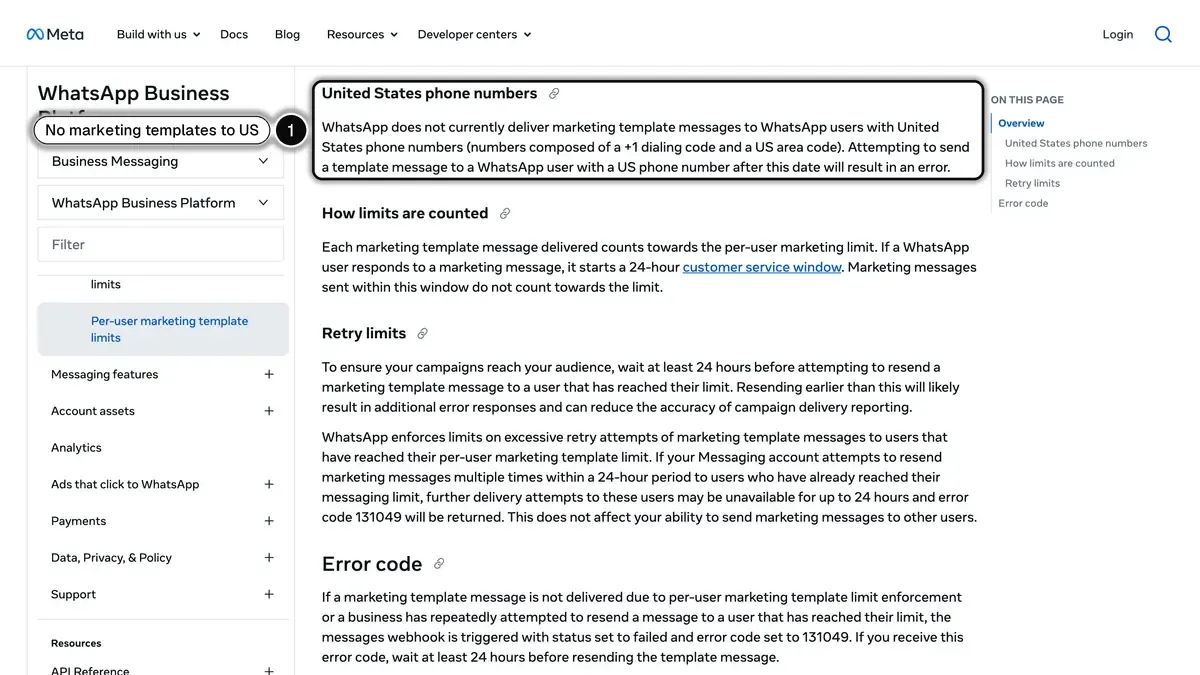 Source: Meta for Developers, Per-user marketing template message limits, read on October 25, 2026. In 1, the rule for United States phone numbers.
A cart reminder is a marketing template, so it does not reach US numbers on WhatsApp. The rule names marketing templates only: order confirmations and shipping updates (utility) and replies to customers who write first (service) are separate categories. For a store with US and international customers, the usual setup is WhatsApp flows for international numbers and texts for US cart reminders. Kanal sends automated SMS on the same store events from the Scale plan.
How do you set up a first WhatsApp automation on Shopify?
Start with the abandoned checkout flow: it has the clearest trigger and the clearest result.
- Read your abandoned checkouts. In your Shopify admin, go to Orders, then Abandoned checkouts. Shopify counts a checkout as abandoned when it stays incomplete for more than ten minutes after the customer entered an email, and only for the Online Store and Buy Button sales channels, as its Help Center explains.
- Check what already runs. Shopify can send its own abandoned checkout emails from Apps, then Messaging, then Automations. Time the WhatsApp reminder so it does not land at the same moment as the email.
- Collect opt-in first. Meta reminds businesses that they can only message WhatsApp users who have opted in. Add a WhatsApp widget, a popup or a QR code before the checkout.
- Write the template. A cart reminder is a marketing template: the customer's first name, one benefit, one button to their own checkout, and a STOP line in the footer.
- Build the flow. Trigger: abandoned checkout. Then a wait, the template, and an exit when the customer orders or replies. If you add a second reminder after more than 24 hours without a reply, it has to be a template again.
- Set quiet hours and measure. Keep reminders out of the night, and compare the Recovery status column in Shopify with the revenue your WhatsApp tool attributes to the flow.
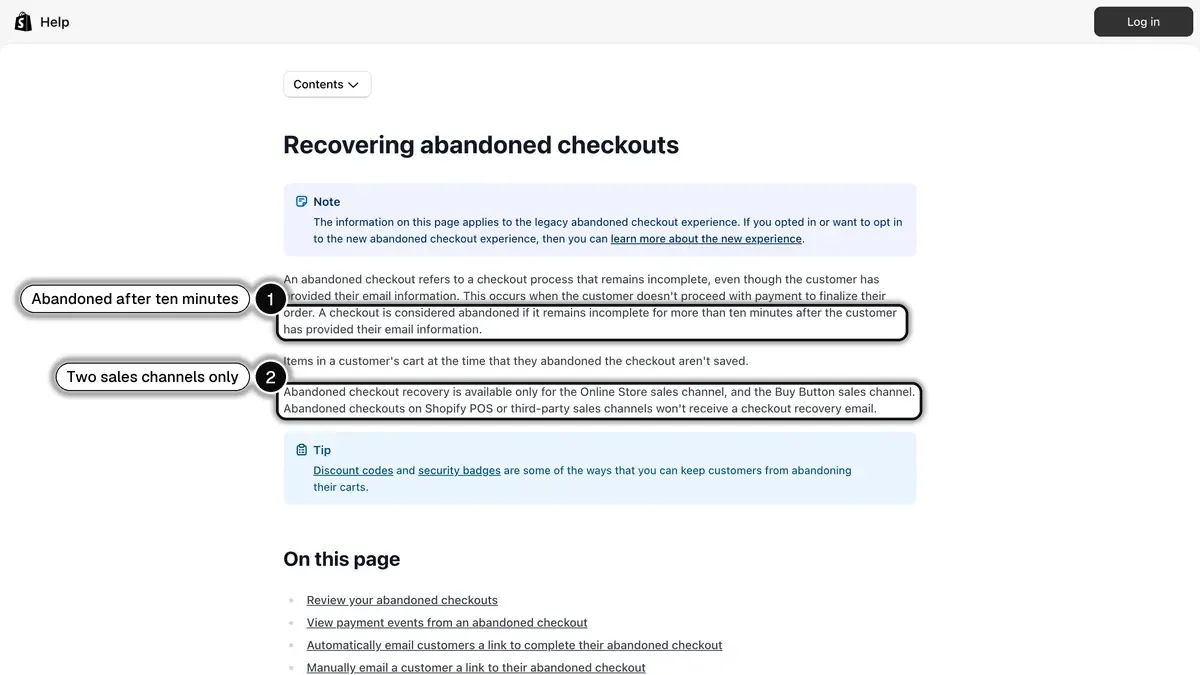 Source: Shopify Help Center, Recovering abandoned checkouts, read on October 25, 2026. In 1, the ten-minute rule; in 2, the two sales channels covered.
Then add order confirmations and the shipping statuses, which are utility messages with no promotional content, before you build welcome and win-back flows.
Can an AI tool reduce customer questions on WhatsApp?
Yes, if it works in two steps. First, answer the most common question before it is asked: a WhatsApp message when the parcel ships, when it is out for delivery and when it is delivered heads off many "where is my order?" messages. Second, let an AI agent answer what remains.
Kanal's WhatsApp AI agent, on the Scale plan, answers from your catalog, FAQ and store policies, and recommends products with a link to buy. It checks an order's status after verifying the customer's email and order number. It never issues a refund, a discount or a cancellation: those requests go to your team, with the conversation history. When you use Gorgias, Crisp or HubSpot, only the conversations that need a person are sent there, not those an automation or the AI agent already handled.
How do you choose a WhatsApp automation tool that works with Shopify and your CRM?
Six questions settle most choices:
- Are the Shopify triggers native? A connector (Zapier, Make, webhooks) works too, but you build and maintain the plumbing.
- Is the flow logic on your plan? Conditions, A/B splits and discount codes often sit on a higher plan, Kanal's Scale included.
- Does it work with your email tool or CRM? Look for reusable segments, a way for email flows to trigger WhatsApp, and WhatsApp events sent back. With Klaviyo, Kanal does all three.
- What happens when a person is needed? Test the handoff to your helpdesk before launch.
- How is opt-in collected? Without opted-in contacts, no flow can send.
- What is the full monthly cost? Plan, add-ons and Meta's fees at your volume, passed through at cost or marked up.
Choose Kanal if you run a Shopify store and want WhatsApp flows on checkouts, orders and shipments, an AI agent and campaigns in one app, with Klaviyo connected. Book a demo or see the plans.
See Kanal on your own store
- Your campaigns and cart reminders on WhatsApp, starting from your own store
- Post-purchase offers, back-in-stock alerts, then the AI agent that advises your customers
- You leave with the plan that fits and its price
From €89/month
- brands
- 500+
- to set up
- 5 min
- open rate on WhatsApp
- +90%
Nicolas helps e-commerce brands grow revenue with WhatsApp marketing. With deep expertise in Shopify ecosystems and conversational commerce, he shares proven strategies for abandoned cart recovery, broadcast campaigns, and AI-powered customer engagement.