How to edit a WhatsApp message (15-minute limit)
You can edit a WhatsApp message for 15 minutes after sending it. The steps on Android, iPhone and Web, what the other person sees, and what to do after.
 Nicolas ProvostOct 7, 2026 · 6 min read
Summarize this article with an AI
 ChatGPT
 Claude
Table of contents (9)
Key takeaways
- You can edit a WhatsApp message for 15 minutes after sending it by pressing and holding the message, tapping Edit, changing the text and confirming.
- The edited message shows the word "edited" next to its timestamp for everyone in the chat, with no new notification and no visible edit history.
- Photos, videos and other media cannot be edited, and after 15 minutes the remaining option is Delete for Everyone, available for two days.
You can edit a WhatsApp message for up to 15 minutes after sending it: press and hold the message, tap Edit (on Android, tap the three dots first), change the text and confirm. The message updates for everyone in the chat and shows the word "edited" next to its timestamp.
Those rules come from WhatsApp's Help Center page How to edit messages, read on October 7, 2026. This guide covers the steps on each device, what the other person sees, what cannot be edited, and what to do once the 15 minutes have passed.
How do you edit a sent WhatsApp message?
The path differs slightly between Android, iPhone and WhatsApp Web.
| Step | Android | iPhone | WhatsApp Web |
|---|---|---|---|
| 1 | Press and hold the message, then tap the three dots (More options) | Press and hold the message, then tap Edit | Hover over the message, click the menu arrow, then Edit message |
| 2 | Select Edit and change your text | Change your text | Change your text |
| 3 | Tap the check mark to update the message | Tap the blue check mark, then OK | Click the check mark, then OK |
Source: How to edit messages, WhatsApp Help Center (Android, iPhone and Web versions), read on October 7, 2026.
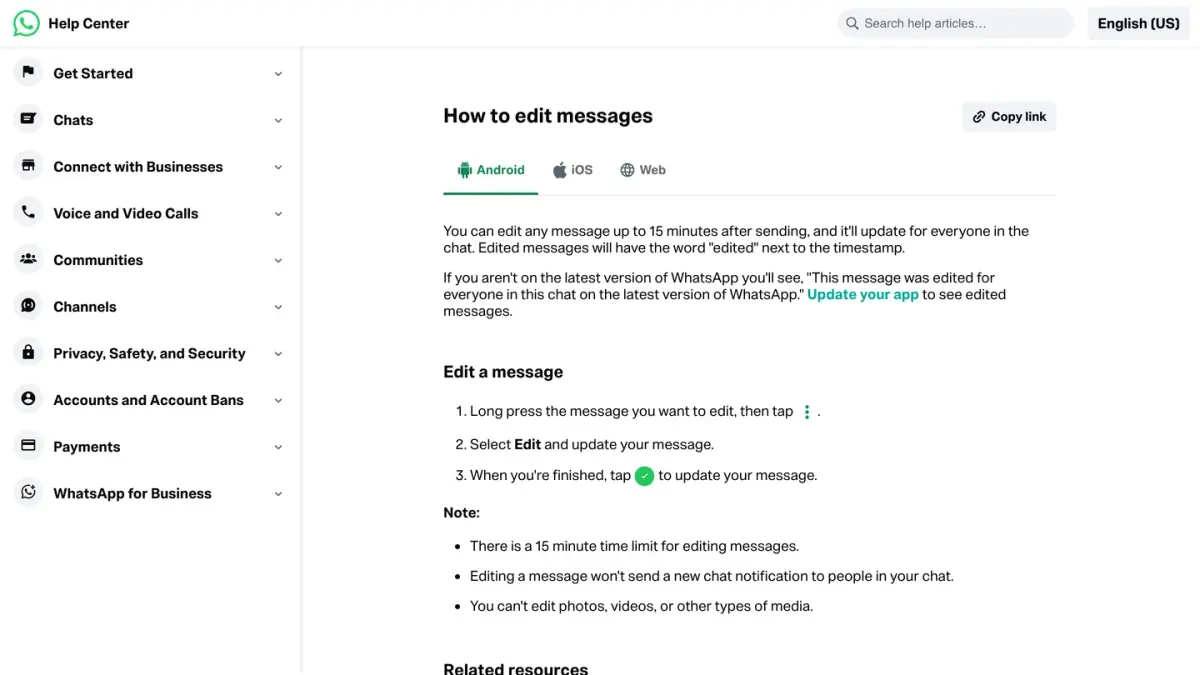
WhatsApp's page says the edited message updates for everyone in the chat.
How long do you have to edit a WhatsApp message?
You have 15 minutes from the moment you send the message. WhatsApp's Help Center page is explicit, as of October 7, 2026: there is a 15 minute time limit for editing messages. After that, the message can no longer be edited.
Once the window has closed, you have two documented options:
| Edit | Delete for everyone | |
|---|---|---|
| Time limit | 15 minutes after sending | Two days after sending |
| What the chat shows afterward | The new text, with "edited" next to the timestamp | "This message was deleted" |
| Applies to | The text of a message you sent, not photos, videos or other media | Messages you sent; media already saved in the Photos of a recipient on iPhone might remain there |
Sources: How to edit messages and How to delete messages, WhatsApp Help Center, read on October 7, 2026.
Our guide to deleting a WhatsApp message for everyone walks through that second route step by step.
What does the other person see when you edit a message?
Here is what WhatsApp documents:
- A label. The edited message carries the word "edited" next to its timestamp, visible to everyone in the chat.
- No new notification. Editing a message does not send a new chat notification to the people in the chat.
- No edit history. When it announced the feature on its blog on May 22, 2023, WhatsApp said the label lets people know about the correction without showing the edit history.
- Read receipts start again. According to WhatsApp's page on read receipts, read on October 7, 2026, read receipts reset when you edit a message, so you can see who viewed the updated version. Our guide to WhatsApp ticks explains how to read them.
- Older versions of the app. Someone who is not on the latest version of WhatsApp sees a notice saying the message was edited for everyone on the latest version, and has to update the app to see edited messages.
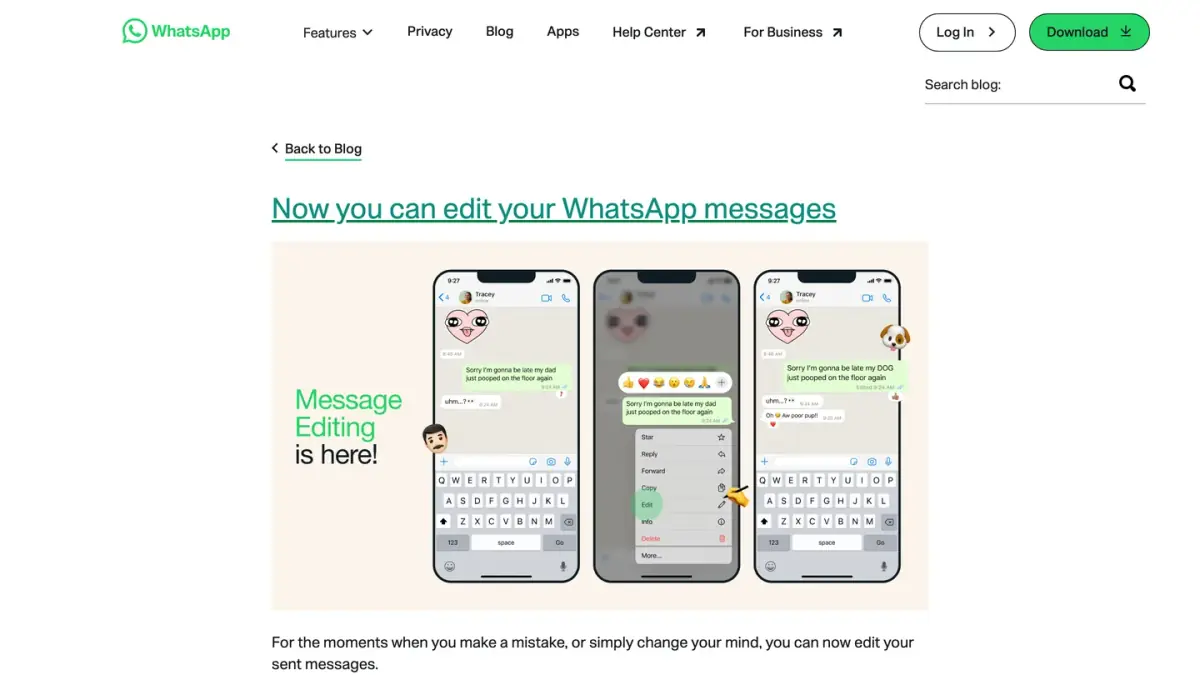
One limit follows from all this: an edit replaces the text in the chat, but it cannot undo the fact that someone already read the first version.
What can't you edit on WhatsApp?
WhatsApp's page lists two limits:
- Messages sent more than 15 minutes ago.
- Photos, videos and other types of media. If the wrong file went out, deleting the message for everyone and sending the right one is the documented way out.
Why is there no Edit option on my message?
Start with the two limits above: the message may be older than 15 minutes, or it may be a photo, a video or another type of media. Those are the limits WhatsApp's page gives.
If neither applies, update WhatsApp. The same Help Center page asks people who are not on the latest version to update the app in order to see edited messages, so an outdated app is the first thing to rule out.
Can you edit a WhatsApp channel update?
Channels follow a different rule. According to WhatsApp's page How to edit channel updates, read on October 7, 2026, a channel admin can edit some updates for up to 30 days. The steps on Android mirror those of a chat: press and hold the update, tap the three dots, select Edit, make the change and tap the check mark.
The edited update shows the word "edited" next to its timestamp, and followers are not notified. Photos, videos, audio updates, polls, other media and forwarded updates cannot be edited.
Are edited messages still end-to-end encrypted?
Yes. In its announcement of May 22, 2023, WhatsApp states that messages and the edits made to them are protected by end-to-end encryption, like all personal messages, media and calls.
Edit, delete or let it disappear: which one should you use?
- A typo spotted right away: edit the message, within 15 minutes.
- A message sent to the wrong chat: delete it for everyone. WhatsApp's Help Center adds that a deleted message cannot be brought back unless it was included in a backup, a case covered in our guide to recovering deleted WhatsApp messages.
- A conversation you do not want to keep: turn on disappearing messages, which erase new messages after the duration you choose.
- A conversation you want to keep away from prying eyes: use chat lock.
If you run a store
This guide is about your own chats. If you also run a Shopify store, Kanal is a WhatsApp marketing and sales app for Shopify stores: campaigns, abandoned cart recovery and order notifications.
If you run a business account, messages sent to customers at scale are not typed one by one: they go through the WhatsApp Business API, which Meta bills per delivered message. See what a WhatsApp message costs a business and our comparison of WhatsApp Business API providers.
Nicolas helps e-commerce brands grow revenue with WhatsApp marketing. With deep expertise in Shopify ecosystems and conversational commerce, he shares proven strategies for abandoned cart recovery, broadcast campaigns, and AI-powered customer engagement.