WhatsApp Business Pricing 2026: Free App vs API Costs

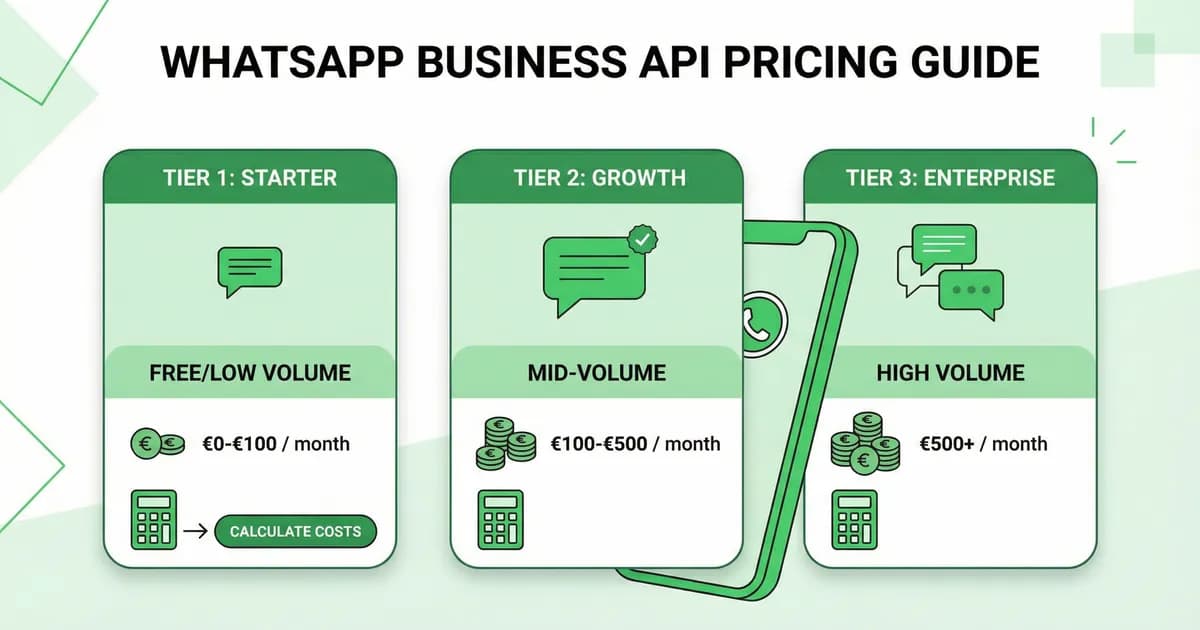
WhatsApp Business pricing in plain English: free app, API per-conversation rates by country, hidden fees, and a calculator to forecast your monthly bill.
Table of contents (31)
WhatsApp Business pricing has two parts: the WhatsApp Business app is completely free, while the WhatsApp Business API charges per 24-hour conversation (roughly $0.025 for marketing, $0.015 for utility, and the first 1,000 service conversations free each month). This guide breaks down every cost clearly, with real examples and tips to maximize your ROI.
WhatsApp Business Pricing Tiers
Tier 1: WhatsApp Business App (Free)
The WhatsApp Business app is 100% free:
- Free to download and use
- Free messaging with customers
- Free business profile, catalog, and quick replies
- Free WhatsApp Web access
Limitations that cost you money indirectly:
- Manual messaging only (no automation = labor cost)
- 256-contact broadcast limit (can't scale)
- No Shopify integration (manual order tracking)
- No analytics (can't optimize campaigns)
- No AI chatbot (support requires human agents)
Tier 2: WhatsApp Business API (Pay-per-Conversation)
The WhatsApp Business API enables automation and scale. You pay for:
- Meta conversation fees (per conversation, varies by category and country)
- Platform fee (monthly subscription to your API provider, e.g., Kanal)
Meta Conversation Pricing (2026)
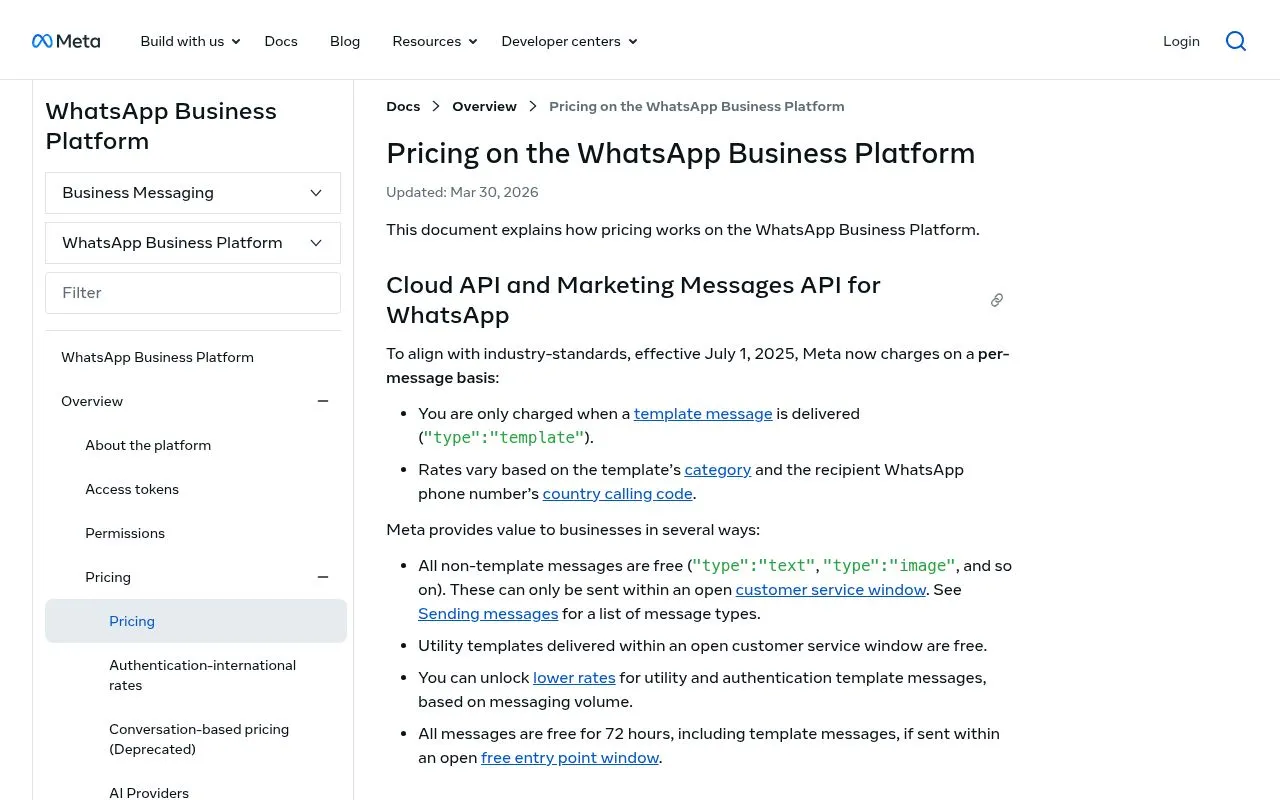
Meta charges per conversation, not per message. A conversation is a 24-hour messaging window during which you can send unlimited messages.
Pricing by Category
| Category | What It Covers | US Price | EU Price | Brazil Price |
|---|---|---|---|---|
| Marketing | Promotions, campaigns, cart recovery, newsletters | $0.025 | €0.045 | R$0.40 |
| Utility | Order notifications, shipping updates, receipts | $0.015 | €0.025 | R$0.20 |
| Authentication | OTP codes, login verification | $0.010 | €0.018 | R$0.15 |
| Service | Customer-initiated support chats | Free (first 1,000/mo) | Free (first 1,000/mo) | Free (first 1,000/mo) |
Source: Meta WhatsApp Business Pricing.
Pricing by Country (Marketing Conversations)
| Country | Cost per Conversation |
|---|---|
| United States | $0.025 |
| United Kingdom | $0.047 |
| Germany | $0.065 |
| France | $0.065 |
| Spain | $0.040 |
| India | $0.010 |
| Brazil | $0.040 |
| Mexico | $0.030 |
Full pricing table: Meta's official rate card.
Real-World Cost Examples
Small Shopify Store (500 orders/month)
| Flow | Conversations/Month | Category | Cost |
|---|---|---|---|
| Cart recovery | 300 | Marketing | $7.50 |
| Order confirmations | 500 | Utility | $7.50 |
| Shipping updates | 500 | Utility | $7.50 |
| Customer support | 200 | Service | Free |
| Monthly campaign | 1,000 | Marketing | $25.00 |
| Total Meta fees | 2,500 | $47.50 | |
| Kanal platform fee | $89/mo | ||
| Grand Total | $136.50/mo |
Expected Revenue from WhatsApp:
- Cart recovery (15% rate × $80 AOV × 300 carts): $3,600/mo
- Campaign revenue (5% conversion × $80 AOV × 1,000 sends): $4,000/mo
- Total Revenue: ~$7,600/mo → 55x ROAS
Medium Shopify Store (3,000 orders/month)
| Flow | Conversations/Month | Category | Cost |
|---|---|---|---|
| Cart recovery | 2,000 | Marketing | $50 |
| Order notifications | 3,000 | Utility | $45 |
| Customer support | 1,000 | Service | Free |
| Weekly campaigns | 8,000 | Marketing | $200 |
| Post-purchase upsells | 1,500 | Marketing | $37.50 |
| Total Meta fees | 15,500 | $332.50 | |
| Kanal platform fee | $89/mo | ||
| Grand Total | $421.50/mo |
Use our ROAS calculator to estimate your specific ROI.
How to Reduce WhatsApp Business Costs
1. Maximize Service Conversations
Service conversations (customer-initiated) include 1,000 free per month. Design your flows so customers initiate conversations:
- Click-to-chat buttons on your website (create one free)
- QR codes on packaging and receipts
- "Message us on WhatsApp" CTAs in emails
2. Use the 24-Hour Window Wisely
Once a conversation opens, you have 24 hours to send unlimited messages. Batch your touchpoints:
- Combine order confirmation + review request in one window
- Send cart recovery + product recommendation together
- Include upsell in post-purchase notification window
3. Segment Aggressively
Don't blast everyone. Use Klaviyo integration to send campaigns only to:
- Customers likely to convert (based on engagement score)
- Segments with matching interests
- Active subscribers (suppress dormant contacts)
Better targeting = fewer conversations = lower cost + higher conversion.
4. Let AI Handle Support
The AI chatbot resolves 80% of support queries without human intervention. That means fewer support conversations and faster response times.
WhatsApp Business Pricing vs Competitors
vs SMS Marketing (Postscript, Attentive)
| Metric | WhatsApp (Kanal) | SMS (Postscript) |
|---|---|---|
| Cost per message | $0.025/conversation | $0.015-0.05/SMS |
| Messages per "send" | Unlimited (24h window) | 1 per payment |
| Open Rate | 96% | 98% |
| CTR | 15-25% | 6-8% |
| Revenue per $1 spent | $5-12 | $2-5 |
| Rich Media | Yes | No (SMS) / Limited (MMS) |
See our full comparison of SMS vs WhatsApp.
vs Email Marketing (Klaviyo)
| Metric | WhatsApp (Kanal) | Email (Klaviyo) |
|---|---|---|
| Cost per contact/month | Variable (per conversation) | $0.01-0.05 |
| Open Rate | 96% | 20-25% |
| CTR | 15-25% | 2-5% |
| Best For | Urgency, cart recovery, support | Long-form, newsletters |
The best approach: use both. Kanal + Klaviyo integration lets you orchestrate WhatsApp and email from a single platform.
Platform Fees Comparison
| Provider | Monthly Fee | Meta Markup | Shopify Integration | AI Chatbot |
|---|---|---|---|---|
| Kanal | From $89/mo | No markup | Native | Yes |
| Twilio | Pay-as-you-go | Variable | Manual | No |
| MessageBird | From $50/mo | Variable | Limited | No |
| Wati | From $49/mo | Included | Limited | Basic |
| Charles | Custom pricing | Included | Yes | Limited |
Check Kanal's pricing page for full plan details.
Hidden Costs and Pricing Traps
Beyond the published Meta rates, several costs are rarely mentioned upfront. Watch out for these to avoid surprises.
1. BSP markup on conversations
Some Business Solution Providers add a 10 to 30% markup on top of Meta's published prices. Always verify:
- Conversations billed at exact Meta cost or with markup?
- One-time setup fees (commonly $200 to $1,000)
- Per-template approval fees (some BSPs charge per submitted template)
- Tier-locked premium support (basic plan often lacks decent help)
Kanal passes Meta's conversation costs through with zero markup, plus a transparent flat monthly fee.
2. Template rejections and approval delays
Every marketing template needs Meta approval before use. Side effects:
- Approval lag: usually 1 to 24 hours, up to 7 days in disputes
- Rejection rate: 15 to 25% of submissions on first try
- Re-submission is unlimited but blocks campaign launches
- Repeated rejections lower your quality rating
3. Quality rating downgrades
Meta scores every business number Green (high), Yellow (medium), or Red (low). A Red rating caps your sending volume:
- Green: 100,000 unique contacts per 24h
- Yellow: 10,000 contact cap
- Red: 1,000 contact cap or temporary suspension
Triggers: opt-out rate above 3%, low engagement, spam reports. Direct cost: less volume = less revenue at the same Meta spend.
4. Currency conversion fees
Meta bills in USD. If your billing account is in EUR or GBP, expect:
- Meta exchange rate (typically 1 to 2% unfavorable)
- Bank fees on international payments
- Variable monthly cost as USD fluctuates
5. Number suspension for abuse
Meta can suspend a number that:
- Sends unsolicited messages (no clear opt-in)
- Generates abnormal user reports
- Uses non-compliant template content (excessive promises, misleading offers)
Recovery takes 1 to 4 weeks, during which your WhatsApp activity is paused.
Common Pricing Mistakes
Mistake 1: Counting messages instead of conversations
Many brands budget WhatsApp like SMS (per outgoing message). That's wrong: Meta bills per 24-hour window, not per message. A single $0.025 marketing conversation can carry 10 messages within the window.
Mistake 2: Ignoring the free service quota
Customer-initiated service conversations include 1,000 free per month. Yet many brands never actively route customers to WhatsApp for support, leaving this lever untapped.
Mistake 3: Sending utility content as marketing
Send order confirmations as utility templates ($0.015) instead of marketing ($0.025). Always categorize templates correctly when submitting to Meta.
Mistake 4: Not adjusting for quality rating
If your rating drops to Yellow or Red, immediately scale back marketing volume. Restore quality with high-engagement utility templates first.
Conclusion
WhatsApp Business pricing is straightforward once you understand the conversation model. The free app works for small operations, while the API (through Kanal) enables the automation that drives real revenue.
The key insight: don't compare WhatsApp's per-conversation cost to email's per-contact cost. Compare the revenue each channel generates. At 96% open rates and 15-25% CTR, WhatsApp consistently delivers 5-12x ROAS.
See the pricing in action. Book a demo and we'll calculate your expected ROI based on your store's metrics. Or start with our ROAS calculator for a quick estimate.
Compare the best Shopify marketing apps to find your ideal stack, or check our best abandoned cart recovery apps comparison.
Free Tools to Optimize Your WhatsApp Spend
Use our free tools to plan and optimize your WhatsApp marketing budget:
- ROAS Break-Even Calculator: calculate your minimum ROAS to break even on WhatsApp campaigns based on your AOV, margins, and messaging costs
- WhatsApp Link Generator: create click-to-chat links to grow your subscriber list (more subscribers = lower cost per acquisition)
- WhatsApp QR Code Generator: generate QR codes for in-store, packaging, and print materials to drive WhatsApp opt-ins
- WhatsApp Number Checker: verify which of your customers have WhatsApp before importing them to save on failed message costs
- Shopify Theme Detector: see what themes and apps your competitors are using to benchmark your stack
Frequently asked questions
Is WhatsApp Business free?
The WhatsApp Business app is completely free. The WhatsApp Business API charges per conversation: marketing conversations cost about $0.025 in the US, utility (order updates) cost $0.015, and the first 1,000 service conversations per month are free.
How much does WhatsApp Business API cost per message?
WhatsApp charges per conversation (24-hour window), not per message. In the US, marketing conversations cost ~$0.025, utility ~$0.015, and authentication ~$0.010. Within a conversation, you can send unlimited messages.
Is WhatsApp Business API cheaper than SMS?
It depends on volume. A single WhatsApp conversation ($0.025) lets you send unlimited messages within 24 hours. SMS costs $0.01-0.05 per message. For cart recovery flows with 3+ messages, WhatsApp is significantly cheaper AND more effective.
What's the cheapest way to use WhatsApp for business?
Start with the free WhatsApp Business app for basic messaging. When you need automation and scale, use a platform like Kanal that passes through Meta's conversation costs with a flat monthly fee and no per-message markup.

Nicolas helps e-commerce brands grow revenue with WhatsApp marketing. With deep expertise in Shopify ecosystems and conversational commerce, he shares proven strategies for abandoned cart recovery, broadcast campaigns, and AI-powered customer engagement.
Ready to boost your WhatsApp sales?
 Install with Shopify
Glossary terms in this article
Quick definitions for the WhatsApp Business terms used above.
WhatsApp Business App
The WhatsApp Business App is a free mobile application designed for small businesses to chat with customers, with a catalog, quick replies, and automated greeting messages.
Read full definitionWhatsApp Business API
The WhatsApp Business API is the programmatic interface that lets medium and large businesses send and receive WhatsApp messages at scale, without using a phone or the chat app.
Read full definitionAbandoned Cart Recovery
Abandoned cart recovery is the practice of messaging shoppers who added items to their cart but left without buying, to encourage them to complete the purchase.
Read full definitionWhatsApp Flows
WhatsApp Flows is a feature for building structured, multi-step experiences inside a chat, such as forms, surveys, bookings, and guided product selection.
Read full definitionBusiness Solution Provider (BSP)
A Business Solution Provider (BSP) is a Meta-approved company that gives businesses access to the WhatsApp Business Platform, usually through a dashboard built on top of the API.
Read full definitionMarketing Template
A marketing template is a message template categorized as promotional, used for offers, product launches, and campaigns. It requires opt-in and is the most heavily reviewed template category.
Read full definitionQuality Rating
The quality rating is a score WhatsApp assigns to a business phone number based on recent customer feedback, mainly blocks and reports. It influences messaging limits.
Read full definitionOpt-in
An opt-in is the explicit permission a customer gives a business to contact them on WhatsApp. It is required before a business can send any message.
Read full definitionCustomer Service Window (24-hour window)
The customer service window is the 24-hour period, opened by a customer message, during which a business can reply with free-form messages instead of approved templates.
Read full definitionUtility Template
A utility template is a message template that delivers information tied to a specific transaction or account, such as order confirmations, shipping updates, and appointment reminders.
Read full definitionSuggested articles
WhatsApp Cloud API vs On-Premise: Which to Choose in 2026
WhatsApp Cloud API vs On-Premise comparison for 2026. Hosting, latency, cost, features, Meta's deprecation timeline, and a step-by-step migration path for Shopify stores still running On-Premise.
WhatsApp Business Profile: 12 Best Practices for High Conversion (2026)
Set up a WhatsApp Business profile that converts in 2026. 12 best practices for photo, name, description, catalog, verification, and Shopify sync.
50 WhatsApp Greeting Message Examples for Businesses (2026)
Business greeting message templates for WhatsApp and Shopify stores. 50 copy-paste examples by industry, opening hours, language. Best practices and free editable templates.
WhatsApp Business App vs WhatsApp Business API: 2026 Decision Guide
Choose between WhatsApp Business app and WhatsApp Business API for your Shopify store in 2026. Pricing, features, scalability, automation, and decision framework with use cases.