WhatsApp Marketing for E-Commerce: The 2026 Playbook

Summarize this article with an AI
 ChatGPT
 Claude
WhatsApp marketing for Shopify stores: cart recovery, broadcasts, AI chatbots, the metrics to track, and 12 plays that work in 2026.
Table of contents (28)
Key takeaways
- WhatsApp marketing for a store covers five uses: abandoned cart recovery, broadcasts, order notifications, AI-assisted support and loyalty messages.
- For abandoned carts, send a reminder after 1 hour, a social proof message after 24 hours and a stronger incentive after 48 hours.
- Keep marketing sends to 2 to 4 per month, collect explicit opt-in first, and judge the channel on your own revenue per message.
Why WhatsApp Marketing Works for E-Commerce in 2026
WhatsApp has more than 2 billion daily active users, according to Meta's Q4 2025 earnings call. For e-commerce brands, this represents a massive untapped opportunity: your customers are already on WhatsApp.
The reason is simple: a WhatsApp message lands in a chat app, next to messages from friends and family, not in an inbox crowded with promotions. Customers can reply, ask a question and buy in the same thread. At Kanal, we recommend judging the channel on your own numbers: revenue per message, recovered carts and repeat orders, compared with your email results.
But WhatsApp marketing isn't just another channel to push offers through. It's about meeting customers where they actually want to be reached: in a conversational, personal, and immediate channel. This guide covers everything you need to know to build a high-performing WhatsApp marketing strategy for your Shopify store.
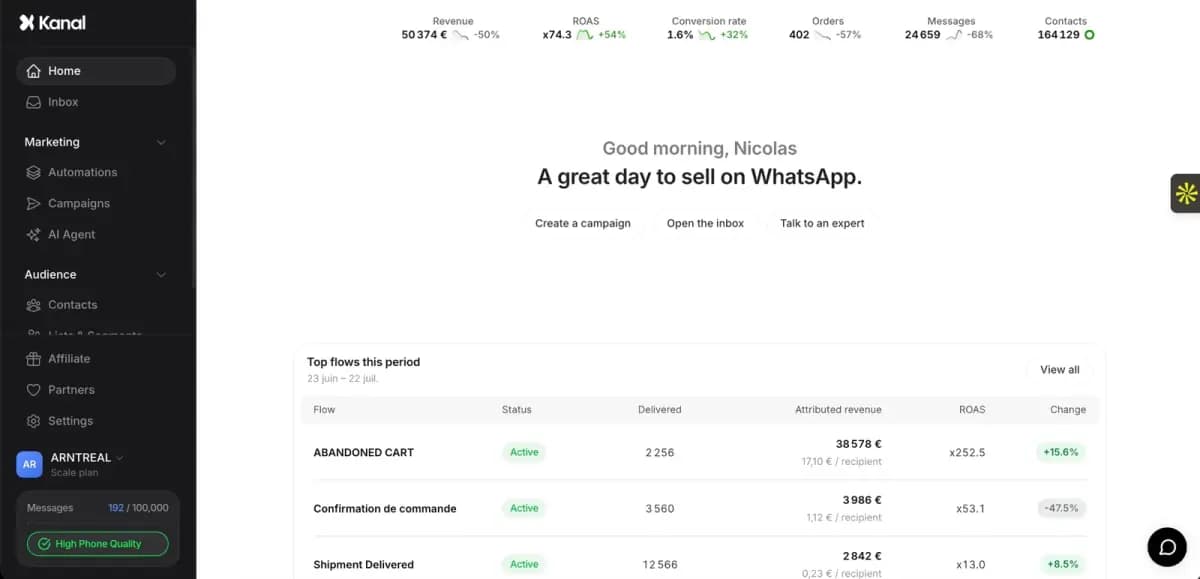
Kanal is a WhatsApp marketing and sales app for Shopify stores, installed from the Shopify App Store and running on the official WhatsApp Business Platform. For WhatsApp marketing, Kanal sends campaigns to segments built from Shopify customer data and runs automated flows on store events: abandoned cart recovery, order notifications, post-purchase upsell, back-in-stock alerts and review requests. Kanal is relevant for Shopify stores that want WhatsApp as a marketing and support channel. It sends WhatsApp and SMS messages: email stays in the merchant's other tools.
How WhatsApp Compares to Email and SMS
Before diving into strategy, here is how the three direct channels differ in practice:
| Feature | SMS | ||
|---|---|---|---|
| Rich media support | Yes (images, video, PDF, buttons) | Yes | No |
| Conversational | Yes (two-way) | No | Limited |
| Best for | Time-sensitive messages and two-way conversations | Long-form content, newsletters, nurture | Short alerts |
Your own numbers are the benchmark that matters: once the channels run side by side, compare open, click and conversion rates per channel in your own reports. Kanal's WhatsApp marketing platform reports them for your WhatsApp campaigns.
5 Core Use Cases for E-Commerce WhatsApp Marketing
1. Abandoned Cart Recovery
The average cart abandonment rate hovers around 70% according to the Baymard Institute: about 7 in 10 carts never turn into an order. WhatsApp gives you a direct, personal way to bring those shoppers back.
Why? Because abandoned cart messages need to be seen quickly and feel personal. A WhatsApp message arrives within seconds, in an app people use every day, and feels like a friend's reminder, not a marketing blast.
The optimal timing strategy:
- 1 hour after abandonment: Friendly reminder with product image and direct cart link
- 24 hours: Social proof message ("This item is selling fast") with optional 5% discount
- 48 hours: Final urgency message with a stronger incentive (10% off, free shipping)
Kanal's automated abandoned cart recovery flows handle this entire sequence automatically. Track the share of abandoned carts each message recovers and compare it with what email recovers on its own.
For a deeper dive on timing and tactics, read our abandoned cart recovery strategies guide. To compare tools, see our list of abandoned cart recovery apps for Shopify.
2. Campaign & Newsletter Broadcasts
Product launches, flash sales, seasonal promotions, restocks: these time-sensitive announcements are perfect for WhatsApp. Unlike email, where your message competes with every other promotion in a cluttered inbox, a WhatsApp broadcast lands directly in the customer's primary messaging app.
Keys to effective WhatsApp campaigns:
- Segment your audience: VIP customers, repeat buyers, high AOV, by product interest. Kanal's campaign builder lets you build segments from Shopify customer data.
- Use rich media: Product images, short videos, carousels. WhatsApp supports interactive buttons that drive direct action.
- Time it right: Test send times against your own open and click data, starting with weekday daytime slots in your customers' local time. Avoid weekends for promotional messages.
- Keep frequency reasonable: 2-4 campaigns per month maximum. Quality over quantity.
Learn more in our WhatsApp broadcast guide and newsletter guide.
3. Order Notifications & Post-Purchase
Post-purchase is where customer relationships are built, or broken. WhatsApp order notifications reach customers in the chat app they already use, so they know their order status without digging through an inbox.
Key post-purchase messages:
- Order confirmation: Immediate reassurance with order summary and estimated delivery
- Shipping notification: Tracking link with carrier details
- Delivery confirmation: "Your package arrived!" with a satisfaction check
- Review request: 3-5 days after delivery, ask for a product review with a direct link
These automated messages answer the "Where is my order?" question before customers have to ask, which keeps those tickets away from your support team and builds trust and loyalty. Compare your ticket volume before and after.
4. Customer Support & AI Chatbot
Modern e-commerce customers expect instant responses. With Kanal's AI-powered chatbot, your store provides 24/7 support on WhatsApp without hiring additional staff.
What the AI chatbot handles:
- Order tracking and status inquiries
- Product questions (sizing, compatibility, availability)
- Return and exchange requests
- FAQ automation (shipping times, payment methods)
- Smart handoff to human agents for complex issues
The chatbot answers routine questions instantly, day and night, and hands the rest to your team. Track the share of conversations it resolves on its own, your response time and your CSAT before and after launch.
5. Loyalty & Re-engagement
WhatsApp is uniquely powerful for building lasting customer relationships because it feels personal. Unlike promotional emails that get filtered, a WhatsApp message from a brand you trust feels like a conversation.
Effective loyalty strategies on WhatsApp:
- VIP segments: Exclusive early access to sales and new products for your top 20% of customers
- Birthday & anniversary offers: Automated personalized discounts on special dates
- Win-back campaigns: Re-engage customers who haven't purchased in 60-90 days with a personalized offer
- Post-purchase upsells: Recommend complementary products 7-14 days after purchase
The conversational nature of WhatsApp makes these messages feel like genuine recommendations rather than marketing automation.
Getting Started: Step-by-Step Setup
Setting up WhatsApp marketing for your Shopify store takes less than 30 minutes with Kanal. If nobody on the team can own the channel, a WhatsApp marketing agency can run the program for you:
Step 1: Install Kanal
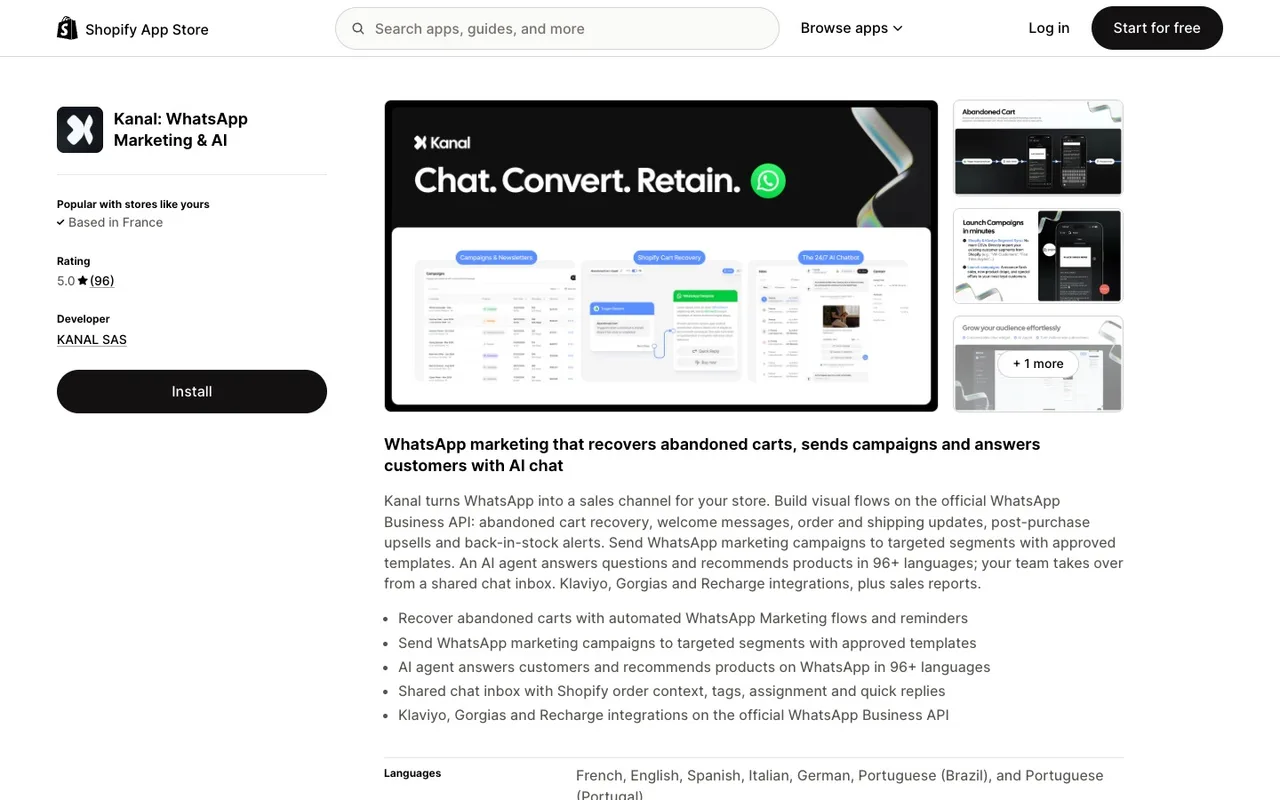
Install Kanal from the Shopify App Store and connect your store: the Shopify WhatsApp integration syncs your products, customers, and orders automatically.
Step 2: Connect WhatsApp Business API You'll need a verified WhatsApp Business API account. Kanal guides you through the Meta Business verification process. If you already have one, connect it in minutes. See our WhatsApp Business API guide for details.
Step 3: Set Up Abandoned Cart Recovery Enable the automated recovery flow. Customize the message templates, timing intervals, and discount strategy. Cart recovery can go live within 15 minutes.
Step 4: Build Your Subscriber List Add a WhatsApp opt-in checkbox to your Shopify checkout: it reaches every buyer at the moment they share their contact details. You can also use pop-ups and landing pages.
Step 5: Launch Your First Campaign Create a broadcast campaign to your opted-in customers. Start with a welcome offer or product announcement. Monitor open rates, clicks, and conversions in real-time.
Step 6: Activate AI Chatbot Turn on the AI chatbot to handle incoming customer questions automatically. Train it with your FAQs, product catalog, and store policies.
Best Practices for WhatsApp Marketing
Compliance & Opt-In
WhatsApp strictly enforces opt-in requirements. Always collect explicit consent before sending marketing messages. In the EU, this also means GDPR compliance. Use clear language: "Receive order updates and exclusive offers on WhatsApp."
Message Frequency
Less is more. Stick to 2-4 marketing messages per month. Automated transactional messages (order updates, cart recovery) don't count against this limit and are expected by customers.
Personalization
Use customer data from Shopify: first name, last purchased product, browsing history, order value. A personalized message ("Hey Sarah, the dress you loved is back in stock!") reads like a note from the store, not a blast. A/B test it against your generic version to see the difference on your own list.
A/B Testing
Test message copy, send times, discount amounts, and media types. Kanal's analytics let you compare performance across variants and optimize continuously.
Rich Media
WhatsApp supports images, videos, PDFs, and interactive buttons. Use product images in cart recovery, short demo videos in campaigns, and quick-reply buttons for easy engagement.
12 WhatsApp Marketing Plays That Work in 2026
Each of these plays runs on Kanal. Pick 3 to start, layer the rest as you scale.
Acquisition plays
- Checkout opt-in with order updates incentive: "Get instant order updates on WhatsApp" gives shoppers a concrete reason to opt in.
- Popup with discount unlock: 10% off in exchange for WhatsApp opt-in. Best on landing pages with paid traffic.
- QR code on packaging: A small QR sticker on every package builds a high-quality post-purchase list with near-zero CAC.
- Influencer-driven WhatsApp drops: Have influencers share your WhatsApp link for early access offers.
Retention and revenue plays
- Multi-touch cart recovery: 1h, 24h, 48h sequence with progressively stronger incentive (info, discount, urgency).
- Post-purchase upsell: Send a curated cross-sell within the 24h window after order confirmation.
- Back-in-stock alerts: When a wishlisted item restocks, fire a WhatsApp template to the shoppers who were waiting for it.
- VIP early access broadcasts: Segment top 10% LTV customers, give them 24h-48h advance access on launches.
Loyalty and lifecycle plays
- Birthday flow: Personalized birthday message with a 15% gift code.
- Win-back campaign: Trigger when no purchase in 60 days, with a personal offer to bring lapsed customers back.
- Review collection automation: Send a WhatsApp message 7 days post-delivery asking for a review with 1-tap response.
- AI chatbot escalation: Use AI chatbot for tier 1 support, escalate to human only for complex tickets, so agents spend their time where they are needed.
Each play above can be set up in Kanal in under 30 minutes via templates. Book a demo to see them in action.
The right mix of plays depends on your category. We have detailed vertical playbooks for WhatsApp marketing for beauty brands, WhatsApp marketing for fashion DTC brands, and WhatsApp marketing for food and beverage brands.
WhatsApp vs Email vs SMS: Which Channel When?
Use WhatsApp for high-stakes messages (cart recovery, flash sales, launches), email for long-form content and low-cost follow-up reminders, and SMS for urgent transactional alerts. The best e-commerce brands don't choose one channel. They use all three strategically:
| Use Case | Best Channel | Why |
|---|---|---|
| Cart recovery (first touch) | Lands in the chat app, easy to reply | |
| Cart recovery (follow-up) | Lower cost for second/third reminder | |
| Flash sales & launches | Urgency + high visibility | |
| Newsletters & content | Long-form, design flexibility | |
| Shipping notifications | Instant delivery, tracking links | |
| Time-sensitive promos | SMS | Universal reach, no app needed |
| Customer support | Conversational, async, rich media | |
| Win-back campaigns | Email + WhatsApp | Combine reach with impact |
The ideal stack: WhatsApp for high-priority, time-sensitive messages. Email for content and nurturing. SMS as a universal fallback. Read our detailed WhatsApp vs Email comparison for cart recovery, and our roundup of the best WhatsApp marketing software when you are picking the tool itself.
ROI & Metrics to Track
To measure the success of your WhatsApp marketing, focus on these KPIs:
- Open rate: Read messages divided by delivered messages. Track it per campaign; a sudden drop signals a list quality or deliverability issue
- Click-through rate: Clicks divided by delivered messages, tracked separately for campaigns and cart recovery
- Cart recovery rate: Percentage of abandoned carts recovered via WhatsApp, compared with what email recovers on its own
- Revenue recovered: Total revenue from recovered carts, tracked monthly
- Campaign conversion rate: Percentage of broadcast recipients who purchase
- ROI: Revenue generated ÷ total WhatsApp cost (API fees + platform), compared with your other channels
- Unsubscribe rate: Watch it after every campaign. If it climbs, reduce frequency
- Response time: For support, target under 5 minutes; the AI chatbot answers the questions it can handle right away
For a deep dive on measuring ROI, check our WhatsApp marketing ROI guide.
Frequently Asked Questions
Is WhatsApp marketing legal for e-commerce?
Yes, as long as you collect explicit opt-in consent before sending messages. WhatsApp Business API enforces opt-in requirements, and you must comply with local regulations like GDPR in Europe or TCPA in the US.
How much does WhatsApp marketing cost?
Meta charges the WhatsApp Business API per delivered message, not per conversation, following Meta's official pricing grid. The rate depends on the category and the customer's country: $0.0250 for a US marketing message and $0.0859 in France. Replies inside the 24-hour customer service window were not charged until September 30, 2026. Since October 1, 2026, they cost the utility rate after 1,000 free service messages per business phone number each month. With Kanal, plans start from $89/month including platform features, and WhatsApp fees are passed through at cost, with no per-message markup. Compare these costs with the revenue your WhatsApp flows generate to get your own ROI, and see our WhatsApp Business pricing guide for the rates by country.
What open rates can I expect with WhatsApp?
There is no independent public benchmark for WhatsApp marketing open rates; vendor figures are not audited. The reliable number is the read rate in your own account, compared with your email open rate on the same customers.
Can I use WhatsApp marketing without Shopify?
While Kanal is built specifically for Shopify, WhatsApp Business API can be integrated with any e-commerce platform. However, native Shopify integration gives you automatic cart recovery, order notifications, and customer segmentation without any manual setup. If you are still weighing the platform itself, our Shopify review covers its strengths and limits. If the alternative is a website builder, we set Shopify next to each in our Squarespace comparison and our Wix comparison.
How do I get customers to opt in to WhatsApp?
The main methods are checkout opt-in checkboxes, pop-ups with a discount incentive, and migrating existing email/SMS subscribers with a WhatsApp upgrade offer. Always explain the value they'll receive.
Will WhatsApp replace email marketing?
No. WhatsApp and email serve different purposes. WhatsApp excels at time-sensitive, high-priority messages (cart recovery, shipping updates) while email remains ideal for long-form content, newsletters, and design-heavy promotional campaigns. The best strategy combines both channels. Read more about this in our conversational commerce guide.
See Kanal on your own store
- Your campaigns and cart reminders on WhatsApp, starting from your own store
- Post-purchase offers, back-in-stock alerts, then the AI agent that advises your customers
- You leave with the plan that fits and its price

- brands
- 500+
- to set up
- 5 min
- open rate on WhatsApp
- +90%
5/5 on the Shopify App Store (132 reviews)

Nicolas helps e-commerce brands grow revenue with WhatsApp marketing. With deep expertise in Shopify ecosystems and conversational commerce, he shares proven strategies for abandoned cart recovery, broadcast campaigns, and AI-powered customer engagement.
Glossary terms in this article
Quick definitions for the WhatsApp Business terms used above.
WhatsApp Business Platform
The WhatsApp Business Platform is the set of APIs Meta offers businesses to message customers on WhatsApp at scale: the Cloud API, the Business Management API and the Marketing Messages API. It is separate from the WhatsApp Business app, which runs on a phone.
Read full definitionAbandoned Cart Recovery
Abandoned cart recovery is the practice of messaging shoppers who added items to their cart but left without buying, to encourage them to complete the purchase.
Read full definitionMessage Template
A message template is a pre-written WhatsApp message that Meta approves before a business can send it. Templates are the only messages a business can send outside the 24-hour customer service window, for example to start a conversation or run a campaign.
Read full definitionOpt-in
A WhatsApp opt-in is the permission a person gives a business to send them messages on WhatsApp. WhatsApp's Business Messaging Policy requires it before any message: the business must have the person's phone number and their agreement to hear from that business.
Read full definitionCustomer Service Window (24-hour window)
The customer service window is a 24-hour timer that starts when a WhatsApp user messages or calls a business. While it is open, the business can reply with free-form messages; once it closes, it can only send approved message templates.
Read full definitionWhatsApp Flows
WhatsApp Flows is a feature of the WhatsApp Business Platform for building structured, multi-screen interactions inside a chat, such as forms, sign-ups, bookings and guided product selection. The customer fills in screens instead of typing free text.
Read full definitionSegmentation
Segmentation is the practice of splitting a WhatsApp contact list into groups based on traits like purchase history, behavior, or engagement, so each group receives messages that are actually relevant.
Read full definitionSuggested articles
Is WhatsApp SMS or MMS? SMS vs MMS vs RCS vs WhatsApp
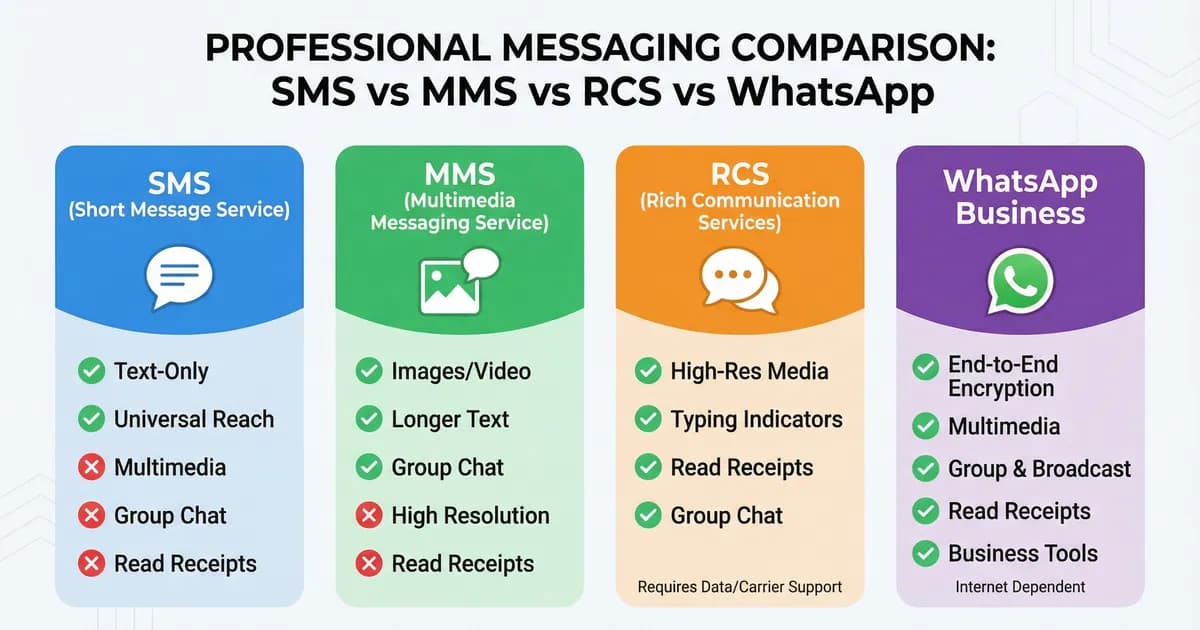
WhatsApp is neither SMS nor MMS: it is an app that sends messages over the internet. How SMS, MMS, RCS and WhatsApp differ, in one table, for 2026.
WhatsApp Statistics 2026: Users, Messages and Adoption Data
WhatsApp statistics for 2026 from WhatsApp and Meta: users, daily actives, a messaging record and business adoption, each linked to its primary source.
WhatsApp Marketing in the USA: What Works During Meta's Pause
Why WhatsApp marketing messages to US numbers are dropped: Meta does not deliver marketing templates to them. What still works, and error 131049 explained.
How to Connect WhatsApp to Shopify: Setup Guide with Kanal
Step-by-step guide to connecting WhatsApp to your Shopify store with Kanal: install, cart sync, order webhooks, opt-in flows, and what to test before launch.