Away, leave a message on WhatsApp: meaning + 40 templates
"Away, leave a message" on WhatsApp means the person is unavailable but your message still arrives. Who set it, was it read, and 40 away message templates.
 Nicolas ProvostMay 19, 2026 · 17 min read
Summarize this article with an AI
 ChatGPT
 Claude
Table of contents (19)
Key takeaways
- On WhatsApp, "Away, leave a message" means the contact is unavailable, but your message is still delivered and read when they are back.
- The line is either a contact's About or a business's automatic away message, so it never tells you whether your message was read.
- A good business away message confirms receipt, says when a person will reply and gives one thing to do in the meantime.
"Away, leave a message" on WhatsApp means the person or business you are writing to is not available right now, and that you can send your message anyway: it is delivered as usual and read when they are back. The line was written in advance by the contact (as their About) or sent automatically by a business (as an away message), so it does not tell you whether your message has been read.
| Where you see it | What it is | Who set it | Was your message read? |
|---|---|---|---|
| Under the contact's name at the top of the chat, or on their profile | Their About: an emoji and a short text | The person, before you wrote | The line does not say. Check the marks next to your message |
| As a reply in the chat, right after you wrote to a business | An away message: an automatic reply | The business, in the WhatsApp Business app | Not yet by a person. The reply was sent automatically |
In Hindi, the line reads roughly as "अभी उपलब्ध नहीं, संदेश छोड़ दीजिए" (not available right now, please leave a message): the same idea, a person who will read your message later.
If you run a business and came for wording to copy, the 40 away message templates start further down, followed by the setup steps for the WhatsApp Business app.
What does "Away, leave a message" mean on WhatsApp?
The meaning is literal: the contact is away, and you are welcome to leave a message. Nothing is blocked, and you do not need to wait for the line to disappear before writing. What changes is where the line comes from.
Under a contact's name, it is their About. About is the WhatsApp feature for telling people what you are up to. WhatsApp's Help Center describes it as an emoji and up to 50 characters of text, shown by the person's name at the top of your chat with them, and set for a duration before it expires (How to edit your About, read on October 24, 2026). WhatsApp made About more visible in November 2025: it shows at the top of one-to-one chats, you can reply to it by tapping it, and it expires after one day unless the person picks another timer. An "away" line there is temporary by design.
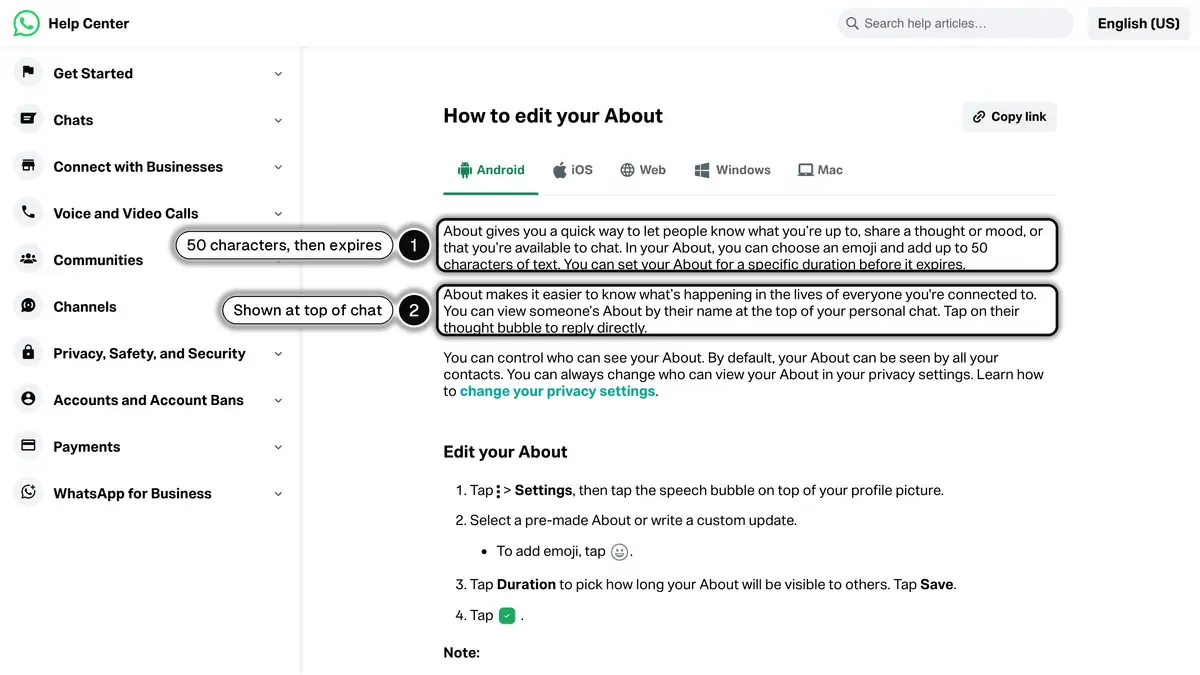
Source: WhatsApp Help Center, How to edit your About, read on October 24, 2026.
As a message in the chat, it is a business away message. WhatsApp's Help Center says that when away messages are turned on, customers who message the business "automatically receive a customizable message, indicating that you're busy or away from your phone" (How to use away messages, read on October 24, 2026). The business wrote the text once, and the app sends it for them.
Did they read my message?
"Away, leave a message" does not tell you. An About was set before you wrote, and an away message is sent by the app, not typed by a person.
The check marks next to your own message are what to look at. According to WhatsApp's Help Center, the message info screen shows Delivered when the message reached the recipient's phone or linked devices but has not been seen, and Read when the recipient has read it; two blue check marks are the read sign, and they do not appear if you or the recipient turned read receipts off (How to check read receipts, read on October 8, 2026).
So you can write, and expect an answer when the person or the team is back.
How do you show "away" or "on leave" on your own WhatsApp?
In the personal app, use your About:
- On Android, tap the menu, then Settings, then the speech bubble on top of your profile picture. On iPhone, tap your profile picture, then the thought bubble.
- Select a pre-made About or write your own, in 50 characters or fewer, with an emoji if you like.
- Tap Duration to choose how long it stays visible, then save.
A few lines that fit in 50 characters: "Away, leave a message", "On leave until Monday", "In meetings, text me", "Traveling, replies in the evening".
If you use WhatsApp for work, the rest of this guide is for you: the away message a business sets up so that customers are never left without an answer.
What is the best away message for WhatsApp Business?
The best away message does three things in a few lines: it confirms the message arrived, says when a person will answer, and gives the customer something to do in the meantime. Three short ones to copy:
- Closed for the night: "Thanks for your message. We are closed until 9am tomorrow and will reply first thing. To track an order, reply with your order number."
- Weekend: "Hi! Our team is off until Monday 9am. We have your message and will answer it first. Opening hours and FAQ: [link]."
- On leave: "We are away from [date] to [date]. Messages are read when we are back on [date]. For anything urgent: [email]."
Why does an away message matter?
WhatsApp is a chat app: customers write to a business the way they write to friends, and they expect a quick answer. When nothing comes back, they cannot tell whether anyone saw their message, and the next store is one tap away. An away message that confirms receipt, gives a reply time and offers an alternative removes that doubt.
Helpdesks like Gorgias and Zendesk do the same for email and chat with out-of-office replies. WhatsApp is no different, and a store that runs its support in one of them can bring WhatsApp conversations in too (see the Gorgias and Zendesk integrations).
What an online store's away message should cover
For a Shopify store, the questions that arrive after closing time are rarely new: where is my order, how do I return this, is this size in stock. A good after-hours reply answers the first one on the spot with the tracking page, points to the returns page, and promises a person for the rest. The fewer "where is my order?" messages you get at night, the shorter the away message can be: customers who receive their order confirmation and shipping updates on WhatsApp already have their tracking link in the chat. Example 4 below is written for exactly this case.
What should an away message include?
A good away message contains 5 elements:
- Acknowledgment: confirm the message was received. "We got your message" is enough.
- Reason: why are you away? Outside business hours, weekend, holiday, high volume. Be specific.
- Expected reply time: "We will reply by 9am CET tomorrow" or "Within 2 business hours". No vague phrases.
- Alternative now: a chatbot, FAQ link, knowledge base, or self-service portal that resolves common questions.
- Escape hatch: an emergency option for urgent cases (refunds, security issues, delivery problems).
Keep the message short, 200 to 350 characters as a rule of thumb. A chat preview only shows the start of a message, so put the most important information first. State the time zone next to your hours: customers can write from anywhere.
Away message examples: after business hours (8)
These work for any store whose team is not online around the clock.
Example 1: standard after-hours
Hi! Thanks for messaging [Brand]. Our team is offline (Mon-Fri 9am-7pm CET). We will reply first thing tomorrow. For order status, reply ORDER. For urgent issues, reply URGENT.
Example 2: with FAQ link
Hi! [Brand] team is off until 9am CET tomorrow. Most answers are in our FAQ: [link]. We will reply to your message first thing in the morning.
Example 3: with chatbot
Hi! It is after hours at [Brand] (back at 9am CET). Our AI assistant can help right now: order tracking, returns, sizing, recommendations. Type START to begin, or wait for a human.
Example 4: ecommerce-focused
Thanks for reaching [Brand]. Our team is offline until 9am CET. To track your order, reply with your order number. For returns, type RETURN. Everything else, we will reply tomorrow.
Example 5: short and friendly
Hey! Team [Brand] is asleep until 9am tomorrow. Sweet dreams. We will reply first thing.
Example 6: reassuring
Hi! [Brand] support. We are offline until 9am CET. Your question is in good hands: you will have an answer tomorrow morning.
Example 7: timezone-aware
Thanks for messaging [Brand]. Our team is in CET timezone, currently offline. We will reply within 2 business hours of opening (9am CET, Mon-Fri).
Example 8: with self-service link
Hi! Outside [Brand] hours (back 9am CET). Most issues resolve faster via self-service: track [link], return [link], FAQ [link]. Otherwise we reply tomorrow.
For more inspiration on customer support flows, see our WhatsApp customer support guide.
Away message examples: weekends and holidays (8)
Weekend and holiday away messages can be slightly more relaxed in tone.
Example 9: weekend standard
Hi! [Brand] team is off for the weekend, back Monday 9am CET. We will reply first thing. For urgent order issues, reply URGENT.
Example 10: Sunday only
Hello! [Brand] is closed Sunday. We will reply Monday morning. Want to keep browsing? Catalog: [link].
Example 11: long weekend
Hi! [Brand] is on a long weekend (back Tuesday 9am CET). Apologies for the delay. Order tracking is always available at [link]. Reply for human help Tuesday.
Example 12: public holiday
Hi! Today is a public holiday in [country] and [Brand] is closed. We reopen tomorrow at 9am CET. Order tracking remains live: [link].
Example 13: Christmas season
Merry Christmas from [Brand]! Our team is off Dec 25 and 26, back Dec 27 at 9am CET. Replies will be slightly slower until Jan 3. Thanks for your patience.
Example 14: New Year
Happy New Year! [Brand] is closed Jan 1 and reopens Jan 2 at 9am CET. We will reply to your message then. Best wishes for the new year.
Example 15: summer break
Hi! [Brand] is on summer break Aug 1 to 15. Replies will be limited but possible. Order tracking remains live: [link]. We resume full hours Aug 16.
Example 16: weekend with chatbot
Hi! Team [Brand] is off until Monday. Our AI assistant works 24/7: order tracking, returns, recommendations. Type START to chat, or wait until Monday for a human.
Away message examples: high-volume periods (6)
During Black Friday, Cyber Monday, or major product launches, a tailored away message manages expectations.
Example 17: Black Friday
Hi! Black Friday at [Brand]. Volume is very high today, replies may take up to 2 hours. To skip the line: track order [link], FAQ [link], chatbot [link]. We see your message.
Example 18: Cyber Monday
Cyber Monday at [Brand]. Reply time: 1-2 hours due to high volume. Code BFCM30 still active until midnight CET. Order tracking: [link]. We will reply ASAP.
Example 19: product launch
Hi! Our new collection launched today and replies may take up to 90 minutes. Browse the drop: [link]. Pre-order link: [link]. Team will reply ASAP.
Example 20: viral surge
Hello! We are experiencing very high message volume right now. Reply time: 1-2 hours. Your message is queued and important. Order tracking remains live: [link].
Example 21: limited drop
[Brand] limited drop sold out fast. Apologies for slow replies. Waitlist for next drop: [link]. For order issues from today, we reply within 4 hours.
Example 22: holiday rush combined
Hi! [Brand] holiday rush. Reply time: 1-2 hours. Last shipping for Dec 24 delivery: today by 5pm. Order tracking: [link]. Returns extended to Jan 31.
For the full seasonal playbook, see Black Friday WhatsApp strategies.
Away message examples by industry (6)
Example 23: beauty / cosmetics
Hi! [Brand] is offline until 9am CET. For shade matching, send a selfie and we will reply with a recommendation first thing tomorrow. Skincare quiz: [link].
Example 24: fashion
Hi! [Brand] team is on a break (back 9am CET). For size guidance, browse our fit guide: [link]. We will reply to your message first thing tomorrow.
Example 25: food and beverage
Hi! [Brand] kitchen is closed (back at 10am CET). For delivery status, reply with order number. Allergen info: [link]. New menu reply tomorrow.
Example 26: B2B / wholesale
Hello, thank you for contacting [Brand] wholesale. Our team replies within 1 business day (Mon-Fri 9am-6pm CET). For urgent enterprise queries, email enterprise@[brand].com.
Example 27: subscription service
Hi! [Brand] subscription support is offline until 9am CET. Manage your subscription anytime at [link] (pause, skip, change). We reply to other questions tomorrow.
Example 28: home and decor
Hi! [Brand] showroom is closed (back at 10am CET tomorrow). For dimensions, materials, shipping costs, our FAQ covers most questions: [link]. Reply tomorrow for the rest.
Away message examples with a chatbot handover (6)
With a chatbot behind it, the away message can offer an answer now and a person later.
Example 29: chatbot first
Hi! [Brand] team is offline until 9am CET. Our AI assistant answers common questions right away, day and night. Type START. If the AI cannot help, you will queue for a human.
Example 30: chatbot with menu
Hello! Team off until 9am. AI assistant ready. Reply: 1 for order tracking, 2 for returns, 3 for product recommendations, 4 to wait for a human.
Example 31: chatbot with handoff
Hi! Our AI agent is online now. It handles tracking, returns, FAQ. For complex issues it escalates to a human (we are back at 9am CET). Type START.
Example 32: chatbot promise
Hi! Team [Brand] is offline. Our AI agent answers right away, day and night. For everything else, our team replies at 9am CET tomorrow. Reply START.
Example 33: chatbot for orders
Hi! Our team is offline, but our AI assistant can help with returns, tracking and reorders. Reply START to chat now.
Example 34: chatbot bilingual
Hi! [Brand] team offline (back 9am CET). Our AI replies in English, French, Spanish, German. Type START to chat in your language, or wait for a human tomorrow.
Read our WhatsApp AI chatbot guide to learn how to design escalation flows, and see how the Kanal AI chatbot answers WhatsApp questions for Shopify stores.
Away message examples in other languages (6)
If you sell in several countries, write the away message in your customers' languages. The WhatsApp Business app sends one text to everyone, so a bilingual message (example 40) is the simple way to cover two languages.
Example 35: French
Bonjour ! L'équipe [Marque] est absente jusqu'à demain 9 h (heure de Paris). Pour suivre votre commande, répondez avec son numéro. Pour le reste, nous vous répondons demain matin.
Example 36: Spanish
¡Hola! El equipo de [Marca] no está disponible hasta mañana a las 9:00 (CET). Para seguir tu pedido, responde con el número. Para lo demás, te contestamos mañana por la mañana.
Example 37: German
Hallo! Das Team von [Marke] ist bis morgen 9 Uhr (MEZ) nicht erreichbar. Für die Sendungsverfolgung antworten Sie bitte mit Ihrer Bestellnummer. Alles andere beantworten wir morgen früh.
Example 38: Italian
Ciao! Il team di [Brand] non è disponibile fino alle 9 (CET) di domani. Per tracciare l'ordine, rispondi con il numero. Per il resto, ti rispondiamo domani mattina.
Example 39: Portuguese
Olá! A equipe da [Marca] está indisponível até as 9h (CET) de amanhã. Para rastrear o pedido, responda com o número. Para o resto, respondemos amanhã de manhã.
Example 40: bilingual EN/FR
Hi! Team offline until 9am CET. Track order: [link]. We reply tomorrow. / Équipe absente jusqu'à 9 h. Suivi : [link]. Réponse demain.
How do you set an away message on WhatsApp Business?
In the WhatsApp Business app
These steps follow WhatsApp's Help Center (How to use away messages, read on October 24, 2026).
- Open WhatsApp Business and go to the Tools tab.
- Tap Away message.
- Turn on Send away message.
- Tap the message to edit it and paste your text.
- Tap Schedule and choose Always send, Custom schedule, or Outside of business hours. This last option only appears once your business hours are set in your business profile (our WhatsApp Business profile guide covers the other fields). For the other ways to send at a set time, see how to schedule a WhatsApp message.
- Tap Recipients and choose: Everyone, Everyone not in address book, Everyone except…, or Only send to….
- Tap Save.
Your phone must have an active internet connection for away messages to be sent.
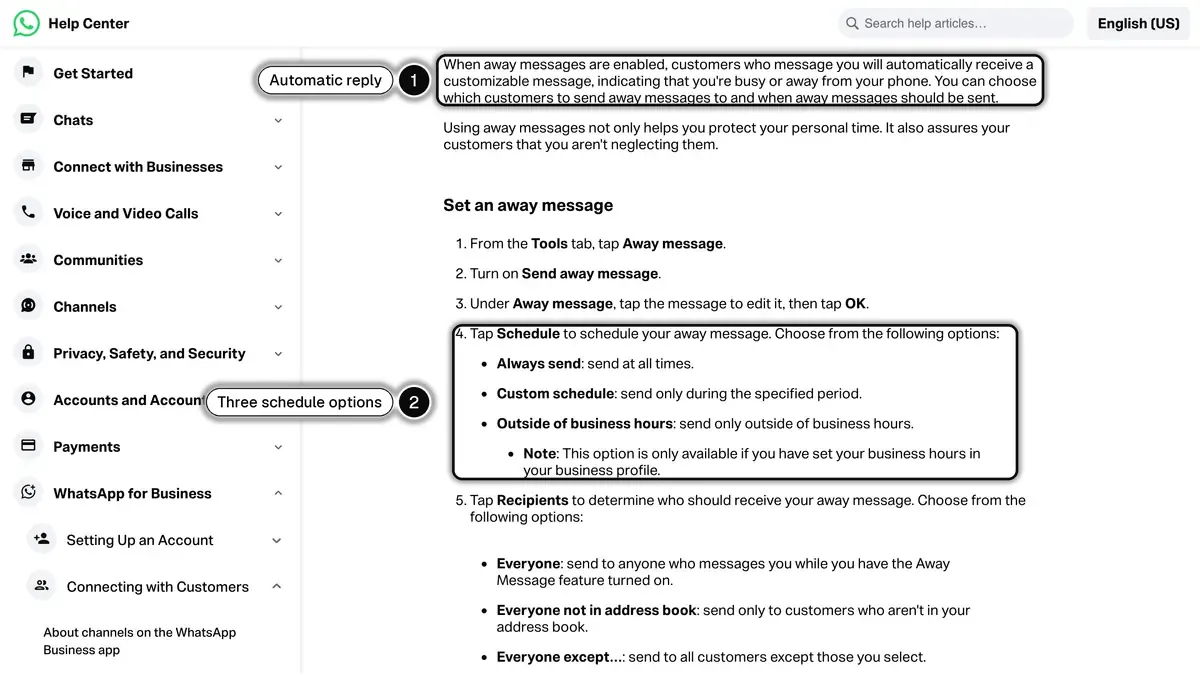
Source: WhatsApp Help Center, How to use away messages, read on October 24, 2026.
On the WhatsApp Business API
The away message setting lives in the WhatsApp Business app. A number connected to the WhatsApp Business Platform (the API) is run through software, so the automatic reply comes from that software: a helpdesk rule, an automation, or a chatbot.
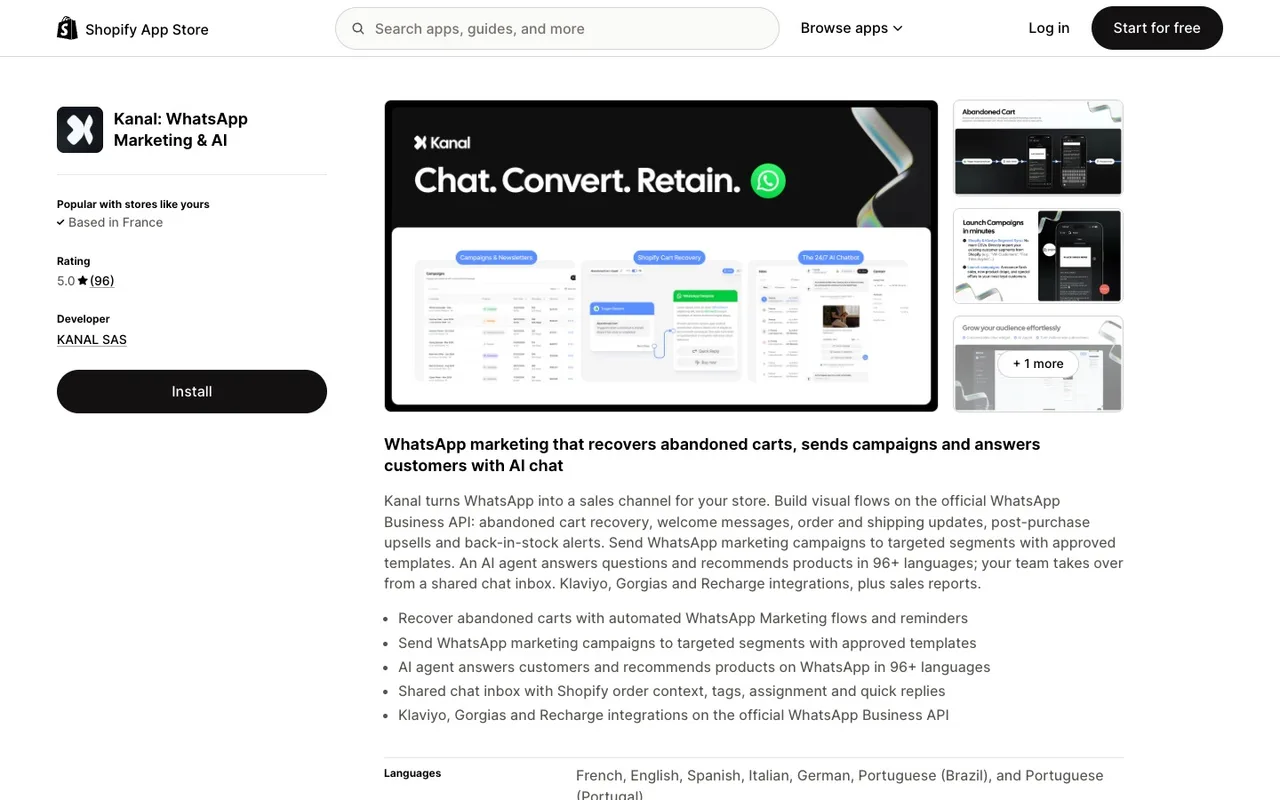
With Kanal, the WhatsApp app for Shopify stores, the after-hours answer comes from the AI chatbot, which replies to customer questions outside business hours (it is included from the Scale plan), and from automations built on your Shopify data, such as the shipping updates that answer "where is my order?" before it is asked. Conversations the chatbot cannot close wait for your team in the shared inbox. You can see it on a Kanal demo, and there are walkthroughs on the Kanal YouTube channel.
Should you pair an away message with a chatbot?
An away message tells the customer to wait. A chatbot can answer while your team is offline:
| Setup | What the customer gets | Customer wait |
|---|---|---|
| No away message | Silence, with no sign the message arrived | Unknown |
| Static away message only | A confirmation and a reply time | Until next business day |
| Away + FAQ link | Answers to common questions | Self-serve or next day |
| Away + AI chatbot escalation | Immediate answers, complex cases queued for a human | None for questions the chatbot can handle |
The usual split: the chatbot takes order tracking, returns and product questions, and the cases it cannot solve wait for a person on the next business day. Our WhatsApp chatbot guide for ecommerce explains how to design that handover. Track the share of conversations your chatbot resolves without an agent, before and after. Our case studies show how Shopify brands set this up.
Read conversational commerce best practices and the ROI of WhatsApp marketing for the KPIs to track.
Which automatic messages go with an away message?
The away message covers the hours when nobody answers. The greeting message covers the first contact: see 50 WhatsApp greeting examples. To map out every automated reply across the customer journey, read our WhatsApp automated message guide. For what messages cost on the API, see our WhatsApp Business pricing guide.
Resources
- WhatsApp Help Center: How to use away messages
- WhatsApp Help Center: How to edit your About
- Kanal AI chatbot for WhatsApp
- Meta WhatsApp Cloud API documentation
- Meta WhatsApp Business Platform overview
- Shopify customer service best practices
- Kanal YouTube channel
- WhatsApp link generator
- ROAS break-even calculator
See Kanal on your own store
- Your campaigns and cart reminders on WhatsApp, starting from your own store
- Post-purchase offers, back-in-stock alerts, then the AI agent that advises your customers
- You leave with the plan that fits and its price
From €89/month
- brands
- 500+
- to set up
- 5 min
- open rate on WhatsApp
- +90%
Nicolas helps e-commerce brands grow revenue with WhatsApp marketing. With deep expertise in Shopify ecosystems and conversational commerce, he shares proven strategies for abandoned cart recovery, broadcast campaigns, and AI-powered customer engagement.